Get the latest updates from us for free

Sign-up for FREE weekly Newsletter.
Showing posts with label Geeky Fun. Show all posts

Google Street View in ASCII Art

Be the first to comment!
Labels: ,
For those who have a fascination for ASCII art and at the same time love to loiter the virtual streets on Google Street view, here is your ultimate dream come true. Peter Nitsch of Teehan+Lax has developed Google Street View in ASCII that lets you explore any place on the planet where Google Street View is available in colored ASCII art. The rendering happens in real time and in your browser, so you will need one that supports WebGL textures such as Chrome or Firefox.


ascii-street-view
You can search for any location and then move around the streets by clicking on the small map inset on the top right. You can’t click on the ASCII street view to change view like you do on the actual Street View. However you can pan around with your mouse and zoom in and out using the mouse wheel. Try zooming into the scene to improve the resolution and clarity of the picture.
One of the main reasons ASCII art was born was because early printers often lacked graphics ability and thus characters were used in place of graphic marks. What was a technological constraints in the 1970s and 80s, became an artform in the twenty-first century “by the same hacker ethos that build the early machines used to produce and view it”, writes the creator of Google Street View ASCII. “Fundamentally, it is both an expression and prisoner of the system it inhabits. This latest experiment attempts to free ASCII art from the confines of the screen and enable it to exist in physical space – with light and paint.”

MaKey MaKey Turns Any Surface Into a Keyboard Controller

Be the first to comment!
Labels: ,

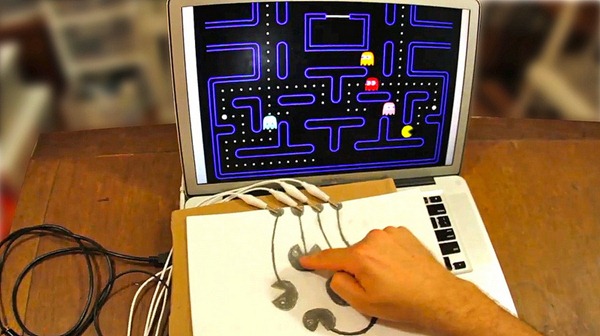
Ever wanted to play Pac Man with a pencil drawn controller or play the piano with bananas? Yes, you can, thanks to Makey Makey, a simple circuit board that turns almost any object into a touch based computer key. Currently being funded at KickStarter, it is by far one of the coolest DIY project I have ever seen.

Makey Makey plugs into a computer via USB and lets users connect the arrow keys, space bar and left mouse click to physical objects. Just connect one end of a wire to the circuit board using crocodile clips and the other end to any electrically conductive object such as bananas, pencil graphite, paint, silverware and cats. Touching the object simulates a key press which is fed to the computer via the USB port. For sensing closed switches on the input pins, high resistance switching is used so you can close a switch even through highly resistive materials like your skin, leaves, and play-doh.

makey-makey

Since no additional software is required MaKey MaKey works with all programs and webpages that accepts keyboard and mouse input.

MaKey MaKey has been used to play piano with bananas,

makey-makey2

Pac Man with a pencil drawn controller

makey-makey3

custom-made alphabet soup keyboard and many more.

If you want this, you can pledge $35 and get the kit delivered to you anywhere in the US. International destination costs an additional $10. The kit includes the MaKey MaKey, Alligator Clips, and USB Cable.

Descriptive Camera: Point, Shoot, Read

Be the first to comment!
Labels: ,

The Descriptive Camera works a lot like a regular camera — point it at subject and press the shutter button to capture the scene. However, instead of producing an image, this prototype outputs a text description of the scene. Rather than using some kind of advanced AI that can read images, it simply passes the description task to Amazon's Mechanical Turk system, which in turn distributes the job to humans. Between 3 to 6 minutes after taking the pictures - slightly longer than a Polaroid takes to develop a picture – the Descriptive Camera spits out the description in a piece of paper.

The Amazon Mechanical Turk, for those who are unfamiliar, is a crowdsourcing Internet marketplace that enables developers (known as Requesters) to submit Human Intelligence Tasks (HITs) for workers on the internet to complete, tasks that computers are unable to perform such as choosing the best among several photographs, writing product descriptions, or describing the content of an image.

Descriptive-Camera

Descriptive-Camera-output

The camera is powered by an embedded Linux platform (BeagleBone) and takes pictures using a USB webcam which is attached to a thermal printer for printing the output. A series of Python scripts define the interface and bring together all the different parts from capture, processing, error handling, and the printed output. The device connects to the internet via Ethernet and gets power from an external 5 volt source.

After the shutter button is pressed, the photo is sent to Mechanical Turk for processing and the camera waits for the results. A yellow LED indicates that the results are still "developing". With a HIT price of $1.25, results are returned typically within 6 minutes and sometimes as fast as 3 minutes. The thermal printer outputs the resulting text in the style of a polaroid print.

Checkout the creator’s blog for sample output from the Descriptive Camera.

[via Metafilter]

Amazing 64KB Demos at Revision Party 2012

Be the first to comment!
Labels:

Revision Party’s 2012 demoparty just concluded in southwest Germany. The event which took place from April 6th to 9th of 2012 in Saarbruecken, Germany, saw hundreds of entries from demosceners pushing the limits of what can be done in a single 64KB executable file. According to the rules of the competition, entries cannot be larger than 64 kilobytes for the executable (4KB for the 4KB competition), which is barely enough for an image but apparently plenty for code. Using extensive procedural techniques and compression, demosceners created stunning realtime animations, featuring high quality rendering, sound, 3D models, and textures. The most noteworthy example in the competition was the winning entry titled Gaia Machina by Approximate.

You can download the 64KB executable file of Gaia Machina to run on your machine or watch the video capture of the demo below.

To run the executable you need a fairly competent PC. At the competition, the demo was run on a Core i7 machine at 3.5GHz and nVidia 580GTX.

Other notable entries are F - Felix's Workshop

and The Scene Is Dead

For those who are not aware of demoscene, here is the Wikipedia description.

The demoscene is a computer art subculture that specializes in producing demos, which are non-interactive audio-visual presentations that run in real-time on a computer. The main goal of a demo is to show off programming, artistic, and musical skills.

The demoscene first appeared during the 8-bit era on computers such as the Commodore 64, ZX Spectrum, Atari 800 and Amstrad CPC, and came to prominence during the rise of the 16/32-bit home computers (Mainly the Amiga or Atari ST). In the early years, demos had a strong connection with software cracking[citation needed]. When a cracked program was started, the cracker or his team would take credit with a graphical introduction called a "crack intro" (shortened cracktro). Within a year or two[1], the making of intros and standalone demos evolved into a new subculture independent of the software (piracy) scene.

Demoscenes previously on Instant Fundas:


Recent comments

Recent comments

Followers

Sponsors

Recent comments

fefew

Recommend on Google

Copyright © 2011 All Rights Reserved Thesis skin. by Nitin. Converted into Blogger Template by TheTechFizz.