Get the latest updates from us for free

Sign-up for FREE weekly Newsletter.
Showing posts with label Opera. Show all posts

Opera 12 Released

Be the first to comment!
Labels: ,

After nearly a year in development, the final build of Opera 12 has just been released with numerous changes focusing mostly on performance, stability and faster browsing. To improve performance, several steps were taken such as plugins are now handled as separate processes, which means even if a plugin such as Flash behaves errantly, it won’t take the whole browser down. Underused features such as Unite and Voice are removed. Opera 12 also received a significant speed boost with faster page loading, faster start up and faster HTML5 rendering, hardware acceleration and a new skinning engine similar to Google Chrome and Firefox persona.

In brief here are the new features in Opera 12.

Support for hardware acceleration has been implemented, which means you can use the computer’s graphics processor to render pages, animations and even the UI of the browser itself, faster and more smoothly. Hardware acceleration is disabled by default, however. You can enable this feature by setting opera:config#UserPrefs|EnableHardwareAcceleration to 1, then saving and restarting Opera.

opera12-ha

Web-GL support: Opera 12 allows users to switch to WebGL engine instead of Opera’s default Presto rendering engine. This means that pages that doesn’t play well with Opera but renders correctly in Chrome will now open without problems in Opera 12. This optional WebGL is also disabled by default and can be enabled by setting opera:config#UserPrefs|EnableWebGL to 1, then saving and restarting Opera.

opera12-webgl

Separate process for plugins: The other important change in Opera 12 is that plug-ins like Flash and QuickTime now run in separate process. As already explained, this improves browser stability.

New Themes: Opera 12 brings a new theming engine to the browser, offering a simple way to change the look and feel of the software. Traditional Opera skins are still supported.

opera12-themes2opera12-themes3

Webcam support: Opera 12 now supports capturing webcam images directly through the browser using HTML5. Several photo applications like Photo Booth, Polaroid and Facekat has been integrated within the browser for hilarity and awesomeness.

64-bit Opera: Opera 12 also debuts 64-bit version of the browser for Mac and Windows.

Opera 12 also added support for five new languages - Arabic, Persian, Urdu, Hebrew and Kazakh — now bringing the total number to 60 for the browser. The ability to add right-to-left reading for Arabic, Persian, Urdu and Hebrew throws the door open for potentially millions of Internet users.

Unfortunately, Opera did let go two add-on platforms Widgets and Unite in favor of Extensions. Also phased out were speech recognition, text-to-speech and VoiceXML. This is disappointing for those users who have grown used to these tools.

Opera to Discontinue Unite, Widgets and Voice

Be the first to comment!
Labels: , ,

The Opera browser has three add-on platforms - Extensions, launched last year, Widgets and Unite. Today the company announced that it will retire two of the platforms in the upcoming Opera 12 release. The platforms that got the axe are Unite and Widgets. Also phased out will be speech recognition, text-to-speech and VoiceXML. Starting with Opera 12, Opera Unite and Opera Widgets will be turned off by default for new users. The two Add-on platforms will be completely removed in a later releases before the end of this year.

Over the last six years we have learned a lot from our work on Opera Widgets and Opera Unite, and when we later built the extension platform for Opera 11 we benefited significantly from this experience. Our extension technology has been a great success, with millions of monthly downloads, and so far completely dwarfing the other platforms. Recently, Opera also shipped a labs version with extension support in Opera Mobile, investigating a fully cross-platform extension environment.

Moving forward we want to focus on one high quality Add-on platform across our products, rather than spending resources on maintaining legacy systems. The know how and and technologies from Unite and Widgets are already being reused in other Opera products. An example is the recently announced UPnP support in Opera Dragonfly.

Opera Unite is a framework that allows for several web services to be hosted from the user's computer, including a web server for hosting a site, file and photo sharing, a chat room, and streaming media and more. An Opera Unite user's applications run on a domain associated with their My Opera Community account, and are accessible from any web browser. It’s a totally radical product which cannot be replaced by extensions.

opera-unite

Opera Unite has fairly large number of users. For instance, the most popular Unite app Media Player (which allows streaming music from the home computer over the Internet) has 4.8 million total downloads and 3,956 instances running at this very moment. Over 9000 downloads were recorded during the last week. While these numbers may look small compared to total number of Opera installer downloads, it indicates that the Unite platform is well loved and very much active.

Opera Widgets was another good platform that never received attention from Opera developers once it was released. The ability to run these widgets out of the browser was the only noteworthy upgrade to the platform. Most of the widgets in the gallery were falling out of use because the Widget API was becoming incompatible with every update of the browser.

As happens whenever a service/feature is discontinued, the decision wasn’t well received by Opera Unite and Widgets users. The decision might make sense as it will allow developers to focus on only one add-on platform – extensions, but Opera Unite and Widgets will be missed.

Opera Mobile for Android Now Supports Extension

Be the first to comment!
Labels: , ,

OperaOpera Labs today released a new Opera Mobile build that supports extensions. The new Opera Mobile Labs is available only for Android, for now. In addition, they’ve released extension-enabled Opera Mobile Emulator Labs builds, so that developers can test their extensions in a desktop-based Opera Mobile instance. Opera hasn’t said whether extensions will be available for Opera Mobile on other platforms such as iOS. Opera Mobile, as you may be aware, is the only browser to run on virtually any mobile phones available including the feature-less Java phones.
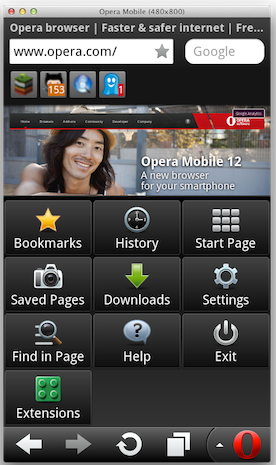
In the announcement, Opera said that when extensions were added to the Presto engine back in 2010, “a lot of time was spent behind the scenes so as to make our extensions framework very versatile and lightweight”. Although initially extension was targeted for desktop only, every aspect of the extensions API was drafted with mobile in mind. However, they quickly added that “it's not quite certain at this point that extensions functionality will effectively make it into a future release of Opera Mobile”. Even if extensions doesn’t make it to the final build, the Labs build supporting extensions is likely to be around. So it’s not as bad as it sounds.

opera-mobile-extensions opera-mobile-extensions2

Once you've downloaded a build, head over to the Opera Extensions site where you'll find plenty of extensions to play with. If you already use Opera desktop, why not try out your favorite Opera extensions on your mobile browser?

When doing so, please keep in mind that Speed Dial extensions are not supported. Extensions relying on keyboard shortcuts and/or mouse events might also not work as expected.

Another limitation is that in Opera Mobile, popup windows are currently launched as a new tab, which limits their functionality.

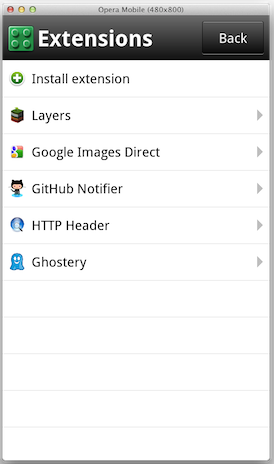
Some of the extensions like Ghostery, Layers, Google Images Direct, HTTP Header, LastPass are found to work quite well. Many users will be delighted to see LastPass in the list.

You can find all installed extensions by clicking the green Extensions icon in the Opera Menu, from where you can disable or uninstall them, and tweak various settings. Furthermore, the Install extension menu option allows you to sideload extensions from the local file system as well.

Hate Icons? Get Text Buttons on New Gmail Interface

Be the first to comment!
Labels: , , ,

One of the many problems with Gmail’s new design is the lack of text on the buttons. A black & white icon on a black & white button conveys nothing. Does a square box with a downward pointing arrow say ‘Archive’ to you? Looks more like ‘Download’ to me. Does an octagon with an exclamation mean some kind of a warning? No. It is just spam.

gmail-before

“Well, I am a literate person and it is easier for me to recognize the ‘Answer’ or ‘Archive’ and ‘Delete’ button with texts than trying to recognize and remember arrows and a great host of other stupid unrecognizable icons.” complained one user in Gmail’s support forum. He isn’t alone. Millions are enraged over the changes. If you are one of them, here are a few solutions, based on the browser you use.

Google Chrome

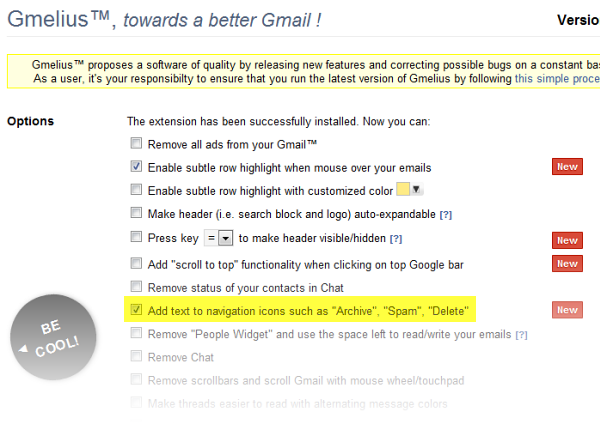
Gmelius is an extension for Chrome that does a lot more than add text button to the new interface. It makes Gmail’s new interface more usable by adding custom colored subtle row highlights, makes header auto-expandable, adds a scroll to top functionality, removes the "People Widget" and use the space left to read/write your emails, removes advertisements, removes chat box, and of course, inserts text into the iconized buttons.

gmelius

All changes are optional so you get to choose the changes you want.

gmelius2

Firefox

If you use Firefox install the Stylish add-on and then install this userstyle. You can also install this as plain CSS or user JS. Aside from restoring text to the buttons, this userstyle will also colorize the icons on the buttons. So cool.

firefox-gmail-after

This userstyle is actually a combination of two different userstyles – one that adds text to the buttons and one that colorizes the icons. If you wish not to have the icons colorized, you can install this userstyle.

Opera

Opera users just needs to install the GMail-TextButtons extension and get this result.

opera-gmail-after


Recent comments

Recent comments

Followers

Sponsors

Recent comments

fefew

Recommend on Google

Copyright © 2011 All Rights Reserved Thesis skin. by Nitin. Converted into Blogger Template by TheTechFizz.