Get the latest updates from us for free

Sign-up for FREE weekly Newsletter.
Showing posts with label Microsoft Office. Show all posts

Microsoft Office 2013 Preview: Offline Installer

Be the first to comment!
Labels: ,

Yesterday, Microsoft unveiled the latest edition of Microsoft Office – Office 2013, also known as Office 15. The version out is the Technical Preview which comes completely free of charge and is intended to get people familiar with the new version until the final version goes on sale.

The initial announcement directed users who wished to download and test Office 2013 to an online installer. But now you can grab the offline installer from Microsoft Technet.

Office2013

Unlike the web-based installer, there are certain limitations to the offline installer:

  • You cannot install and run multiple versions of office simultaneously. That means if you have Office 2010 or Office 2007 installed, you’ll have to remove it before installing Office 2013. Update: Apparently, this is not true. Office 2013 can be run alongside your current Office installation.
  • It also does not support the fast streaming feature.
  • It comes with a Product Key that you will need to active your Office installation with.

To download the offline installer and get your product key:

  1. Head over to TechNet Evaluation Center, scroll down the page and click on the link that says “Download the .msi package now”.
  2. Sign in with your Live ID, fill up the form, and click on Continue.
  3. On the next page you will get your product key for Office 2013.
  4. On the same page, you will get the download links for Office 2013, 32-bit or 64-bit version.

It is recommended that you download the 32-bit version because it is more compatible with existing add-ons.

The direct download links are given below. However, you still need to register on TechNet to get the product key. Both downloads are above 600MB in size. The downloads support pause and resume so you don’t have to worry about the your Internet connection breaking in the middle of the download.

Download Office 2013, 32-bit
Download Office 2013, 64-bit

[via SumTips]

Microsoft Word 2013 Will Support PDF Viewing and Editing

Be the first to comment!
Labels: ,

Microsoft’s upcoming word processing suite Office 2013 is about to get a big upgrade. According to Liveside, Microsoft Word 2013 will be able to open PDF files and even edit them.

Until now, editing PDF documents wasn’t easy or cheap. Free PDF editors are few and far between and their PDF editing abilities are limited. The only true PDF editor in existence today is Adobe Acrobat. It’s still unclear up to what extent Microsoft Word 2013 will allow PDF editing though.

Word-2013-Reading-Mode

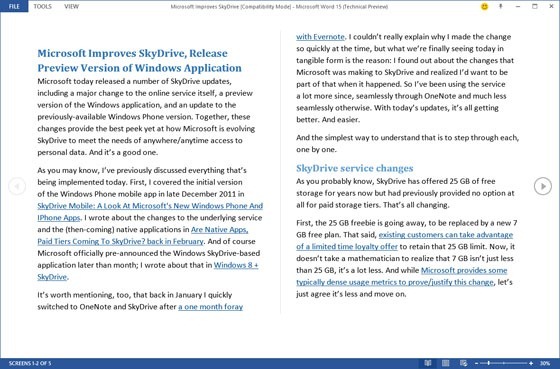
Word 2013 reportedly provides a “stunning new reading experience for both traditional Word documents and PDFs that reflows text in a columnar view automatically”. Interesting, the default layout on a traditional landscape PC screen uses a left-to-right scrolling mode, not top-to-bottom as has always been the case with such document-based applications.

Word 2013 will also support bookmarking pages that will allow users to return back to where they left when they closed the document last.

Word-2013-Bookmark

It must be noted that Office 2010 already supports saving documents in the PDF format, but this is the first time the Office application will be able to open and view PDF documents. Office 2013 may sound the death knell for Adobe Reader and many PDF reading utilities such as Foxit Reader. An unexpected outcome of the built-in PDF editing feature will be that the PDF documents will no longer be considered non-tamperable.

The first public beta of Office 2013 is expected to be released sometime next week.

Microsoft Office Mobile Now Available on Symbian

Be the first to comment!
Labels: ,

Last year we saw the fruit of the Nokia-Microsoft partnership in the form of the beautiful Lumia Windows Phones, and it is obvious that the collaboration will bring more new Windows Phone products in the future. But Nokia hasn’t forgotten Symbian. Today the Finnish company announced the availability of a full suite of Microsoft Office apps for their Symbian line of phones.

The first batch of Office apps were released in February this year which consisted of OneNote, Lync 2010, Document Connection and PowerPoint Broadcast. The rest of the apps to join today are Word Mobile, PowerPoint Mobile and Excel Mobile. The update is limited to Symbian Belle devices namely, Nokia 701, Nokia 700, Nokia 603, Nokia E7, Nokia X7, Nokia C7, Nokia Oro, or Nokia C6-01. Owners of Nokia N8, Nokia E6 or Nokia 500 will have to wait just a little longer. The Nokia 808 PureView will also come with all these apps when it begins selling.

office-mobile

Office Mobile apps gives you quick access to your documents so that you can get more done while on the go, or when you’re not using your laptop. And because these apps were created by Microsoft, the functionalities are as close as possible – if not the same – to the Microsoft Office apps on your PC.

If you’re a Word user, you’ll appreciate the fact that with Word mobile, you can save or send documents while preserving tables, SmartArt and charts, or the pinch/zoom functionality to easily view and edit documents. PowerPoint mobile will play nice to presentations without losing formatting and and with Excel mobile, you can insert formulae and view rich data and charts from anywhere.

You can get Microsoft Office Mobile using the Nokia Software Update tool on your smartphone, or connecting your phone to the Nokia Suite on your PC. Office Mobile apps will also be available from the Nokia Store in just a few weeks.

[via The Verge]

Microsoft Outlook Configuration Analyzer Tool

Be the first to comment!
Labels: ,

outlook-iconMicrosoft has released a handy troubleshooting tool kit that will sure save some headache for people who provide tech support, either professionally, or to family and friends or take care of their own machines. The Outlook Configuration Analyzer Tool (OCAT) provides a mean to analyze your Microsoft Office Outlook profile for common configurations issues that may cause problems in Outlook.

The Outlook Configuration Analyzer Tool provides a detailed report of your current Outlook profile. This report includes many parameters about your profile, and it highlights any known problems that are found in your profile. For any problems that are listed in the report, you are provided a link to a Microsoft Knowledge Base (KB) article that describes a possible fix for the problem. If you are a Help Desk professional, you can also export the report to an XML file. Then, the report can be viewed in the Outlook Configuration Analyzer Tool on another client computer where the tool is installed.

ocat

Once installed, launch OCAT and start a scan. If Outlook is not running OCAT will ask you to, otherwise, you can choose the ‘offline scan’. The time required for a scan depends on the complexity of the profile being analyzed, for example, how many accounts, mailboxes, and archive mailboxes are opened, the version of Outlook that’s installed (hot fixes, service packs, and so on), and the health of the system registry. Once the scan completes, OCAT will display a configuration report. The report generated is divided into two sections - Informational (reports that are useful to know) and Issues (things that require your attention). Any issues it finds are highlighted with an alert icon.

OCAT can find issues with unpatched vulnerabilities/fixes, identify non-standard registry settings and detect other unusual behavior such as too large mail folder.

After you’ve finished reviewing the data, you can export it in XML format to forward it to a support engineer for further analysis. However, OCAT is only able to print reports if you run it on a Windows XP or Windows 2003 client. This is an acknowledged issue that the authors say will be fixed soon.

You’ll need to have .NET Framework 3.5 Service Pack 1 installed on a PC before OCAT can be installed. Supported platforms include Windows XP SP3, Vista SP2, and Windows 7. OCAT does not support Outlook 2003.

[via WindowsITPro]

Keyword Based Notification for Important Email in Outlook

Be the first to comment!
Labels: ,

Microsoft Outlook provides desktop alerts for new emails but there is no way to filter these notifications such as to highlight important emails or suppress less important ones. It’s either all or none. Important Mail Alert for Microsoft Outlook solves this problem by bringing rule based alerts to the email program. Using this free add-in you can configure Microsoft Outlook to immediately notify you when you receive emails that contain specific keywords or phrases or mails from persons you actually care about.

important-email-alert4

Important Mail Alert blends perfectly into Microsoft Outlook 2007 and 2010’s interface. It sits quietly at the bottom of the inbox pane waiting for new emails to parse. The box is collapsible so there is no worries about wasting screen space. When you need to create a new rule or edit/delete existing ones, just expand the box and select an action. Adding rules is quick an simple: type the phrase you wish to be alerted for in the box and hit the Enter key. No jumping through hoops and no clicking multiple ‘Next’ buttons.

Important Mail Alert accepts only keyword based rules, but these keywords can occur anywhere in the email – it can be the sender’s name or email address, message subject or some text from the message body. Unfortunately, it won't find your alarm text in RSS feeds, tasks or meeting invitations.

important-email-alert

When the e-mail you are waiting for arrives, the add-in shows an Important Mail Alert box on the desktop on top of all applications you are working with. A history of all alerts received is available under the ‘Alerts’ tab on the add-in window.

Features:

  • Important Mail Alert is independent of your standard Outlook rules. Whatever your standard Outlook rules do to the message, wherever they move it, Important Mail Alert will fish it out.
  • It works in Outlook with Exchange Server.
  • If you got more than one Inbox, the add-in lets you select the accounts you want to scan.
  • You can open the message straight from the add-in pane.
  • Works on Microsoft Outlook 2010 (32-bit and 64-bit), Outlook 2007, Outlook 2003.
 

Recent comments

Recent comments

Followers

Sponsors

Recent comments

fefew

Recommend on Google

Copyright © 2011 All Rights Reserved Thesis skin. by Nitin. Converted into Blogger Template by TheTechFizz.