Get the latest updates from us for free

Sign-up for FREE weekly Newsletter.
Showing posts with label Giveaway. Show all posts

Kepard VPN Accounts Giveaway

Be the first to comment!
Labels: ,

How protected are you when surfing the Internet? How often do you expose your sensitive information to spyware or malware? How often does the government see what you’re transferring? If you’re like most people, you really don’t know. The actual answer is pretty stunning – the amount of risk on the modern Internet is staggering. For 10 lucky readers, that won’t be a problem, though, thanks to Kepard’s awesome giveaway.

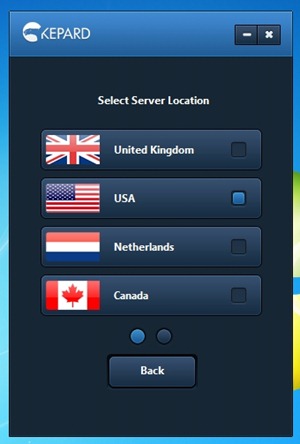
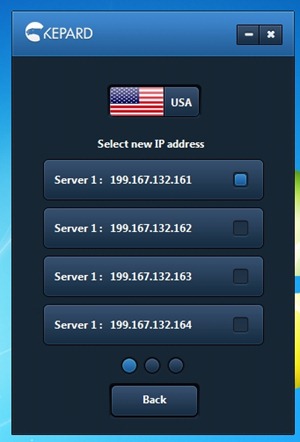
Kepard is a new VPN service provider that has servers located in 5 different countries: the US, the UK, Germany, Canada and the Netherlands. Additionally, each server has multiple IP addresses and the client program actually allows you to choose your preferred IP address.

Kepard supports all the three major VPN protocols: OpenVPN, L2TP and PPTP. It is possible to use Kepard without installing their client software. L2TP and PPTP protocols are natively supported by Windows. If you want to connect through the more secure OpenVPN protocol and if you already have the OpenVPN software installed then you can simple download the OpenVPN certificates from the website and connect through OpenVPN. However, using Kepard’s own client software is recommended as it allows you to quickly change VPN server locations, VPN protocols and IP addresses.
app5 app4

All Kepard accounts feature unlimited traffic, unrestricted speeds and even allows torrents and P2P downloads. You are also allowed to access Kepard’s services simultaneously on 2 computers.

Generally, people use VPN services either to access geographically restricted services such as Hulu, Pandora, BBC iPlayer and so on, or to remain anonymous in such a way that that their online activities cannot be linked to their true identity. If your primary reason to use Kepard is to protect your identity then you should be aware of their logging practices.

This is what Kepard says about connection logs:

Considering all the frauds happening on the internet we do have to keep logs in order to protect our business from the abuse of using our services. But this should be not a concern for you because we keep the logs just for 3 days. If during this time there are no official complains regarding any illegal activity, the logs containing your IP addresses are automatically deleted. We would like to make clear that no third party can get access to your logs. The reason of keeping the logs is just to protect everybody’s business.

But information in their privacy policy is contradictory:

The way Kepard Applies Collected Data From Kepard VPN Sessions:


This data is preserved for usage with billing, troubleshooting, service offering evaluation, TOS issues, AUP concerns, and for managing violation achieved over the service. We keep this information on a per-session base for a minimum of ninety days. We may continue upload and download bytes at total extended periods of time.

Update: Kepard told me that the 90-days period was an error in their privacy policy, and the actual log retention period is indeed 3 days.

However, Kepard assures us that they “will not provide any personal data - minimal information rationally intended to recognize and no more - or activity information to investigators, attorneys, or agencies in case when we are forced to do it by a court of competent jurisdiction in the domain. If there is a trial in court, the customer will be informed so they will have an occasion to contest the surrender of private information.”

The Giveaway

We have 10 3-months accounts of Kepard Premium VPN for this giveaway. If you are interested in entering the sweepstake, leave your name and email ID in the form below and also tell us what you intend to do with your VPN account. Winners will be selected by a random draw. The contest closes on 21 August, 2012.


Password Recovery Bundle Recovers Passwords from Windows and 50+ Applications [Giveaway]

Be the first to comment!
Labels: ,

Password Recovery Bundle Recovers Passwords from Windows and 50+ Applications [Giveaway]

Have you ever forgotten the password to a computer or an email account or some program you haven’t used for a while? Or maybe you have a PDF file or Word document or a ZIP file but don’t have the password. Rather than having different password recovery tools for different files, here is one password recovery software that rules them all.

Password Recovery Bundle 2012 is a complete suite of password recovery tools that allows you to recover lost or forgotten passwords from all kinds of software and documents easily. Password Recovery Bundle lets you recover or reset passwords for Windows, PDF, Word/Excel/Access, RAR/ZIP, Outlook, Windows Live Mail, Email, FTP, Internet Explorer, Firefox, MSN, AIM, and a whole lot more. It's arguably the most powerful password recovery software in its class.
password-recovery-bundle-

Features:

  • Windows Password Recovery - Instantly reset lost administrator and other account passwords on any Windows 7, 2008, Vista, XP, 2003, 2000 system, if you forgot Windows password and couldn't log into the computer.
  • File Password Recovery - Recover forgotten passwords for PDF, RAR/ZIP, Word / Excel / PowerPoint, PST files.
  • Instant Messenger Password Recovery - Recovers MSN Messenger, Windows Messenger, MSN Explorer, Windows Live Messenger, AIM Pro, AIM 6.x and 7.x, Google Talk, MyspaceIM, Trillian Basic, Trillian Pro, Trillian Astra, Paltalk, Miranda, Digsby, Pidgin, GAIM, EasyWebCam, Camfrog Video Chat, Ipswitch Instant Messaging, etc.
  • Email Password Recovery - Recovers Outlook, Outlook Express, Windows Mail, Windows Live Mail, Hotmail, Gmail, Eudora, Incredimail, Becky! Internet Mail, Phoenix Mail, Ipswitch IMail Server, Reach-a-Mail, Mozilla Thunderbird, Opera Mail, The Bat!, PocoMail, Pegasus Mail and Outlook Personal Folder (PST file) passwords.
  • Product Key Finder - Finds lost product key (CD Key) for Microsoft Windows, Office, SQL Server and Exchange Server and many other products, even if you cannot boot to Windows.
  • Internet Browser Password Recovery - Decrypts and recovers logins and passwords stored by Internet Explorer, Firefox, Opera, Opera Mail, and Google Chrome browser.
  • FTP Password Recovery - Recovers logins and passwords for FTP accounts stored by the most popular FTP clients: CuteFTP, SmartFTP, FileZilla, FlashFXP, WS_FTP, CoreFTP, FTP Control, FTP Navigator, FTP Commander, FTP Voyager, WebDrive, 32bit FTP, SecureFX, AutoFTP, BulletProof FTP, Far Manager, etc.
  • Asterisk Password Recovery - Reveals the hidden passwords on password dialog boxes and web pages, that are covered by the asterisks (*****). It works with almost any of programs.
  • Other Password Recovery - Retrieves passwords for Ipswitch Instant Messaging, Digsby, Total Commander, EasyWebCam, Camfrog Video Chat, Remote Desktop Connection, Dial-up and much more.

Giveaway

Top Password Software, Inc is offering 10 licenses of Password Recovery Bundle Standard Edition for Instant Fundas users, each worth $30. If you are interested in the software leave your real name and email ID in the form below. Winners will be selected by a random draw. The contest closes on 10 August, 2012.

Backup4all Professional Review and Giveaway

Be the first to comment!
Labels: ,

Backup4all Professional is a powerful backup software for Windows with a large number of features that will appeal to users who want more out of their backup programs. At the same time, the program is simple enough for the average user to reliably create backup of their data, thanks to the intuitive interface and the short streamlined backup creation process. Backup4all Professional has everything you would expect from backup software such as support for wide range of backup media, different backup modes (full, incremental, differential), file versioning, filters and scheduler.

Backup4all Professional employs a wizard-based approach that guides you through the entire process. The wizard gives you only the basic choices, like selecting the source folder and files, the backup destination (local, network, FTP, SFTP), the type of back and the frequency you want the backup job to run. A number of presets, in the form of plug-ins, let you backup specific programs and the data associated with them like Microsoft Outlook, Mozilla Thunderbird, Firefox profile, Windows Live mail etc.

Backup4all

To access the finer controls of the backup job you have to go into the advanced mode. Here the choices are a bit more complex and varied. You get additional backup destination such as external drive, removable drive or optical media. When burning to optical disks, the program gives you the option to use a third party burning program.

In the advanced mode you can setup filters that let you always exclude or include certain types of files. The filters can be based on file names, file types, file attributes, file size and file creation/modification date. By default, certain files and locations are excluded from backup – the page file, hibernation file, temporary files and folders. One notable feature that’s worth mentioning is that filters can be applied to individual folders and different folders can have different set of filters applied, even if these folders are all part of the same backup job.

Backup4all Professional does four different types of backup: Full, Differential, Incremental and Mirror. Full Backup, as the name suggests, is the complete backup of the contents of the folders that are selected to be backed up. In Differential Backup, only files that have changed since the last full backup are backed up. Incremental Backup stores all files that have changed since the last full, differential or incremental backup. Mirror Backup is identical to a full backup with the exception that the files are not compressed in zip files and they cannot be protected with a password. A mirror backup is most frequently used to create an exact copy of the backup data. It has the benefit that the backup files can also be readily accessed using tools like Windows Explorer.

Other noteworthy features of Backup4all Professional are:

  • Run specific programs before and after performing a backup. You can use this to run a cleanup program like CCleaner before backup starts.
  • Track file versions and selectively restore any previous version of a file.
  • Compress and/or encrypt your backups
  • Detailed report after each backup job completes with options to see files added, deleted, changed etc.
  • Built-in scheduler where you can define backup jobs to run at specific dates and time
  • Automatically delete old backups or restrain backups to specific sizes
  • Send custom emails after a backup finishes, with success, error and warning notifications.

Drawbacks:

  • No disk imaging ability
  • No real-time backups

Giveaway

Backup4all Professional retails at a steep $49.95, but here we have 10 copies of the software that we are going to giveaway to Instant Fundas’ readers. If you are interested leave your real name and email ID in the form below. Winners will be selected by a random draw. The contest closes on 31 July, 2012.

[Giveaway] KeyLemon: Use Your Face as Your Password

Be the first to comment!
Labels: ,

Facial recognition software has been around for quite some time. Google's Picasa image organizer has a built in face recognition system that can associate faces with persons. Apple’s photo organizer iPhoto has a similar feature. Facebook also included face recognition technology and the latest version of Windows Live Photo Gallery also included one. So far facial recognition has been used only for convenience purposes, as a mean to automate jobs such as image sorting and identification, but never as a security solution.

Industry leaders are now starting to see biometrics as a viable alternative to passwords. Android 4.0 Ice Cream Sandwich has an optional Face Unlock feature that employs facial recognition software to unlock their phones instead of hassling with the traditional pin codes or pattern unlocks. Apple is also rumored to be working on facial recognition for their Mac operating system. Windows is not likely to have native biometric authentication any time soon; Windows 8 does include a pattern password feature though.

But Switzerland based software company KeyLemon has been offering affordable (and free) biometrics security software for personal computers for the last 5 years. KeyLemon offer a simple and convenient solution for users to login to their Windows computer and other web services using their face instead of a password.

keylemon-login

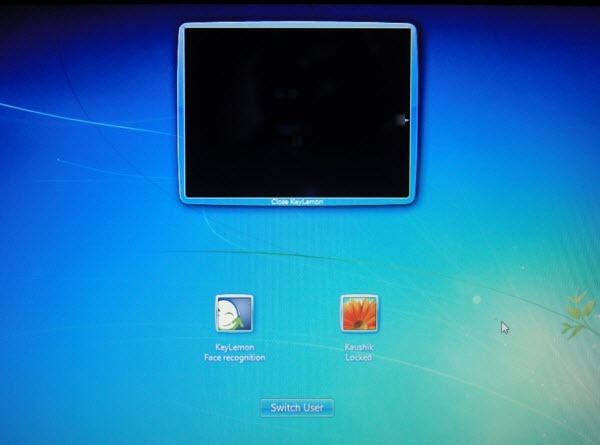
KeyLemon replaces the standard Windows logon screen with a KeyLemon login screen that connects to the computer’s webcam. Users can automatically login to their Windows computer by simply positioning their face in front of their webcam. If the computer has multiple users the software automatically logs the user into the right Windows account. When the user leaves the computer, KeyLemon automatically locks it and then unlock it when the user is back. When an unauthorized user attempts to login to the computer, their mug shots are recorded and saved for the owner to review.

Under good lighting condition, authentication takes barely a second allowing for quick logins that isn’t possible with tradition password based login. If due to bad lighting or some other reasons, KeyLemon fails to identify the user, the program allows the user to fallback to the default Windows password based login.

KeyLemon has been reported to be easily fooled by a smartphone recording of the face of the user. This is true, but the success or failure of this depends on the trade-off the user made between convenience and security when configuring KeyLemon. The program offers three security level – High, Medium and Low.

keylemon-profile

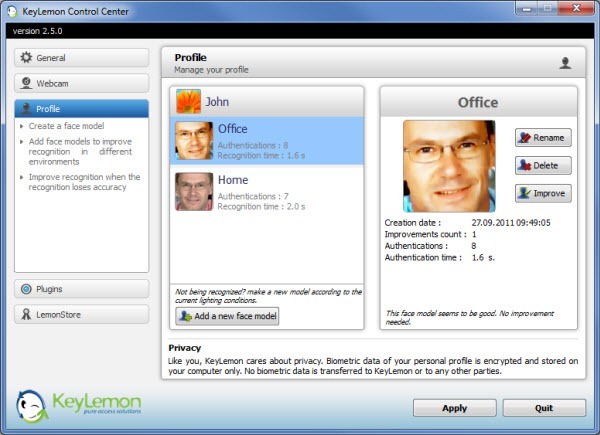
High security offers maximum security with accurate facial recognition. A high level of correlation is required for authentication which demands adequate lighting. KeyLemon cannot be fooled by a video recording of the user’s face at this security setting. In the Medium security setting, a compromise is made between ease of use and authentication. At this setting, KeyLemon tends to get duped when a video recording of the user’s face is held in front of the webcam. The Low security setting offers the lowest security and should be avoided. At the lowest setting, even a still picture of the user can unlock the computer.

However, to prevent spoofing KeyLemon includes an anti-spoofing technology. When this is enabled, the user is required to blink his or her eyes to unlock the computer. The blinking action also needs to be made at a certain moment when the anti-spoofing icon lights up. This makes spoofing nearly impossible since not only the intruder will need to acquire a video of the user blinking but he or she needs to make sure the whole thing is accurately timed when played back in front of the webcam.

With anti-spoofing enabled, even the Low security level can provide adequate protection that cannot be easily bypassed.

keylemon-plugins

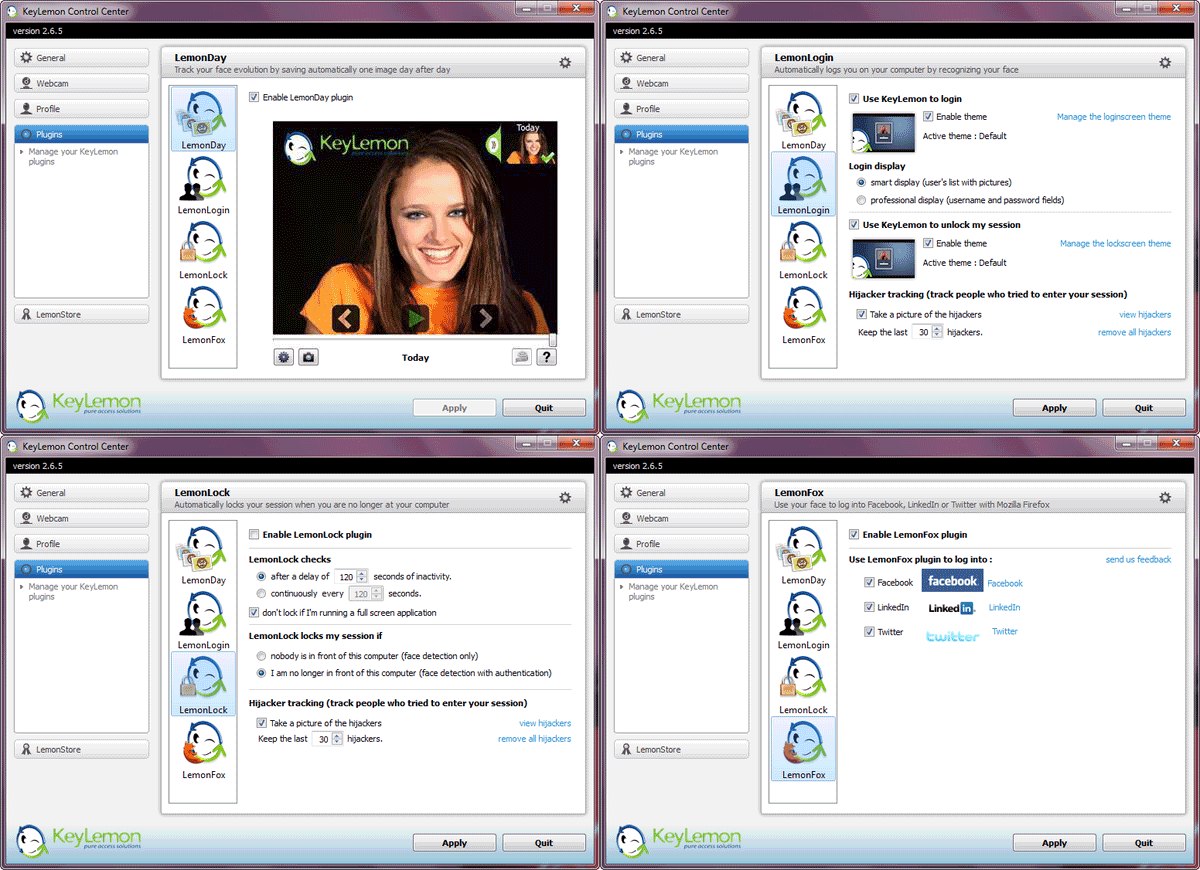
KeyLemon includes several plug-ins that enhances the program features, but unlike traditional plug-ins, they come preinstalled with the software. Currently four such plug-ins are available and they offer a range of interesting features.

The LemonDay plug-in allows one to archive every picture of himself or herself the webcam takes at logon and then stich them together to create a glorious time-lapse video. This is a fun way to track the evolution of one’s face with time.

The LemonLogin plug-in allows one to use themes on the logon screen and personalize it with their own background pictures.

The LemonLock plug-in automatically locks the computer when the owner is not in front of the computer. If an unauthorized person tries to use the computer there is an option to take a picture of them.

LemonFox is another plug-in that installs an add-on in Firefox that enables users to log in to three social-networking services using their Webcam. The supported websites are currently Facebook, Twitter and Linked In.

keylemon-facebook

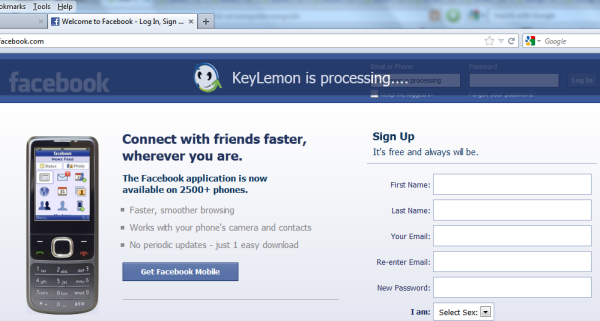
To login into the social-networking simply open the supported website and KeyLemon will launch authentication. If facial authentication is successful, your login credentials are searched in the login manager of Firefox. If they are not already stored, a window asks you the credentials. Once you’ve entered your login username and password, these are stored in Firefox’s password manager. The next time you open the website, your face will be scanned and only when the authentication succeeds, you will be logged into the website.

KeyLemon comes in three flavors – Basic, Bronze and Gold. Basic is free to use but contains only Windows login with majority of features locked. Bronze contains more features than Basic but still lacks Hijackers Tracking, Security Levels, Anti-spoofing and LemonFox. Bronze is priced at around $20. The Gold version is the complete product and costs twice that of Bronze.

Thanks to KeyLemon, we have 5 Gold licenses to giveaway to our readers. If you are interested in entering this giveaway contest, simply leave your real name and email ID in the form below. Winners will be selected by a random draw. The contest closes on 22 July, 2012.

Get Ready for Dropquest II and a Chance to Win 100GB of Dropbox Space

Be the first to comment!
Labels: , ,

Dropbox’s most tempting feature is it’s referral program that gives users the opportunity to increase their storage space by several Gigabytes simply by getting their friends to sign-up and doing odd jobs like connecting their social accounts or uploading pictures from their cameras. Occasionally, Dropbox would improve their referral program, add new tasks or cooperate with other businesses to give more free space. One new opportunity is coming next week.

Dropbox just made a pre-announcement for Dropquest II – an online scavenger hunt game which will have people, within a week’s time, cranking their brains to solve several increasingly difficult puzzles in a quest to score some free Dropbox space. Last year’s Dropquest engaged half a million people, which in my book, is a huge success. Dropbox promises that this year's quest will be harder than last year's and will require “a discerning eye and tons of creativity to solve”. Last year’s Dropquest was finished in a little under 2 hours, but Dropbox’s team believes that this year’s quest will take at least 5 hours to accomplish.

dropquestbox (2)

But the rewards are enticing: the person who completes the quest the fastest will see their Dropbox space increased to a whopping 100GB, for life. The winner will also receive an assortment of goods including a hoodie, t-shirt and an invitation to help write the next Dropquest.

Rest of the prizes include more Dropbox space in slabs of 20GB, 5GB, 2GB and 1GB. Everyone who completes Dropquest will get at least 1 GB of extra free space, even if they participated last year.

Dropbox says that it will not tolerate use of their support, forums, or blog for Dropquest hints or answers and they will disqualify anyone caught doing this. Last year, the entire Dropquest walkthrough was leaked and anybody who cared to complete got away with an extra GB of space.

Dropquest starts Saturday, May 12, at 10AM PST (17:00 GMT) on this page.

[via Softpedia]

Giveaway and Review: Wondershare Video Editor

Be the first to comment!
Labels: ,

video-editor-bannerYou must remember Microsoft’s video editing application Windows Movie Maker that first debuted on Windows Me and later included in Windows XP and then on Vista. Despite its bare-bone interface and relatively lack luster feature Windows Movie Maker became a popular software for home video editing because it was simple and because it worked.
After the release of Windows Vista, development of the program was abandoned and replaced by Windows Live Movie Maker as a part of Windows Live Essentials. It does not have the same features as Windows Movie Maker – in many ways the new version is inferior to the original program. It’s doesn’t have the timeline, for instance. It’s a shame that Microsoft maimed such a good software. And when that happens, people start looking for alternatives.

There is no shortage of capable of video editing programs, and most of them are vastly powerful than Windows Movie Maker. But video editing software are usually complicated programs. With software such as Jahshaka and Lightworks, you get Hollywood type abilities but miss out on simplicity. Just navigating the various menus and buttons on these programs is a chore.

Wondershare Video Editor, on the other hand, is refreshingly different. It has a simple interface with simple functions and just the right amount of goodies to produce the perfect home video.

Wondershare Video Editor

Run Wondershare Video Editor and choose an aspect ratio between 16:9 or 4:3, and the main interface will load. Click "Import" to select videos, audio and photos from your computer, or click "Record" to capture videos with a connected capturing device. You can also batch drag and drop files into the editor.

wondershare-video-editor

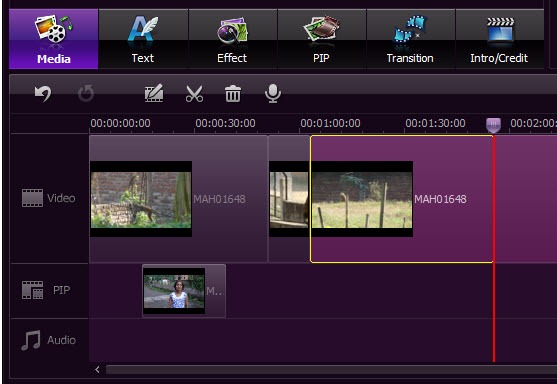
To make a new video, drag media files from your Album to the Timeline at bottom. You can drag and drop as many video clips as you want to the timeline and stitch them together to produce a single long video. For background music, you can drag a music file and drop it into the timeline.

Now here is an interesting feature: if you drag a video and drop it over an existing video on the timeline, the first video will automatically split to accommodate the second video in between. Video trimming can be done right on the timeline itself. Simply grab one end of the video and drag it left or right to trim the ends.

In the timeline, you can cut, copy, paste and delete any clip any time you want. All the editing can be previewed in real-time. You can change each video clip's contrast, brightness, hue, saturation and gamma individually. Other editing tools include Crop, Rotate (Flip), Adjust and Speed (Fast and Slow Motion), while Audio tools include Volume, Fade in/out, and Effect (Voice change).

wondershare-video-editor-2

To add titles, effects and intro/credit to your movie, just switch to Text, Effect or Intro/Credit tab, and then drag and drop an item to the Timeline. You can double click the added item to make changes. On Timeline, you can easily move added items and adjust the duration by dragging. You can also add transitions between your video or photo clips from the Transition tab.

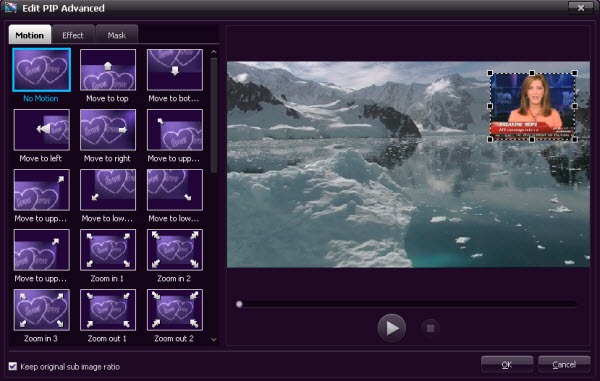
Wondershare Video Editor has another interesting feature called Picture-in-Picture.

Picture-in-Picture is an additional video clip or picture playing on top of the main video. Picture-in-Picture is commonly seen in news broadcast where the news video is displayed on the full TV screen and at the same time a video of the news anchor is displayed in an inset window at a corner of the screen.

wondershare-video-editor-3

Using Wondershare Video Editor you can reproduce Picture-in-Picture effect. Simply drag imported video/photo to the "PIP" track, and bingo! you get a Picture-in-Picture video. You could double click on PIP items on Timeline to personalize your Picture-in-Picture video with Motions, and even additional effects like shadow, border, alpha, and mask by clicking "Advanced" button.

Once you are done with editing, it’s time to save your video. For this Wondershare Video Editor offers plenty of options. You can either choose a video format such as AVI, WMV, MOV, FLV, MP4, MKV, MPEG, etc., or choose a device from iPhone 4, iPad, iPod touch, PSP, Wii, Creative, etc. to get the optimized videos for your devices. You can save the video to your hard disk or burn it into a DVD. You can also directly upload the finished video to YouTube

Wondershare Video Editor supports a large number of video, audio and image format. The likelihood of you encountering file format compatibility issues is non-existent.

Giveaway

We have 8 licenses for Wondershare Video Editor priced at $35 each. Those who are interested in entering the giveaway contest, just leave your name and email ID in the form below. Winners will be selected by a random draw. The contest closes on 24 March, 2012.

Additionally, Wondershare is organizing a Spring Break promotion where you can win 20 copies of the Video Editor and the grand prize of the new iPad. To enter the contest participants will be required to upload 1 or 2 of their most memorable pictures, and write a sentence or two about their trip and what made the trip great. Entries which receive the most number of votes will be chosen the winner. The contest starts from March 12th and April 16th, 2012. More information at the promotion page.

Get 2GB Additional Space on Dropbox With This Hack

Be the first to comment!
Labels: ,

Samsung Portugal is giving away 2GB of additional storage space on Dropbox for customers of Samsung Android cell phones. The offer is available only on select number of phones and only for Portuguese residents, but using fake credentials and a fake IMEI number anybody can grab the extra 2GB. Here is how.

  1. Go to https://www.samsung.com.br/dropbox/Default.aspx. The page is in Portuguese.
  2. Click the “avançar” button.
  3. Click the “avançar” button again.
  4. Enter a (bogus) e-mail address. This won't be verified and does NOT have to be the same as your Dropbox e-mail address. Click the “avançar” button.
  5. Click the “avançar” button to confirm the e-mail address you entered.
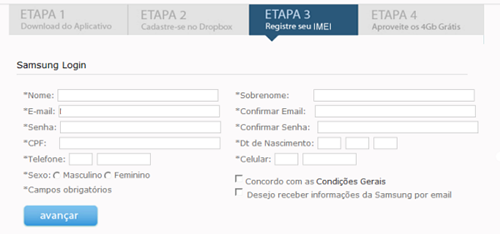
  6. Fill in the form with (bogus) information.

    samsung-dropbox-1

    • Nome is name.
    • Senha is the password. At least eight characters, numbers and letters, no sequences.
    • For CPF, go to this website: http://www.gerardocumentos.com.br/
    • Click the "Gerar" button, copy the number generated in the box below, and if it displays "Verdadeiro", you're good.
    • Dt de Nascimento is a day of birth. Day, month, year format.
    • Telefone and Celular are phone numbers. In the first box use area code 34. Entere eight random digits for the phone numbers. A different one for both boxes.
    • Check the box next to "Concordo com as Condições Gerais".
    • Click the “avançar” button. If it will display any errors in the form, use Google Translate to figure out the errors. http://translate.google.com/
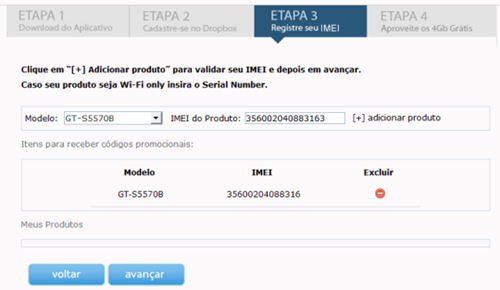
  7. On the next page, select "GT-S5570B" from the drop-down box.
    • For the IMEI in the box next to it, go to this page: http://dl.dropbox.com/u/3471788/imei.html
    • Leave the base number alone, and enter a five digit number in the serial number box.
    • Click generate.
    • Paste the resulting number in the IMEI box on the Samsung page and click "adicionar produto" to attempt to add the number.
    • It will add the device, IMEI, and a red minus sign in the area below the entry form if the number was accepted.

      samsung-dropbox-2

    • If the IMEI was not accepted and the device was not added, go back to the IMEI generator page and increase the serial number by one. Repeat submission until it is accepted.
    • Click the “avançar” button.
  8. On the next page, you will see a code under "Codigo Promocional".

    samsung-dropbox-3

  9. Copy that and paste it here: https://www.dropbox.com/coupon. (you may have to log in to Dropbox first)
  10. Your space should be instantly increased by 2GB!

The offer is valid till April 2, 2012 or the first 100,000 customers.

[via XDA]

Giveaway and Review: EaseUS Todo Backup Advanced Server 4.0

Be the first to comment!
Labels: ,

todo-backup-logoEaseUS Todo Backup Advanced Server is a powerful file backup and disk imaging software for Windows Server as well as for desktop Windows installation. The Advanced Server edition is targeted towards enterprise users and provides powerful data backup and recovery features such as fast system and files backup, disaster recovery, advanced backup scheduler and comprehensive backup management tools. It aims to simplify both basic and advanced server backup and recovery management while minimizing server downtime as well as ensuring business continuity.

EaseUS Todo Backup Advanced Server contain additional features over and above those included in EaseUS Todo Backup Free, such as support for Windows Server 2000/2003/2008, backup Microsoft Exchange Server database, backup to tape, WinPE based recovery disk, creation of bootable USB drive, recovery of disk image to dissimilar hardware and free tech support from EaseUS technicians.

todo-backup-server-1

The program’s interface is the same as in EaseUS Todo Backup Free. All available functions are split into 4 main categories – Backup, Recovery, Clone and Tools. Additional tools to manage previously created images are located under the “Management” tab at the top of the program window.

The File backup function will backup selected files and folders to the backup destination of choice, which can be local disks, network connected disks, FTP server or legacy storage media such as magnetic tapes. Todo Backup Advanced Server can also backup databases from Exchange Server 2003, 2007 and 2010 and SQL Server 2000, 2005, 2008 and 2008 R2.

todo-backup-server-2

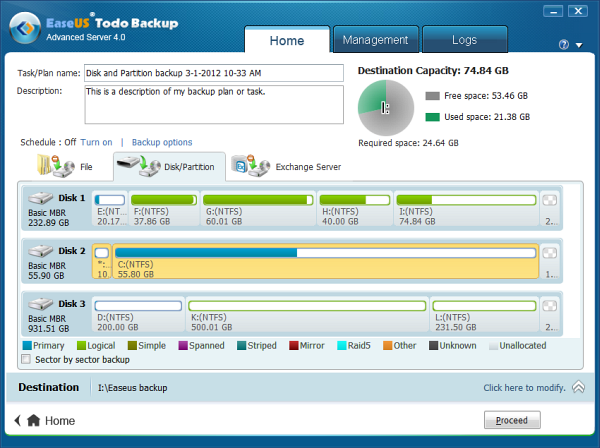
Aside from file backup, Todo Backup Advanced Server also performs full disk and partition image backup. The partition can be regular volumes, dynamic volume or GPT disk. If the disk is an SSD, Todo Backup is capable of ensuring sector alignment during the backup process.

Backups can be full, incremental or differential. They can be run manually when needed or scheduled to run at a desired time of day, or during certain events like system startup/shutdown and user log on/logout. Notification on the result of the backup job can be configured to automatically emailed to multiple email addresses.

When performing a recovery operation, it is possible to selectively recover files and folders from a backup. For disk images containing more than one partition, users can select the partitions to recover. The program even allows users to recover a partition to a different computer. When restoring a system partition to another computer with dissimilar hardware configuration, the program will lets users install drivers for the new hardware during the recovery process.

todo-backup-server-3

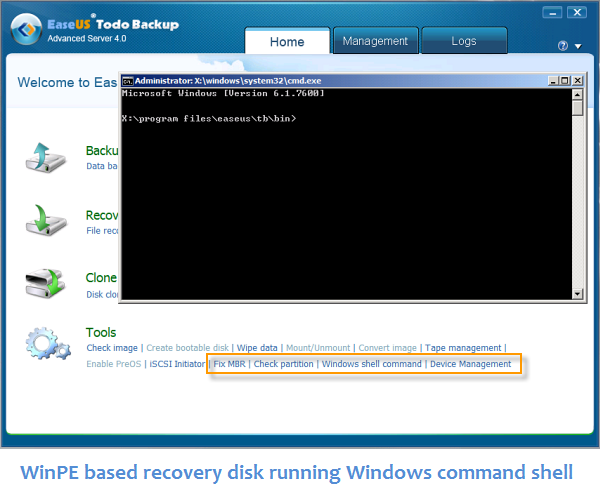
EaseUS Todo Backup Advanced Server offers WinPE based recovery disk. The advantage of WinPE based disks over Linux based disks is that you can access Windows command shell and fix Master Boot Records of the disks. You can also perform new backup, manage old backup images, access network devices and other functions which isn’t possible from Linux-based recovery disk.

Todo Backup Advanced Server also offers a disk-less recovery option, wherein the computer is restarted and automatically goes into the recovery mode without having to boot it off a recovery disk. And yet another way to get rid of optical disks (and drives) is to create a USB recovery drive, which is possible through this program.

The application comes with comprehensive backup management features that automatically removes old backups with an option to keep the first backup and any number of recent backup. Users can split back images to smaller sizes so that they can be efficiently transferred to another location. Disk images can be mounted as a virtual drive and their contents browsed, or the images can be converted into VirtualPC and VMWare format and mounted with the respective software.

How exactly is the Free edition different from the Advanced Server edition?

EaseUS Todo Backup Advanced Server contain the following additional features:

  • Backup Exchange Server 2003, 2007 & 2010, and SQL Server 2000, 2005, 2008 and 2008 R2.
  • Run on Windows Server 2000/2003/2008 (32 & 64 bit)
  • Perform remote backup and recovery by connecting to a remote computer running Todo Backup Advanced Server
  • Create WinPE based recovery disk and USB
  • Backup to magnetic tape
  • Recover backup image to dissimilar hardware
  • Use in commercial establishments such as offices and enterprises is permitted
  • Free tech support

Giveaway

EaseUS Todo Backup Advanced Server is priced at $299. Thanks to Vanessa from EaseUS, we have 5 copies of this software to giveaway to our readers. If you are interested in entering the sweepstake, leave your name and email ID in the form below. Winners will be selected by a random draw. The contest closes on 5 March, 2012.


Giveaway: CactusVPN’s P2P/Torrent Supported VPN Accounts

Be the first to comment!
Labels: ,

cactusvpn-logoNot many VPN service providers allow downloads through Bittorrent and other P2P file sharing network on their servers, but new entrant – CactusVPN - does. CactusVPN has servers on three countries – the US, the UK and the Netherland. Torrents and P2P downloading is allowed on the Netherlands server, a country which has always been tolerant to file downloading. However, after the recent change of heart of the Dutch government, CactusVPN might want to review their decision of placing servers in the Netherland.
Depending on why you want a VPN account, you can choose from one of the 4 VPN packages CactusVPN offers. If you want to gain access to sites restricted to only the US and the UK such as Hulu, Pandora, ABC, NBC, BBC iPlayer, Spotify and recently, Grooveshark which is now blocked in Germany, you can take the package containing the US or the UK servers. If downloading torrents anonymously is your plan, then the servers on the Netherland is what you should go for. Each of these packages contain only one country server and are available on a fixed rate of $4.99 a month. A fourth plan with all three servers/countries is also on offer at $9.99 a month.

With every package you will get OpenVPN, PPTP, L2TP/IP Sec protocols. Download bandwidth is not metered and no connection logs are kept. CactusVPN also does not monitor the communications of its clients, unless it becomes aware of harmful activities in which case CactusVPN may shutdown your account. CactusVPN doesn’t support downloading of copyrighted materials.

cactusvpn

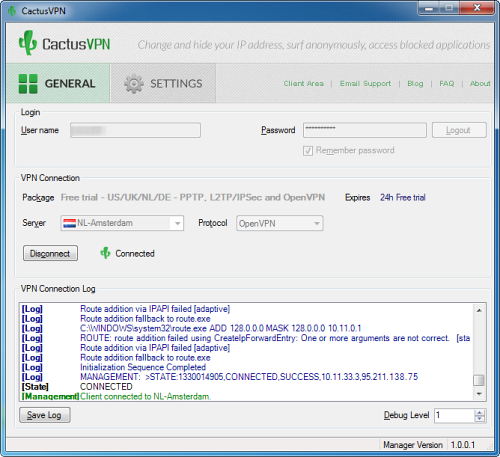
CactusVPN offers their own connection software which makes it easier to connect to their servers, than set up a PPTP connection by yourself or download OpenVPN certificates to configure with your OpenVPN client. Those alternatives are still available for those who prefer that way.

The VPN username and password required to connect is available on your account page. Enter the login information in CactusVPN’s software and then choose a server to which you want to connect.

The Giveaway

CactusVPN is offering 10 accounts of the P2P/Torrent package for our readers. Each of these account will remain valid till 3 months. If you are interested in grabbing an account, leave your name and email ID in the form below. Winners will be selected by a random draw. The contest is closed.


DAZ Studio 4, Bryce 7, Hexagon 2.5 Free for Limited Time

Be the first to comment!
Labels:

daz-WonderWomanVeteran developer of 3D application software, DAZ 3D is well known among 3D circles. DAZ provides large number of add-on products and models of human figures, anatomy, clothing, animals, vehicles and such for use in popular 3D software applications such as Poser, Blender, Maya and Photoshop Extended. DAZ also has several of their own 3D creation programs, the most notable among them are DAZ Studio and Bryce. Bryce is one of the first realistic landscape generating computer program while DAZ Studio is a 3D posing and rendering applications.

DAZ 3D is currently giving away three of their popular products including these two, for free. The three software programs - DAZ Studio 4, Bryce 7 Pro and Hexagon 2.5 - has a combined retail value of over $800 and all three are solid products as any 3D digital artist will attest. The programs will be available for free download from their website until the end of February. That’s not all; the download is eligible for free updates and upgrade pricing on future versions of each product, potentially saving you of hundreds of dollars in future as well.

daz

DAZ Studio Pro (worth $429.95)

DAZ Studio Pro is a feature rich 3D figure customization, posing, and animation tool that enables anyone to create stunning digital illustrations and 3D animations. DAZ Studio Pro is the perfect tool to design unique digital art and 3D animations using virtual people, animals, props, vehicles, accessories, environments and more. Simply select your subject and/or setting, arrange accessories, setup lighting, and begin creating beautiful artwork.

Bryce 7 Pro (worth $249.95)

Bryce is an award winning, fun, feature-packed 3D modeling and animation package designed to allow new users to quickly create and render stunning 3D environments. Bryce combines exceptional power with an innovative interface for incredible ease of use. Add wildlife, people, props and more to your scenes via the DAZ Studio character plug-in in addition to terrain, water, sky, rocks, clouds, fog, vegetation, and architecture for which Bryce has long been the standard. Originally created by Eric Wenger, Kai Krause and Phil Clevenger.

Hexagon 2.5 (worth $149.95)

Hexagon delivers all the tools a graphic artist needs to create detailed 3D models ready for final render. Packed with features such as; DAZ Studio Bridge, sculpted primitives, freehand modeling brushes, micro-displacement modeling tools, comprehensive UV-mapping modules, advanced 3D paint, and instant ambient occlusion. Hexagon provides you with all the options of expensive competitor software, but at an affordable price.

[via Buzz99]

Related Reading:

Giveaway: Auslogics File Recovery 3

Be the first to comment!
Labels:

Auslogics File Recovery is an easy to use file recovery software for Windows that can recover any type of files irrespective of the file extension/type from any kind of storage media such as hard disk, SD card, USB drives, digital camera, iPod etc. The software also supports file recovery from major file systems: NTFS, FAT16, FAT32, and exFAT.

Features:

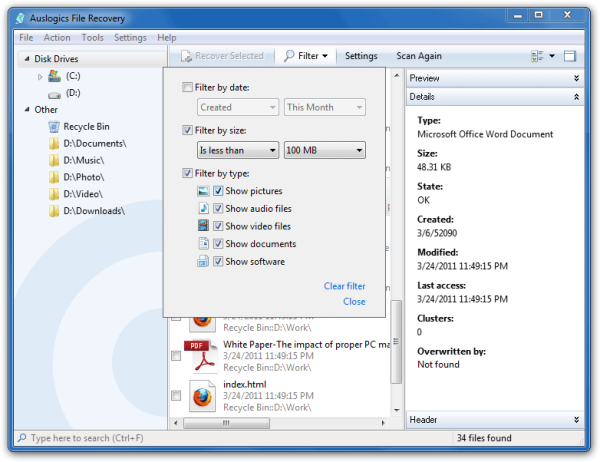
  • Recovery Wizard: The Recovery Wizard guides you through the steps that helps streamline the process and minimize recovery time when working with deleted files. The Recovery Wizard allows you to select the drives you want to scan, specify the file types, when last modified, specify a date range or just recover a deleted file by name.
  • Advanced Filter to Sort Scan Results: You don’t need to go through hundreds of deleted files to find the file(s) you want to recover. An advanced built-in Filter will help you sort the deleted files quickly and easily. Filter by date, size, file type or a combination of these options.
  • Deep Scan for Tough Recoveries: The Deep Scan lets you dive deep into your file system to recover the deleted files you thought were lost for good.
  • Preview Files: The Preview option lets you preview photos, videos, documents and PDF files right from the program. Just browse through the list of deleted files you find and start recovering the deleted files you want back.

auslogics-file-recovery

Giveaway

We have 5 licenses for Auslogics File Recovery 3 for giveaway. The license allows you to install the program up to three PCs – perfect for use in homes with more than one computer. Each license in this giveaway is worth $50. Those who are interested in entering the sweepstake may leave their name and email ID in the form below. Winners will be selected by a random draw. The contest closes on 3 February, 2012.


Recent comments

Recent comments

Followers

Sponsors

Recent comments

fefew

Recommend on Google

Copyright © 2011 All Rights Reserved Thesis skin. by Nitin. Converted into Blogger Template by TheTechFizz.