Get the latest updates from us for free

Sign-up for FREE weekly Newsletter.
Showing posts with label Internet. Show all posts

Tunlr DNS: Watch Hulu, Pandora, Netflix and Others Without VPN

1 Comment so far
Labels: ,
Many services based on the entertainment industry, viz. the music and movies, are geographically restricted because of licensing issues. The video streaming service Hulu, movies on demand service NetFlix and Internet radio service Pandora, for example, are available only within the United States. Similarly, BBC iPlayer and Channel 4 are only for the U.K. audience. But the global Internet population couldn’t be easily kept away from such treasures. Many Internet users are getting around the geo-location block using proxy, and VPN services in particular.

A large number of VPN providers have sprung up in a short period of time to meet demands. Unfortunately, they are all paid services and for students and for those without a regular paycheck, even $5 a month is expensive. Besides, they're are already paying for Internet connectivity. Free VPN services are available but they are always subject to abuse because of which they either become slow, restrictive or shut down entirely.

 Tunlr DNS: Watch Hulu, Pandora, Netflix and Others Without VPN

Recently, a new free service called Tunlr has emerged that allows users to access services blocked outside the United States. But Tunlr does not provide VPN service. It is a DNS unblocking service that uses a combination of a DNS server and a collection of proxies in various countries to go around the geographical block. The user simply change their DNS servers to those provided by Tunlr. After doing this, they are able to bypass the block and access Hulu, Netflix, Pandora and any of the supported services.

Unlike VPN, where the content is routed through the VPN servers, with Tunlr users are able to stream directly from the blocked service with no intermediary servers in between. Besides, Tunlr is free.

Tunlr can unblock the following services:
  • US video streaming services: Netflix, Hulu, CBS, ABC, MTV, theWB, CW TV, Crackle, NBC, Fox, TV.com, PBS, Vevo, History, Lifetime TV,
  • US audio streaming services: Pandora, Last.fm, Turntable.fm, Mog.com, iHeartRadio,
  • Non-US services: BBC iPlayer (UK), Channel4 4oD (UK), iTV Player (UK), and Zattoo (Germany).

How Does Tunlr Work?

Tunlr uses two main components - a DNS server and a collection of proxies located in different countries. When your computer sends a DNS query for a blocked website, for example, hulu.com, instead Hulu’s real IP address, the Tunlr DNS server returns the IP addresses of a proxy server operated by Tunlr in the US.

When your connection is received by Tunlr’s proxy in the correct country, it is forwarded to the service provider e.g. Hulu. For Hulu, you appear to be in the correct country because it sees the IP address of the proxy server located in the US.

Once the IP address check is passed, and your connection established, Tunlr re-introduces your true IP address into the data stream so that the video content is streamed directly to your computer and not through Tunlr’s proxy server.

In order not to overwhelm their DNS servers with request, Tunlr strongly recommends that you switch to their DNS servers only when required to access the blocked services. You can do this easily using tools such as Public DNS Server Tool or DNS Changer. If you are using an alternative router firmware such as DD-WRT and Tomato, it is also possible to use Tunlr DNS for only the supported sites and use ISP’s for all other sites.

Unfortunately, many people are using their DNS servers in a permanent fashion, which forced Tunlr to introduce restrictive measures. Tunlr wrote in their blog.
Since too many users are using our DNS servers in a permanent fashion, we have to introduce some form of traffic shaping in order to make the permanent use of our DNS servers less attractive with the ultimate goal to keep Tunlr a free service. We’re going to implement artificial response delays and tighten the existing request rate-limiters on our DNS servers. This is going to slow down internet surfing a lot (!) for anyone who’s permanently using Tunlr’s DNS servers.
And from their FAQ:
We’re not aiming to provide a professional 24/7 service. Tunlr is up when it’s up, and is down when it’s down.
If you want to use Tunlr, please pay heed to their request otherwise you are going to kill an amazing free service.

Offensive Images in SkyDrive Will Lose Your Entire Microsoft Account

Be the first to comment!
Labels: ,
Be careful of what you upload to your SkyDrive storage, for even a single stray image containing offensive material can make you lose your entire Microsoft account and all services associated with including Outlook/Hotmail, XBox 360, Zune and what not, as a German man recently found out the hard way.

Every cloud storage service has its own set of policies and restrictions that determine what you can or cannot store there. This is reasonable as long as the policies are restrictive only towards materials that infringe copyright or violate laws of the land, such as child pornography. But Windows Live code of conduct that governs SkyDrive are much more restrictive than that.

SkyDrive’s EULA doesn’t allow users to store any images that “depicts nudity of any sort, including full or partial human nudity, or nudity in nonhuman forms such as cartoons, fantasy art or manga.” This means that your private beach holiday photos or even nude drawings are off-limits. Microsoft also disallows users from storing pornographic and obscene content so all your legally purchased adult movies should be kept off SkyDrive. Others things restricted include materials and documents that expresses profanity, hatred, bigotry, racism, or gratuitous violence.

Neowin speculates that your SkyDrive account could be banned if you upload a document with just one swear word inside. The ban on "gratuitous violence" means you could possibly be banned if you upload a movie of your gameplay in, for example, the "M" rated Halo series from Microsoft.
The German man who was banned from SkyDrive, along with all of the services linked to his Microsoft online account, had upload four partially nude pictures in his private folder. The keyword here is “private folder”.

This poses a big problem for users. SkyDrive is deeply embedded into the Windows 8 operating system and Microsoft expects everybody to use SkyDrive in Windows 8 to store pictures and documents in Office 2013. So what happens when you sync your private pictures to SkyDrive, or if you write a story with one too many swear words in Word and save it to SkyDrive? Windows Phone 7, too, has an option to automatically upload any picture you take to a private folder on your SkyDrive.

With Windows 8’s release round the corner it’s time that Microsoft review their SkyDrive policies or at least offer some guidance on its SkyDrive agreements.

Access Blocked Sites like Facebook, Twitter, YouTube in Pakistan

Be the first to comment!
Labels:
In recent past, Facebook banned in Pakistan and then YouTube and Twitter also blocked. People can’s access these sites in Pakistan as message appears that “You are not authorized to access this page”. But if your country, college, office, school is blocking any site and you want to access that from there, you can also use Proxy Servers to do the same. Here is the list of 10 Proxy websites which are nothing but 10 ways to access blocked sites at your place.


List of Proxy Websites to Access Blocked Sites

1. ProxEasy – Free Service

2. Proxify – Paid Service

3. RocketSurf

4. Zerolike.com

5. 2UnblockSites

6. ProxyBoxOnline

7. Evade Filters

8. ExitB

9. Self Hide

10. UnDirect

[ List of sites via ]

To use these proxy sites, you just need to paste the URL of the blocked site in the input box and then you will be redirected to a page where you can see the data from blocked site. Some of these services are free to use but some of them are paid as well.

ToS;DR and TOSSOS Makes Sense of Long ‘Terms of Services’ You Didn’t Read

Be the first to comment!
Labels:
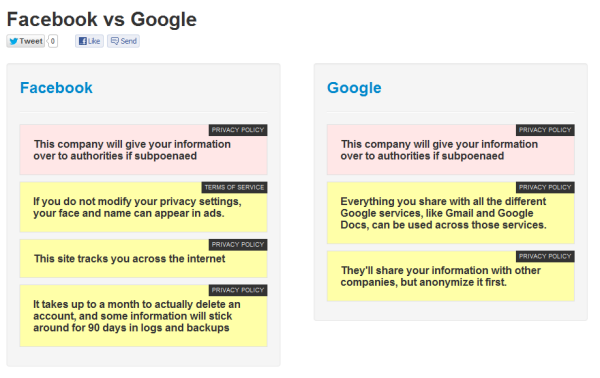
As with desktop software, online services such as Facebook and Twitter requires the user to read and agree to their terms and conditions before signing up for an account. But very few people actually read the entire Terms of Service before they click “I agree”. Most people don't care about terms or Privacy Policy and even if they do, they usually don’t have the time or patience to read the long, jargon filled document.
A new service called Terms of Service; Didn't Read or ToS;DR in short seeks to fix this problem by making complicated Terms of Service of major websites readable by highlighting the most important clauses and offering a rating system that lets users quickly judge how fairly the service treats users and respect their data.
ToS;DR explains in plain language the gist of a web service’s terms, with a one-sentence explanation of each term you've agreed to and a brief judgment of whether the term is beneficial for the user. Each term is labeled as either Good (with a green thumbs up), Mediocre (with an orange thumbs down), Alert (with a red X), or informative (with a neutral gray icon). There is also an overall ranking that judge each service by Class ranging from Class A for the best terms of services (“they treat you fairly, respect your rights and will not abuse your data”) to Class E for terms of service that “raise very serious concerns”.
tosdr
By this classification, DuckDuckGo has earned a Class A label, while image hosting service Twitpic has been marked with Class E. All services are ranked through a peer-review process and anyone can join the discussion on a Google Group message board.
Right now, the site includes ToS of 32 services, including major social media sites like Twitter, Facebook, LinkedIn and Instagram, mobile carriers AT&T and Verizon, and tech giants Amazon, Microsoft and Apple. However, not all services are equally scrutinized and most of them has not been assigned a class yet. If you can spare a few minutes, go join them and help them rate their terms of services.
ToS;DR was launched in June, but just a few weeks earlier another service with the same goals was launched.Called TOSSOS, this service too was built to help people understand what they actually agree to when they use products and services. Like ToS;DR, TOSSOS highlights important clauses in a ToS document using color codes to distinguish between a good clause and a bad clause. You can click on the clause summary to read an extract from the original terms and service.
TOSSOS even lets you compare terms of services of two different web services/companies.
tossos
What’s great about TOSSOS is that it has a Chrome plugin. When you visit a site and you want to check out the site’s privacy policy or terms, you hit the TOSSOS plugin button and if the site has been reviewed by TOSSOS, it will display the summarized terms in a little pop-open window.
Both ToS;DR and TOSSOS are based on a wonderful concept and has the potential to be a great educational tool. Hopefully in time they will reach a wider audience and if enough people are made aware of the practices of these service providers, maybe we can exert pressure on them to be more open and reasonable with their terms.

Misconceptions of Google Two-factor Authentication Debunked

Be the first to comment!
Labels:

Misconceptions of Google Two-factor Authentication Debunked

Last week former Gizmodo writer Mat Honan found his iCloud account compromised which the hackers used to reset his Gmail password. They then gained control of his Twitter account and used it to broadcast racist and homophobic messages. The hackers also remotely erased all of the data on his iPhone, iPad, and MacBook from his Apple account. “In the space of one hour, my entire digital life was destroyed”, says Mat Honan.

Like most people Honan had his accounts daisy-chained together. Getting into one account allowed the hackers to get into the others. “Had I used two-factor authentication for my Google account, it’s possible that none of this would have happened, because their ultimate goal was always to take over my Twitter account and wreak havoc.”
The email account is the most important of all accounts. When you lose control of your email you lose your online identity. But the consequences are usually deeper and often affect your life outside of the Internet. The hackers have access to every sensitive information that is important to you – your credit card numbers, bank account information, your social account, medical info and more.
It’s been a while Google added two-factor authentication ability to Google accounts but not many people are using it because they think it’s a big inconvenience. Sure, it’s a hassle to setup but the enhanced security you get, and not to mention the peace of mind, is worth it. Besides, once you’ve authorized all your devices using two-factor authentication you don’t have to enter the PIN every time you login. Only when you try to login using another machine that the SMS-PIN code becomes necessary.
Matt Cutts, in his recent blog post, answers some of the frequently asked questions and clears doubts people have regarding two-factor authentication.
Myth #1: But what if my cell phone doesn’t have SMS/signal, or I’m in a foreign country?
Reality: You can install a standalone app called Google Authenticator (it’s also available in the App Store), so your cell phone doesn’t need a signal.
Myth #2: Okay, but what about if my cell phone runs out of power, or my phone is stolen?
Reality: You can print out a small piece of paper with 10 one-time rescue codes and put that in your wallet. Use those one-time codes to log in even without your phone.
Myth #3: Don’t I have to fiddle with an extra PIN every time I log in?
Reality: You can tell Google to trust your computer for 30 days and sometimes even longer.
Myth #4: I heard two-factor authentication doesn’t work with POP and IMAP?
Reality: You can still use two-factor authentication even with POP and IMAP. You create a special “application-specific password” that your mail client can use instead of your regular password. You can revoke application-specific passwords at any time.
Myth #5: Okay, but what if I want to verify how secure Google Authenticator is?
Reality: Google Authenticator is free, open-source, and based on open standards.
Myth #6: So Google Authenticator is a free and open-source, but does anyone else use it?
Reality: Yes! You can use Google Authenticator to do two-factor authentication with LastPass, Amazon Web Services, Drupal, and DreamHost, or even use a YubiKey device.
Have you setup two-factor authentication on your Google account?

Google Street View in ASCII Art

Be the first to comment!
Labels: ,
For those who have a fascination for ASCII art and at the same time love to loiter the virtual streets on Google Street view, here is your ultimate dream come true. Peter Nitsch of Teehan+Lax has developed Google Street View in ASCII that lets you explore any place on the planet where Google Street View is available in colored ASCII art. The rendering happens in real time and in your browser, so you will need one that supports WebGL textures such as Chrome or Firefox.


ascii-street-view
You can search for any location and then move around the streets by clicking on the small map inset on the top right. You can’t click on the ASCII street view to change view like you do on the actual Street View. However you can pan around with your mouse and zoom in and out using the mouse wheel. Try zooming into the scene to improve the resolution and clarity of the picture.
One of the main reasons ASCII art was born was because early printers often lacked graphics ability and thus characters were used in place of graphic marks. What was a technological constraints in the 1970s and 80s, became an artform in the twenty-first century “by the same hacker ethos that build the early machines used to produce and view it”, writes the creator of Google Street View ASCII. “Fundamentally, it is both an expression and prisoner of the system it inhabits. This latest experiment attempts to free ASCII art from the confines of the screen and enable it to exist in physical space – with light and paint.”

Automatically Publish Blog Post or RSS Feed to Google Plus

Be the first to comment!
Labels: ,

Google Plus doesn’t provide users a way to automatically publish content from an RSS feed to their Google Plus Page. The idea is to keep Google Plus spam free as anything that you want to share on Google Plus has to be done manually. While this has been a success in keeping spammers at bay but it also discourages business and bloggers, in particular, from using Google Plus as a medium to share content with their followers and readers. Now the social media management tool called Hootsuite is providing this service through their web based dashboard.

The process is not exactly straightforward and needs some figuring out. So here is a step-by-step guide on how to publish your blog’s RSS feeds to Google+.

  1. Sign-up on Hootsuite for a free account.
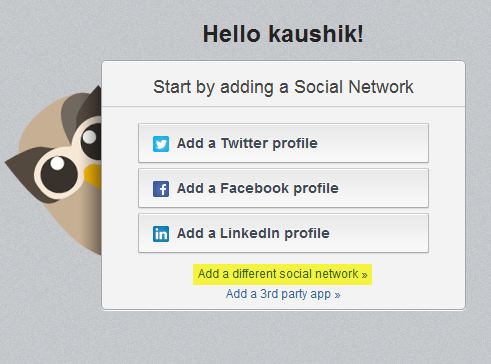
  2. On the start screen, click on the link Add a different social network.

    rss-to-google-plus-1

  3. Choose Google+ from among the various options and then click on “Connect with Google+”. This will open another window where you’ll have to login to your Google account in order to authorize Hootsuite.

    rss-to-google-plus-2

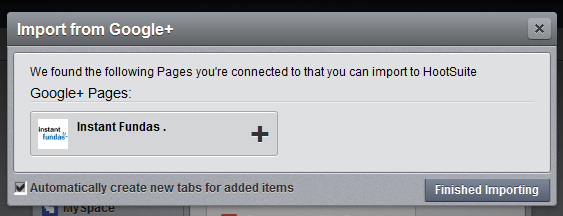
  4. Hootsuite will detect available Google+ Pages in your Google+ account. Select your Google+ Page and click on the “Finished Importing” button.

    rss-to-google-plus-3

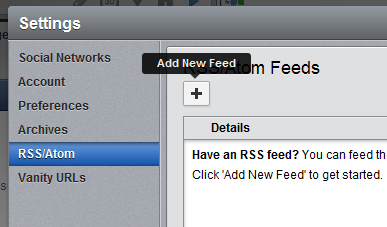
  5. You will now return to the dashboard. On the left sidebar, click on the gear icon (settings) and then click RSS/Atom.

    rss-to-google-plus-4

  6. Click on the plus button which says “Add New Feed”.

    rss-to-google-plus-5

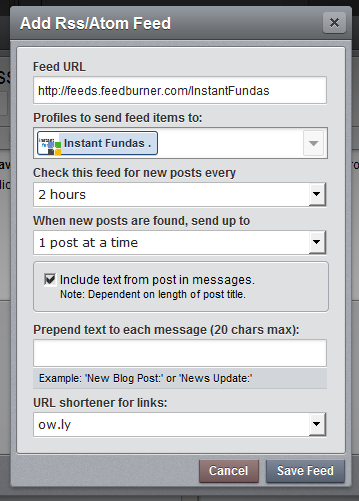
  7. This will open a window where you will need to enter the feed settings. Paste the feed URL, adjust the Check interval according to the frequency of your posts, add a prepend text if you want and choose a URL shortener. Click “Save Feed” and you’re done.

    rss-to-google-plus-6

Create Annotated Screenshot Based Tutorials in Your Browser with IORAD

Be the first to comment!
Labels: , ,

IORAD is a web services that lets software developers, bloggers or just about anybody to easily create interactive tutorials or instruction manuals of software products. Unlike traditional desktop based screen casting tools or screenshot capture programs, IORAD works from within the browser. Even though browser based, IORAD is capable of taking screenshots of any programs window running on the computer. Once a recording session begins, IORAD automatically captures screenshots of every mouse and keyboard movements such as typing, scrolling and clicking. These are then arranged in a slideshow and appropriate captions automatically added. The end result, which is fully editable, resembles a PowerPoint like slideshow with step-by-step instructions which can be embedded on any website.

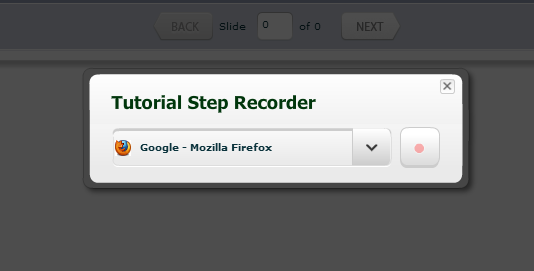
Head over to IORAD’s website and sign up for a free account. The website will ask you are some permissions to run additional programs like Java. Once these are taken care of, select the window you wish to record from the drop-down list.

iorad-1

If you haven’t already started the program, you may want to do it before you begin IORAD’s screen recording program so that IORAD can detect the program window. Alternatively, you can ignore the “select window to record” prompt and click the blinking red record button. This will take you to a recording window on the desktop. Anything you perform within the recording window will be recorded. You can resize this window or go full screen to capture everything in your screen. When you are ready to begin, click the Record button.

iorad-2

The thing to keep in mind is that IORAD is not a screen casting program. It doesn’t make a video recording of the screen, rather it records your interaction with items on your screen by taking screenshots. So you don’t have to worry about proceeding too fast or too slow. Proceed at your own pace. Once you are done, click on the Done on the recording window.

You will be then taken to the editing program. Here you can annotate slides, add captions, add actions that might not have been captured such as mouse hover, dragging and clicking. Basic actions are automatically annotated. For example, during the recording if you click on a button that says “Submit”, IORAD will have a screenshot of that action and the image will already have a caption that reads “Click Submit”. Additionally, the “Submit” button will be highlighted by a orange rectangle.

iorad-3

When you have completed editing, save the tutorial and grab the embed code to embed it in your website or blog or simply point to the tutorial hosted on IORAD. Watch this simple tutorial I created.

Currently, there is no way to export the tutorial out of IORAD but this feature is expected to become available for paying customers sometime later.

Now You Can Export Your Google+ Circles to Another Account

Be the first to comment!
Labels: ,

When Google+ was launched in June last year, initially businesses and non-human entities were not allowed on the social network. They even terminated any business accounts that it spotted on Google+. But businesses wanted to be a part of Google+ from the start and so many businesses and brands started using regular Google+ accounts. A few months later when Google introduced Google+ Pages for business, many businesses found themselves with two Google+ accounts, and some were forced to abandoned their old accounts. On Thursday, Google launched a new tool that allows these businesses or any individual to migrate data from one Google+ account to another.

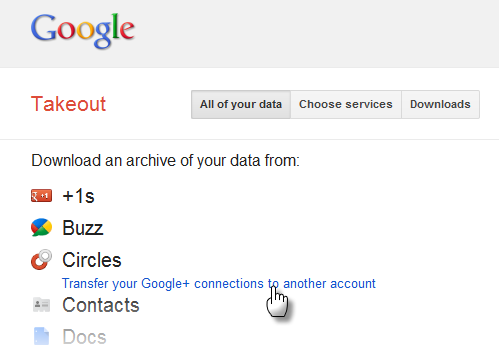
The tool, which is part of Google Takeout, the company’s initiative at making data portable, allows users to transfer their circles from one Google+ account to another and automatically forward followers to their new account.

export-google-plus

The transfer process needs to be started through Google Takeout, but the transfer doesn’t happen immediately. There is a seven-day wait period after which Google will take another two days to transfer the data over. During this period, users won’t be able to share anything on either of their Google+ accounts, add or remove people to and from their circles, and block or ignore people. An account transfer also affects people who have added these account profiles to their circles, as they won't be able to add, remove, block or ignore these profiles during the transfer.

When the transfer is completed, your circles, blocks, and ignores will be copied from the source account to the destination account. Your profile information, posts, and comments will not be not be transferred to the destination account. Similarly, authorship information and Google+ pages that you manage with your source account will not be transferred to the destination account.

At this point, you can choose to delete the source Google+ profile or let it stay.

More information on the transfer process can be found on the Google+ help page.

[via GigaOm]


.

Two Great Ways to Listen to YouTube Music by Building Playlist

Be the first to comment!
Labels: ,

youtube-logo-2According to a research conducted last year in UK, music videos drive nearly one-third of the total traffic to video sharing sites including YouTube, which because of it’s familiarity, is a popular place on the web to listen to and discover new music. Despite this there is no jukebox-like functionality on the website. You can setup playlist and channels but those aren’t easily created, requires registration and is such a hassle that it takes the fun out of music surfing. If you are among those who frequent YouTube solely to listen to music, here are two elegant solutions.

Tunesicles

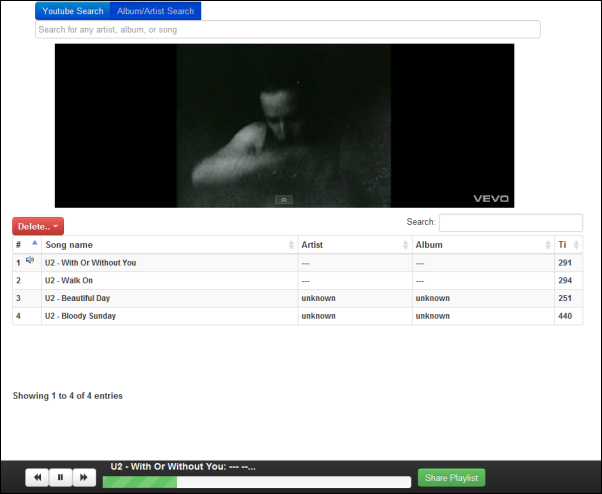
Tunesicles is a mash-up of YouTube and Last.fm that makes searching for and listening to music on YouTube very convenient. The new service allows you to search for music on YouTube and build a playlist from the search results. It is possible to setup a large list of tracks within minutes. The playlist can also be shared with others via a unique URL assigned to each playlist. No user registration is required to use Tunesicles.

Tunesicles

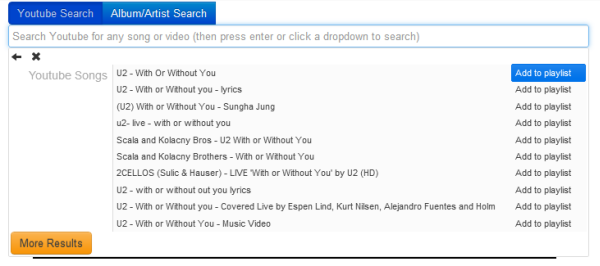
You begin by typing the title of any song or name of any artist/album you want to listen to. Then from the drop down list select a suggestion. The results appear on another drop down list. Each entry on the result is accompanied by a “Add to playlist” button. Click it to add the song to the playlist. You can even add whole albums.

The video starts playing the instant it’s added to the playlist. The player controls appear at the bottom of the the playlist/website that allows you to play, pause and skip songs. An on/off button on the right darkens the entire screen except the playing video for a better viewing experience.

Tunesicles2

Although not immediately apparent, the playlist is interactive: you can drag and drop the tracks to rearrange them, sort the playlist by song name, album name, artist name or track length. Double clicking on a track will play it. The track length is shown in seconds and not minute:seconds that requires you to do some calculations mentally. There are a few oddities and quirks like the search term disappearing when you click on the search field and layout misalignment in some browsers.

Youtify

Youtify is a more refined service and it combines, aside from YouTube, SoundCloud and Official.fm. Youtify’s elegant interface allows you to search for music across all supported services. The real time search brings you results even before you have finished typing the track or artist name. The results are categorized by their sources, viz. YouTube, SoundCloud and Official.fm. Simply right click on the results and then click on “Queue”.

Once you have finished adding tracks to the Queue, click on “Play Queue” on the left to start playing music. You can continue to add tracks to the queue while the music is playing.

Youtify

Rather than creating a queue, you can create a playlist. To create a playlist, enter a name and then drag and drop the tracks from the search results into the playlist. Unlike queues, tracks on the playlist can be reordered.

When a track is playing, the video from YouTube plays within a small window. There are player controls that lets you play/pause and skip. There is also a shuffle button.

Youtify is completely free and there’s no login required.

Youtify2

4 Tools to Compare the True Size of Maps

Be the first to comment!
Labels: , ,

Did you know Greenland is approximately 14 times smaller than the great continent of Africa, even though both appears to takes the same amount of area on the map? That’s because maps are intrinsically inaccurate. It is impossible to accurately represent the surface of the earth on a piece of paper because the earth is spherical while a map is flat. Imagine peeling an orange and pressing the orange peel flat on a table - the peel would crack and break as it was flattened because it can't easily transform from a sphere to a plane. The same is true for the surface of the earth and that's why we use map projections.

Map Projection

All map projections distort the surface in some fashion. Depending on the purpose of the map, some distortions are acceptable and others are not; therefore different map projections exist in order to preserve some properties of the sphere-like body at the expense of other properties.

A very famous projection is the Mercator Map.

Mercator_projection

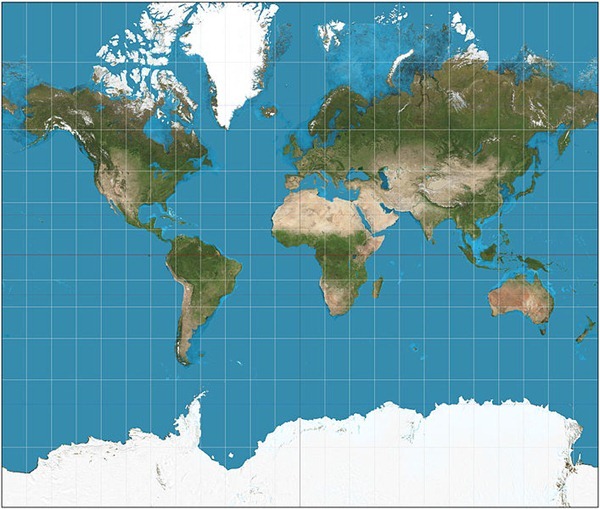
The Mercator projection was invented by the Flemish geographer and cartographer Gerardus Mercator in 1569. It became the standard map projection for nautical purposes because of its ability to represent lines of constant course. On his map, lines of latitude and longitude intersect at right angles and thus the direction of travel - the rhumb line - is consistent. While the linear scale is equal in all directions around any point, the Mercator projection distorts the size and shape of objects as we move from the Equator to the poles.

On Mercator's map Antarctica appears to be the biggest continent that wraps around the earth and Greenland appears to be just as large as Africa. Alaska appears to take as much area on the map as Brazil, when Brazil's area is actually more than 5 times that of Alaska.

Even though Mercator never intended his map to be used for purposes other than navigation, it became one of the most popular world map projections due to its unique properties. A better attempt to solve the problem of showing the whole globe as a flat image was made by Arthur H. Robinson in 1961. He created the Robinson projection where he discarded existing projection rules to create a map that is visually attractive. 

Robinson_projection

Robinson projection

During the 20th century, the National Geographic Society, various atlases, and classroom wall cartographers adopted the rounded Robinson Projection. Later, the National Geographic Society switched to an improved version – the Winkel tripel projection, which is now followed by many educational institutes and textbooks.

Below are some map comparison tools that allows you to grasp the true size of a country or region by overlaying maps of different regions over each other.

OverlayMaps

OverlayMaps lets the user compare the sizes of different countries, states/provinces, lakes/rivers and other landmarks around the world. There are a few drawbacks of OverlayMaps such as the inability to compare sizes of continents, and custom regions. The collection of rivers and lakes is also rather poor.

overlay-maps

MapFight

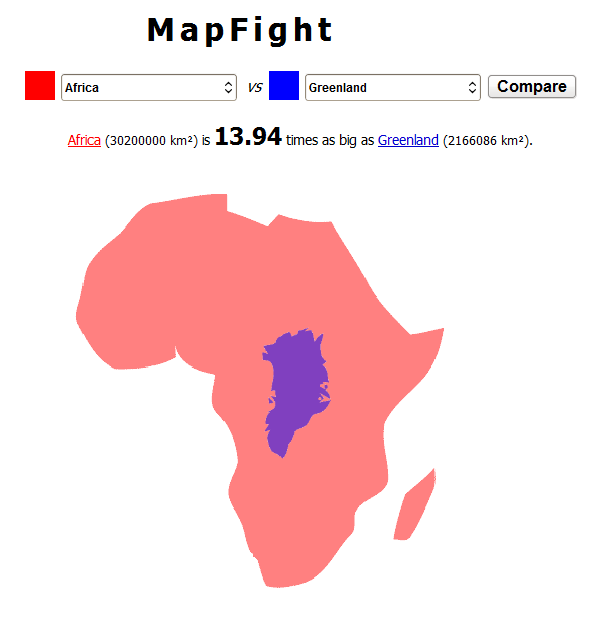
This is another map comparison tool that lets you compare both countries and continents against each other. Unlike most map comparisons tools, MapFight doesn’t use accurate maps or satellite images but a rough form of the country, but it does the job. It also tells you how big or small the compared regions are using figures.

mapfight

MAPfrappe

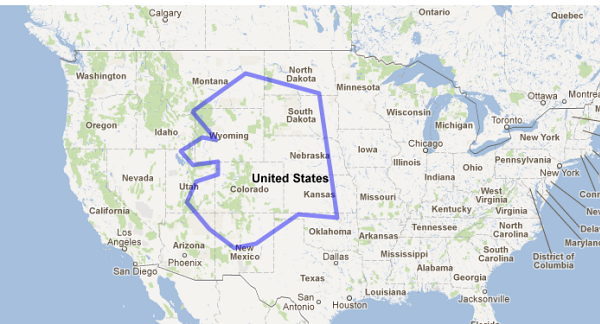
MAPfrappe is a similar tool but with the advantage that you can actually define your own area to compare.

MAPfrappe uses two Google Maps. Click on the top, “Reference” map to draw an outline around the region you wish to compare. As you draw your outline in the top map, it appears at the center of the bottom map. You can drag and zoom the bottom map to anywhere in the world to compare, and the outline stays in the center of the map.

mapfrappe

BBC Dimensions

BBC Dimensions (previously on Instant Fundas) is an excellent size comparison tool. Here you can’t define your own region but it has a huge collection of areas for comparison. Aside from countries and capitals, you can select from a wide range of important objects and historical events, environmental disasters, festivals, ancient world monuments, festivals and spectacles and even space objects like the moon. You can map the Apollo 11 moon walk or plot the Mars rovers tracks around your home and neighborhood.

bbc-dimension

BBC Dimension is based on Google Maps and hence it understands most place names, street names and zip codes that Google maps understands.

Sources: 1, 2, 3, 4

Stop YouTube Videos at a Specified Time

Be the first to comment!
Labels:

YouTube gives users the ability to easily start video playback at a specific time using the start parameter, a trick I’m sure you must be aware of. Today, Google added a new parameter that allows users to stop video playback at a specific time as well.

The end parameter is a positive integer whose value specifies the time, measured in seconds from the start of the video, when the player should stop playing the video. Note that the time is measured from the beginning of the video and not from either the value of the start player parameter or the startSeconds parameter.

The end parameter works both for videos playing on YouTube’s website as well as on an embedded player.

Example:

<iframe width="420" height="315" src="http://www.youtube.com/embed/Nc9xq-TVyHI?start=110&end=119" frameborder="0" allowfullscreen></iframe>

Storing Passwords in Plaintext: Websites’ Hall of Shame

Be the first to comment!
Labels:

signinRecently, at a security breach at LinkedIn, the hashed passwords of more than six million accounts were stolen and circulated on the web. Even though no harm came to pass as the passwords were hashed and not associated with corresponding email logins, it was a serious lapse in security. The breach at Microsoft India’s online store, early this year, produced a different story. When the site was hacked in February, the hackers stumbled upon passwords of users stored in plain text. Several sites have been caught in the past storing passwords in a form that could be recovered. The Sony PlayStation site hack of last year was among one of the most notorious, and the kind that leaves a bad taste in the mouth.

Storing passwords in plaintext is inexcusable. Sadly, this practice is very common particularly among small websites. According to the hacker who broke into RockYou.com some years ago and stole 32 million passwords, 30% of websites store plain text passwords. The usual line of thinking is that their website is too small and obscure for anybody to hack, or that their users are unimportant and low-value. But they totally ignore the fact that users often reuse passwords. Even if a website’s user accounts have no value in the context of the information they hold, the user’s login credentials are valuable. And the hackers know it, which is precisely why they target small, obscure websites because their developers think exactly that. Small sites follow poor security practices and consequently when they get hacked and the password database stolen, the attacker gets away not just with the users’ logins on the site but logins on Facebook, GMail, Paypal and their bank accounts.

password-plaintext

password-plaintext3

While you can't control how a website stores your password, you can control what services you sign up for. Stay away from websites that stores your password in plain text. A better practice will be to use a different username-password combination for every website you sign up on. Remembering so many passwords is hard, and this is where password manager like KeepPass and LastPass comes in.

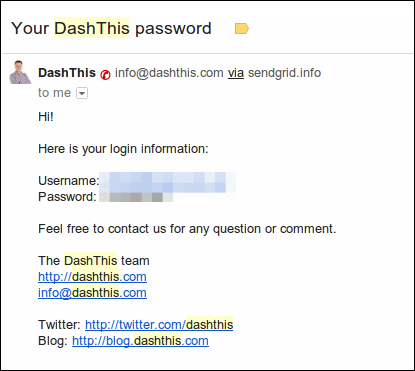
A good way to find out if a website stores your password in plaintext is to click the "forgot password" link. If the website sends you your password in an email, it means that they are storing the password itself and not the hash.

At PlainTextOffenders.com, you can browse hundreds upon hundreds of websites that exhibit a complete lack of regard for customer password security. Of course, the collection represents only a small fraction of websites that follow sloppy password security.

We’re tired of websites abusing our trust and storing our passwords in plain text, exposing us to danger. Here we put websites we believe to be practicing this to shame.

Regrettably, plaintextoffenders.com is not easy to browse. The website has a search function but it’s broken. The site itself is a simple Tumblr blog that hosts user submitted screenshots of password-reset email they received from the service with their passwords in plain sight. A better implementation of the same idea is at PasswordFail.com. They even have a Chrome extension that warn users when they visit a website that stores password in clear text. But their database is small.

If you happen to come across a service that emails you the password in clear text, take a screenshot, redact your personal information and submit it to the Plain Text Offender’s Hall of Shame. I encourage you to contribute to passwordfail.com as well. And don’t forget to notify the webmaster about their poor password security.

Photo credit: Big Stock Photo

[via Krebsonsecurity]

Custom Themes for Gmail: Add Your Own Images as Background

Be the first to comment!
Labels: ,

Here is a heads up for those who love using themes on Gmail, particularly those HD themes with a high quality image behind the Gmail interface. It’s now possible to use a custom image as a background, thus giving your inbox a personal touch. In the showcase video (embedded below), a number of personalized themes are shown in quick succession, and I have to admit it does look dandy.

Simply click on gear icon on the right and from the menu select Themes. Custom themes are available in two options, Light and Dark. You can upload your own images from the computer, select one from your Google+ photos or simply paste any image URL. If you don't have a particular image in mind, Google provides a rich, searchable gallery of photos to choose from. Try searching for ‘hdr scenery’ or ‘bokeh wallpaper' in the Featured tab.

Custom Themes will be rolled out to all users over the next couple of days.

[via Gmail blog]

Tunlr DNS: Watch Hulu, Pandora, Netflix and Others Without VPN

Be the first to comment!
Labels: ,

Tunlr DNS: Watch Hulu, Pandora, Netflix and Others Without VPN

Many services based on the entertainment industry, viz. the music and movies, are geographically restricted because of licensing issues. The video streaming service Hulu, movies on demand service NetFlix and Internet radio service Pandora, for example, are available only within the United States. Similarly, BBC iPlayer and Channel 4 are only for the U.K. audience. But the global Internet population couldn’t be easily kept away from such treasures. Many Internet users are getting around the geo-location block using proxy, and VPN services in particular.

A large number of VPN providers have sprung up in a short period of time to meet demands. Unfortunately, they are all paid services and for students and for those without a regular paycheck, even $5 a month is expensive. Besides, they're are already paying for Internet connectivity. Free VPN services are available but they are always subject to abuse because of which they either become slow, restrictive or shut down entirely.
hulu-south-park
Recently, a new free service called Tunlr has emerged that allows users to access services blocked outside the United States. But Tunlr does not provide VPN service. It is a DNS unblocking service that uses a combination of a DNS server and a collection of proxies in various countries to go around the geographical block. The user simply change their DNS servers to those provided by Tunlr. After doing this, they are able to bypass the block and access Hulu, Netflix, Pandora and any of the supported services.
Unlike VPN, where the content is routed through the VPN servers, with Tunlr users are able to stream directly from the blocked service with no intermediary servers in between. Besides, Tunlr is free.
Tunlr can unblock the following services:
  • US video streaming services: Netflix, Hulu, CBS, ABC, MTV, theWB, CW TV, Crackle, NBC, Fox, TV.com, PBS, Vevo, History, Lifetime TV,
  • US audio streaming services: Pandora, Last.fm, Turntable.fm, Mog.com, iHeartRadio,
  • Non-US services: BBC iPlayer (UK), Channel4 4oD (UK), iTV Player (UK), and Zattoo (Germany).

How Does Tunlr Work?

Tunlr uses two main components - a DNS server and a collection of proxies located in different countries. When your computer sends a DNS query for a blocked website, for example, hulu.com, instead Hulu’s real IP address, the Tunlr DNS server returns the IP addresses of a proxy server operated by Tunlr in the US.
When your connection is received by Tunlr’s proxy in the correct country, it is forwarded to the service provider e.g. Hulu. For Hulu, you appear to be in the correct country because it sees the IP address of the proxy server located in the US.
Once the IP address check is passed, and your connection established, Tunlr re-introduces your true IP address into the data stream so that the video content is streamed directly to your computer and not through Tunlr’s proxy server.
In order not to overwhelm their DNS servers with request, Tunlr strongly recommends that you switch to their DNS servers only when required to access the blocked services. You can do this easily using tools such as Public DNS Server Tool or DNS Changer. If you are using an alternative router firmware such as DD-WRT and Tomato, it is also possible to use Tunlr DNS for only the supported sites and use ISP’s for all other sites.
Unfortunately, many people are using their DNS servers in a permanent fashion, which forced Tunlr to introduce restrictive measures. Tunlr wrote in their blog.
Since too many users are using our DNS servers in a permanent fashion, we have to introduce some form of traffic shaping in order to make the permanent use of our DNS servers less attractive with the ultimate goal to keep Tunlr a free service. We’re going to implement artificial response delays and tighten the existing request rate-limiters on our DNS servers. This is going to slow down internet surfing a lot (!) for anyone who’s permanently using Tunlr’s DNS servers.
And from their FAQ:
We’re not aiming to provide a professional 24/7 service. Tunlr is up when it’s up, and is down when it’s down.
If you want to use Tunlr, please pay heed to their request otherwise you are going to kill an amazing free service.
[via Raymond]

Bing Adds Interactive Presentations to Search Results Called Qwiki

Be the first to comment!
Labels: ,

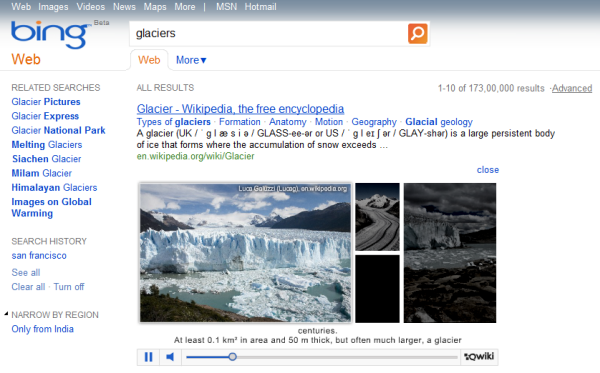
Today search engine Bing started adding interactive multimedia presentations called Qwiki to their search results page. Qwikis combine images, videos and maps complete with narration, that are embedded into Bing results and can be played directly inside the search page. Qwikis will initially appear for Wikipedia search results, but the plan is to expand the integration to other websites as well.

What are Qwikis? Qwikis are interactive presentations combining images, videos, maps and spoken narration. In other words, Qwikis are a gateway for further exploration that offer a unique, visual experience to help you quickly get information and do more. With features like snapshot, which we introduced with the recent Bing redesign, we made it easier to takeaction directly from the results page. With Qwikis and other visual elements in Bing, we’re helping people decide what they want to do by creatively exposing them to information that might otherwise take them awhile to find.

When the search result page has links to Wikipedia, you will find the Qwiki play button underneath. Not all Wikipedia results carry Qwiki though. You can expect to find Qwikis for popular search terms, places, events, famous personalities etc.

qwiki

Users can cycle through the presentation, pause the video, and click on the images. Clickable items within the presentation either launch a new search or takes the users to the source of the embedded content.

You can watch a video demonstration of Qwiki here but the best way to experience Qwiki is to try it out yourself.

UsenetStorm: Free Usenet Provider With in-Browser Downloading

Be the first to comment!
Labels:

Usenet is a vast, globally distributed system of discussion and file sharing groups known as “newsgroups”. Users read and post messages called articles or news to one or more newsgroups which are then broadcast to other newsgroups interconnected via a wide variety of networks. Individual users with access to a Usenet server may then read messages from and post messages to, download files etc., using a Usenet client software called Newsreader. 

Today, the importance of Usenet is diminishing, losing out to mainstream Internet services such as email, discussion board, web access and mainly Torrents, but there is no denying the fact there are certain decisive advantages of Usenet over Torrents. Top of the list for many will be security and speed.

Usenet is anonymous. Unlike Bittorrent where you broadcast to the world every bit of data you download, Usenet downloads are completely secure and private. Nobody can snoop on what you download from or upload to a newsgroup. BitTorrent's speed depends largely on how many seeders there are distributing the files. In Usenet, the complete file is present in the Usenet server just waiting to be downloaded. On Usenet, your download speed is limited by the speed of your home connection.

However, unlike BitTorrent, Usenet is not free, which is a deal-breaker for those without a credit card.

In the past, ISPs used to operate Usenet servers for their users, but because of the large amount of data involved, and small customer base, many ISPs have discontinued Usenet access. Free Usenet providers doesn’t exist anymore, and even if they do, they probably server a small community of enthusiast well hidden from the rest of Internet.

Today, TorrentFreak introduced a new Usenet provider called UsenetStorm that’s offering free entry-level service. Furthermore, UsenetStorm reduces the complexity of Usenet downloading by providing access to binary content through a standard web-browser.

usenetstorm

UsenetStorm offers Usenet binary files download over HTTP, through a process similar to the one employed by services that offer Torrents-over-HTTP download. Using a free Usenet search engine such as NZBIndex.nl or Binsearch.info, users download the NZB file and then uploads the same to UsenetStorm. They can also supply the URL to the NZB file instead of downloading to their computer and uploading. The NZB is small –  a couple of Megabytes at most.

Once you upload the NZB file, UsenetStorm will grab the files you want from Usenet, wrap it up in a single ZIP file and store it on its own servers. When the file is ready to download, you will be taken to the download page from where you can download the ZIP file to your hard drive.

Free users are limited to 500MB per NZB file and download speeds are capped at 5mbit, which means you cannot download any file larger than 500MB. But you can download any number of files smaller than 500MB and any number of times. Usage is unlimited to everyone without registration.

UsenetStorm is a great service for anyone who wants to get a taste of Usenet but shying away because of the cost and lack of understanding and rumors of steep learning curve.

Read: Automatically Download Movie Torrents/NZB Of Preferred Quality With CouchPotato

Breeziee: Add a Paywall to Any Link. Sell Digital Goods Easily

Be the first to comment!
Labels:

A new startup called Breeziee makes it possible for anybody to quickly setup a paywall to any link and use it for selling digital goods such as downloadable files, images or even articles on webpages. Simply fill out the form on the homepage, and your file will be posted for sale immediately. You can then share your sales page and manage all your sales through the control panel. The best part is, Breeziee charges no fees and takes no cuts from payment. The payments go right to your PayPal account.

The process is very simple and takes less a minute. You enter your PayPal email address, the link to the product which you wish to sale and the price. Optionally, you can add a description and upload an image.

breezies

Once you click the “Sell” button, your file will be put up for sale and will also automatically be added to their file directory. You get a shortened link that takes you to your sale page. When a customer clicks on the “Buy” button they are automatically taken to PayPal to complete the payment. Payments go directly to your PayPal account.

From the seller’s dashboard, one can change, track, and view stats such as the number of views made and sales completed, and the total earnings.

One should keep in mind that the paywall is encountered only when visiting your sales page. The actual link to your product is still unprotected and can be accessed by anyone who knows the URL.

Related: Refer.ly Offers Regular People to Earn Easy Affiliate Commission

Get Now Playing Notifications for YouTube Videos on Desktop [Firefox and Chrome]

Be the first to comment!
Labels: , , ,

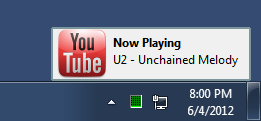
Some media players show pop-up notification on the desktop whenever the track changes even if the media player is minimized or not in focus. I’m not particularly fond of those, but if you are, you will love the Now Playing notification for videos playing in YouTube. If you are wondering why one should need notification when they can see for themself which video is playing, you are forgetting that YouTube is the most popular destination for listening to music.

Most users will load a video album playlist, click the play button and minimize the browser or otherwise carry on surfing. With YouTube notification, these users get the same functionality they get from their desktop media player. And here is the interesting part: these notifications are displayed on the desktop, out of the browser.

youtube-notification-chrome youtube-notification-firefox

Now Playing YouTube Notification in Chrome (left) and Firefox (right).

Whenever a new video loads from the playlist, a small window pops open near the notification tray displaying the title of the song. The notifications stays just long enough for you to notice and disappears on it’s own.

Want these notifications? Get them for Firefox and Chrome.

Related: How to Download All YouTube Videos in a Playlist

How to Unblock the Pirate Bay

Be the first to comment!
Labels: , ,

pirate-bayThe Pirate Bay is perhaps the most censored website on the Internet. Recently, a UK high court ordered several ISPs to block the website. Unfortunately, for the recording industry, the news about the forthcoming block was reported on the BBC resulting in a huge traffic spike of 12 million curious visitors in a single day. Similar incidents have occurred around other European countries and elsewhere as well. At present, the Pirate Bay remains blocked – partially - in Belgium, Denmark, Finland, India, Ireland, Malaysia, Netherland, China, and the UK.
Governments will continue to block access to the website despite the relative ease by which such censorship can be circumvented in most countries. Here are some methods that will let you unblock the Pirate Bay.

Proxies

Proxies are no-brainer. People have been using them for decades to bypass blocks in offices and schools. Network administrators know them and so do ISPs but there are so many thousands of them that blocking proxies is a futile exercise. The Pirate Bay alone has hundreds of dedicated proxies. The website PirateReverse.info lists about 150 of them. Just pick one and use it to browse the Pirate Bay unmolested.

Google Cache

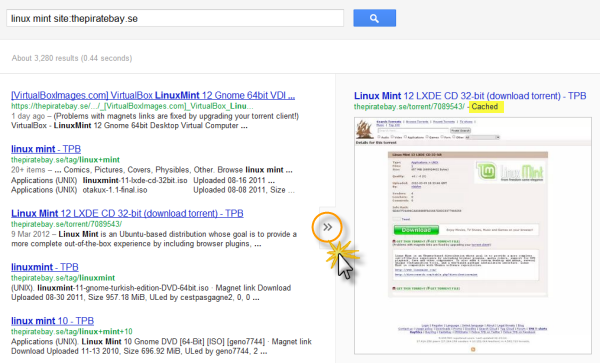
Google and other search engines keep a copy of the indexed pages which aren’t and cannot be blocked because they load from Google’s servers rather than from the blocked website. When a website gets blocked, you can always use the cache to retrieve a copy of the site. Let’s assume you want to download Linux Mint by torrents. Go to google.com and Type “linux mint site:thepiratebay.se” to get a list of results for Linux Mint torrents on the Pirate Bay website.

google-cache

Instead of clicking on the links, click the Instant Preview arrow and from the preview click on the cached link. This will load the cached copy of the Pirate Bay page. Thanks to magnet links, you can now directly click on “Get this torrent” link to obtain the torrent file of the download.

TorrentFreak shares another shrewd way to download torrents. As explained in a previous article, magnet links simply contain the hash value of the torrent file and that hash is published on the download page. Just copy the “Info Hash” from the cached page and add “magnet:?xt=urn:btih:” before it to obtain the magnet link. Alternatively, paste the info hash on this magnet link generator to obtain the magnet file.

torrent-info-hash

VPN

There are a several free and commercial VPN service providers with servers located all over the world, commonly in the U.S. Since the Pirate Bay is not yet blocked in the U.S, all you have to do is use a US-based VPN service provider. You don’t have to actually download the torrent over VPN, just use it to access the blocked page. Once you obtain the magnet link or the torrent file, disconnect the VPN connection and download the file. If you intend to download torrents over VPN, make sure your provider allows it.

TOR

TOR is another way to unblock the Pirate Bay, but downloading torrents over TOR is not supported and shouldn’t be attempted. Use TOR to access the blocked page initially and then disconnect from the network to download directly from the peers.

Alternative DNS server

Often ISPs would block only the domain name and not the actual IP address of the website. If that is your case, you can easily circumvent the block by not using your ISP’s DNS resolver. There are many public DNS servers available such as OpenDNS, Google DNS, and others. Read: How to quickly switch between different public DNS servers

Related: Wikileaks blocked? Access it through these mirror sites


Recent comments

Recent comments

Followers

Sponsors

Recent comments

fefew

Recommend on Google

Copyright © 2011 All Rights Reserved Thesis skin. by Nitin. Converted into Blogger Template by TheTechFizz.