Get the latest updates from us for free

Sign-up for FREE weekly Newsletter.

Ybuy.com Lets You Try Gadgets for 30 Days Before you Buy

Be the first to comment!
Labels: ,

Want to try a new gadget that you can’t afford? Well, if you can spare $25 the new iPad or Xbox 360 can be yours for a full month. If that sounds good, head over to Ybuy.com and signup for a membership. Ybuy which launched early this year brings subscription services back in style.

YBuy.com allows members to try out a product, such as an iPad, a Jawbone headset, a Keurig coffee maker, a Wi-Fi scale or an iRobot Roomba vacuum, for 30 days before deciding whether they want to keep it. Members must pay $25 for the service. If they decide to keep the product, the fee applies toward the item’s purchase price, so they pay for the item minus the $25 already paid. If members decide not to purchase, they can simply return the product. YBuy pays for shipping both ways, and if they choose to skip a month, they don’t have to pay.

ybuy

The concept is based on the theory that product returns are already costing the consumer electronics industry a lot of money. In 2011, YBuy estimates that 68 percent of products were returned because they did not meet customer’s expectations, costing the industry $16.7 billion.

Thus, if users get the chance to use the product before they buy it, the number of returns will drop. YBuy says it offers new products, but will also refurbish unwanted products before sending them to another customer. Unlike other online retailers such as Amazon where customers have a huge selection to choose from, YBuy will offer only a handful of products picked by its staff.

The company says it will also discount items under regular retail prices to make buying through YBUY more attractive. Not all the gadgets are cheaper though.

At the moment membership to YBuy is invitation-only and is available only for residents of the US.

Take Screenshots of Webpages Bigger Than Your Screen with wpic

Be the first to comment!
Labels:

Capturing screenshots is easy – there is already a dedicated key on your keyboard for this purpose. Then, there are plenty of screen capture programs that automatically saves captured images, or loads them on an image editor for editing. But screen capturing programs only grabs the visible region of the screen. If the page is too large to be displayed in full on your monitor than the task becomes a bit more challenging.

Previously, Firefox users could take screenshots of the entire page using the addon Screengrab. But this is no longer compatible with newer versions of Firefox. There is another standalone tool called Webshots that uses Internet Explorer to render the pages. Anybody who is aware of IE’s history knows that it isn’t the most desirable and reliable rendering engine in the world.

wpic is a command based screen capturing program that is based on the Chromium project. The program's command-line nature means it can easily be automated using scripts. And it's based on the Chromium project, so you can be sure it'll render your target page accurately.

To use the program, open command prompt and provide the URL of the page and the name of the output file, like this:

wpic.exe -u “http://www.instantfundas.com” -o image.png

Mind the quotes, mind the “http://” before the URL. Miss any of these and the program will throw an error.

wpic

The image captured is saved inside wpic’s directory. There is no GUI and no configuration options, so it isn't exactly very friendly to use. If you need to capture full pages frequently the typing will get on your nerves and you’ll have to look elsewhere. But otherwise, wpic works perfectly.

Refer.ly Offers Regular People to Earn Easy Affiliate Commission

Be the first to comment!
Labels: ,

Affiliate programs are very tempting because they offer affiliates an opportunity to earn easy cash just by recommending products to buyers. For the serious marketers, affiliate marketing is big money. But this $3 billion business is hard to get into and regular people don’t have any part in it, aside from being the bottom rung of the ladder - the customer.

One of the requirements to get into any affiliate program is to have a functioning website. Some merchants will want to know how much traffic your website receives or by what means you plan to market their products so that they can determine whether or not you can be a valuable affiliate. If your website doesn’t meet their requirements or if you say you want to recommend products on Twitter, your application is likely to get rejected.

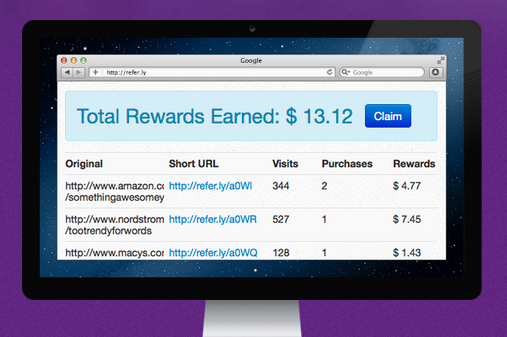
Refer.ly is a fresh startup that allows regular folks to get into the game. What Refer.ly does is act as a middleman between the merchants and you. When you signup on Refer.ly and sale a product using a Refer.ly link, you actually help Refer.ly earn commission from the merchant. Acting as an single affiliate of the merchants, Refer.ly aggregates commissions earned by all Refer.ly users and then distributes it to its users, taking a cut from the revenue. But for now, Refer.ly is giving up the entire affiliate fee to Refer.ly’s users. The company’s not taking a cut.

referly2

Normally, when you want to recommend a product sold online you will have to log into your affiliate account, find the product and the special link. You may have dozens of affiliate accounts for dozens of merchants and you have to keep track of each of them separately. With Refer.ly, you have to login to just one account. You don’t need to apply to hundreds of merchants nor meet their affiliate requirements. You may not even have any marketing skills, yet thanks to Refer.ly, you can do affiliate work for thousands of merchants.

Once you have earned a minimum of $10 you can claim your rewards by providing them with the bank information where you would like this money deposited.

The idea sounds brilliant, but it may be a violation of terms and agreements of merchants and affiliate programs. The possibility is discussed on this Hacker News thread.

Transfer Files Between Two Dropbox Accounts and FTP Server Using Backup Box

Be the first to comment!
Labels:

Backup Box is an online tool that allows users to connect two Dropbox accounts together and transfer files from one to the other, or connect an FTP server to a Dropbox account and transfer files between the two. Such an arrangement allows users to automatically and periodically backup their website to Dropbox or facilitates easy migration between Dropbox accounts.


Backup Box isn’t complicated to setup either. The service just requires you to give them permission to access your Dropbox and FTP accounts and files can be transferred from one place to another without downloading them to your computer. Backup Box will move your files from the source to the destination using Amazon S3 as an intermediary place to store files. The files are encrypted before putting them on Amazon, and once the transfer is completed, the files on Amazon’s server are deleted.

backupbox

Aside from files and folders on an FTP drive, you can also transfer MySQL databases. Lots of additional sources are planned for the future such as Google Drive, PostgreSQL, MongoDB, Box, SugarSync, Email Flickr, Google Docs and GitHub. You can choose between which directories on either side the transfer should take place. Scheduling is allowed.

The free accounts are bit restrictive though. You get only 1GB of transfer per month and not more than 10 transfers per month. Paid plans start from $10 a month.

Affixa Integrates Webmail into Windows, Makes it Default Email Program

Be the first to comment!
Labels: ,

Desktop based email programs doesn’t work someone who uses multiple computers. Webmail is great for this purpose but they don’t play along nice with Windows. For example, if you click a mailto link in your browser, it will start your default email program which is Microsoft Outlook or whatever you have installed. Similarly, if you use the built-in email capabilities of software such as Microsoft Word, or Adobe Acrobat, or Windows Explorer you are most likely to end up opening the compose window of your email program.

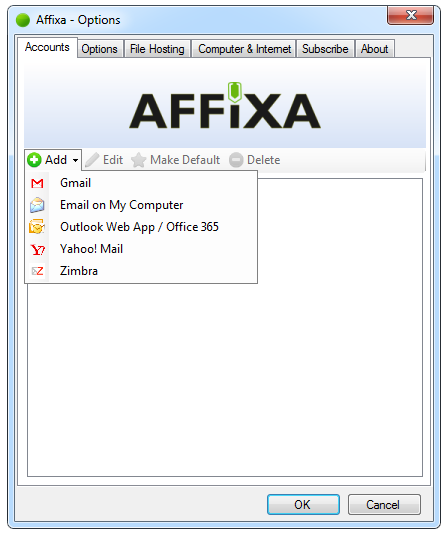
Affixa is a program that solves this problem by integrating webmail with your desktop. The application does this by becoming the default email program; when you mail a file or files from Windows Explorer or from any program, Windows sends the command to Affixa which then resends the command to the webmail account of your choice. A new message with the file attached is created in your Drafts folder. Then you open your email Draft folder in a browser and send the email to the intended recipients.

affixa

The Basic download of Affixa allows you to have only one webmail account. Paid users can add multiple webmail accounts. Whenever users try to email a file, Affixa will ask them which email account they want to use. Currently supported web mail services include, Gmail, Gmail Apps Mail, Office 365 and Yahoo.

If the email service has file attachment size limits, Affixa can automatically upload the attachment to a file hosting service offering 100MB of storage. Affixa offers the option to automatically zip all attachments and shrink images to one of the several predefined sizes, but only to paid users.

Affixa also allows you to drop multiple files into a "baskets," that you can then upload either to your e-mail account or to the Drop.io file-sharing service.

Affixa Basic is free for personal use. For £2 a year, you can have the full version, which handles multiple accounts and can zip and mail your files. Subscribers also get to assign different web browsers to different accounts, add signature, automatic recipient inclusion and access to up to 1GB drop space for a year.

How to Access Box.net Files From Windows Explorer?

Be the first to comment!
Labels: ,

Box, formerly Box.net, is one of the first cloud storage services of the Internet, launched in early 2005. Box targets enterprise companies with services based around sharing, collaborating, and working with files that are uploaded to Box. Box has a number of features ideal for businesses such as unlimited storage, custom branding, encryption, administrative controls and integrations with applications like Google apps, Gmail, and NetSuite. The service also has a variety of social features such as discussions, groups and an update feed.

Businesses aren’t Box’s only customers - Box also offers free Personal accounts for individuals with 5GB free space. A while ago, Box gave away 50GB of free storage to Android and iPhone users. Unfortunately, Personal accounts do not come with desktop client and file sync, because of which it cannot be used as an automatic online backup service. I have a 50GB Box account that is pretty much going waste.

Then I learned that Box offers WebDAV support on free Personal accounts. Now that is something I could take advantage of.

But what is WebDAV? Web Distributed Authoring and Versioning (WebDAV) is an extension of the HTTP Protocol which allows users to create, move, or change files directly on a server. WebDAV is like the FTP protocol but better. For example, if you want to edit a file on an FTP server, you need to download the file, edit, and upload the revised file. WebDAV allows you to edit the file on the server, without downloading. WebDAV also allows multiple users to work on files without having to configure accounts for each user.

How to integrate Box in Windows Explorer

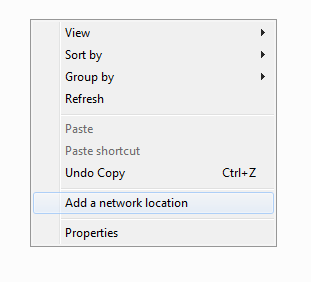
  1. Open My Computer, right click on an empty space and click Add a network location.

    add-network-loc

  2. Click Next on the welcome screen and then Choose a custom network location.
  3. Type in https://www.box.com/dav in the box and click Next.

    add-network-loc2

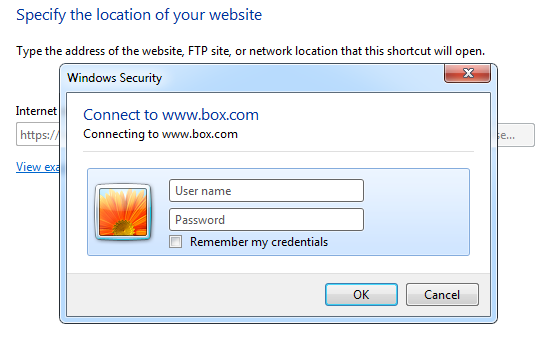
  4. Enter your login credentials.

    add-network-loc3

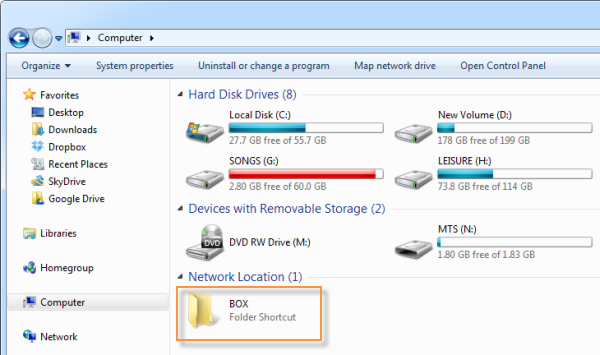
  5. Name your Box location and be done.

box-in-explorer

You can now access your Box storage directly from Explorer. To upload files, simply copy and paste to the folder. Similarly, to download files drag files from your Box folder to a local folder.

With Box easily accessible from Explorer, you can start utilizing the unused space for online backups without the Box client software.

Related:

Preview PDF Files in Windows Explorer Without Opening

Be the first to comment!
Labels:

Windows Explorer can display preview of certain types of files, such as images, videos, and text, on thumbnails and the preview pane. PDF Preview is a free software that adds this functionality for PDF files.

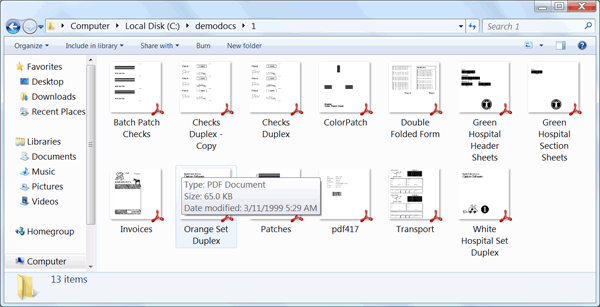
PDF Preview allows Windows 7 users to take advantage of the PDF preview functionality to view PDF documents without needing to open them. This free PDF preview software installs PDF Preview add-in for Windows Explorer, Microsoft Office, and Microsoft Outlook, and automatically configures itself to preview a PDF file in the Preview pane of Windows Explorer or in the Reading pane in Outlook 2007, 2010, and 2012. The first PDF page is shrunk as a thumbnail, and you can zoom in if you double-click on the thumbnail.

pdf-iconpreview

pdfpreview

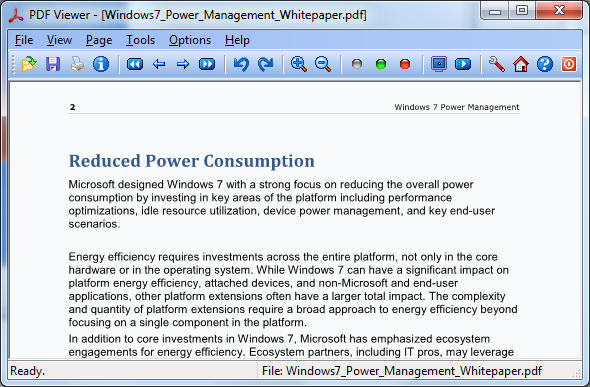
Bundled along with PDF Preview is also a light-weight yet powerful PDF viewer/reader. The viewer is only 927KB in size and opens even large PDF files in a jiffy.

The PDF Viewer supports multiple page layout, zoom-in and zoom-out, page rotation, free panning and a slideshow mode. the viewer can also extract text and images from PDF files

This freeware program is specifically designed for Windows 7, and works on both Windows 7 32-bit and Windows 64-bit systems.

pdf-viewer

4 Excellent Free Audio Converters, Rippers, Joiner and Cutter Utilities

Be the first to comment!
Labels: ,

Need to convert audio files in order to play them in your mobile device? Want to rip an audio CD to your computer? Need to make ringtones from music files? Look no further than these four great utilities.

MP3 Toolkit

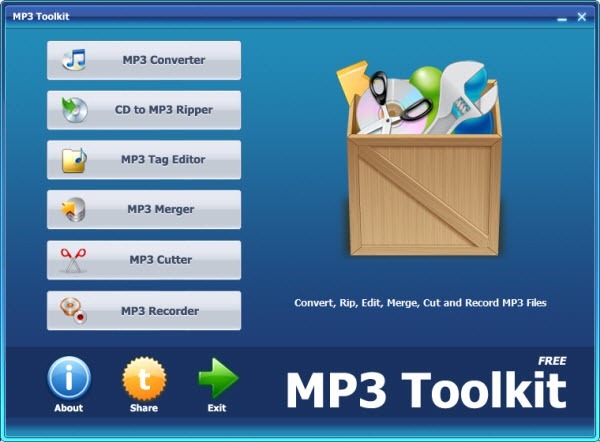
MP3 Toolkit is a newly launched powerful suite of free music editing tools that allow users to convert between audio formats, rip CD disks, edit tags, cut and merge MP3 files and record MP3 from the mike.
mp3toolkit

The free MP3 Toolkit applications include:

  • MP3 Converter lets the user convert one or more audio files to a format of choice which can be MP3, WMA, OGG, WAV, FLAC, AC3, AAC or AMR. In addition to the audio format, one can customize other settings such as bitrate, rate, audio channel and destination folder. However, the biggest annoyance of this tool is you cannot select multiple files at once to add to the converter. You either add folders or individual files one at a time.
  • CD to MP3 Ripper is designed for anyone who wants to make backup copies of tracks from an audio disk. For this the application offers four audio formats and different options to customize the output such as bitrate, maximal VBR bitrate, encoding quality and destination folder.
  • MP3 Tag Editor provides a handy interface to edit tags of an MP3 file. One can add or edit a song title, artist, album, year, comment and track number. Also it's possible to define a file name format ([Artist] - [Title], [Title] - [Artist] and more), directory format ([Current Folder]\[Artist]\[Album]\) and enable additional file rename options (Append Bitrate to Filename, Append Mode to Filename).
  • MP3 Merger is a simple tool for merging two audio files into one. All the user needs to do is select files in MP3, WAVE, FLAC or OGG, specify the output settings such as bitrate, rate, audio channel and output folder and start the process by clicking the Merge MP3 File Now button.
  • MP3 Cutter lets the user cut an audio file to remove unnecessary parts. One may want to do this in many situations, for example, in order to make a custom ringtone for the smart phone. The application allows customizing the output settings such as bitrate, rate and channels.
  • MP3 Recorder is designed to help users to record any sound from the microphone to standard MP3 format without any limitation on length. Again the user can select sample rate, bitrate and channels.

Helium Audio Converter

helium-audio-converter

Helium Audio Converter is an easy to use audio converter that can work with all popular audio formats including FLAC, AAC, MP3, M4A, MP4, MPC, OGG, WAV and WMA. Simply drag and drop files to the interface or use the traditional browse and select method to add files for conversion. The main screen will show you details about the files added such as bitrate, file format, artist, album name and track from meta-tags.

Conversion settings are on the lower part of the main screen. You can choose either a constant bitrate or a variable bitrate, and optionally normalize the audio volume.

Sometimes ill-informed users may try to convert lesser quality audio into a higher quality format, such as increasing bitrate from 128kbps to 256kbps, hoping that it would improve their music. Helium Audio Converter can prevent such useless activities by warning the user when the output quality chosen is better than the source. It would have been nice if the program offered similar warnings when users are about to degrade the quality of their music files.

For FLAC and MP3 formats, Helium Audio Converter can also analyze the files and report on errors. However, the program doesn’t tell what errors it found, which doesn’t help much.
Freemake Audio Converter

freemake-audio-converter

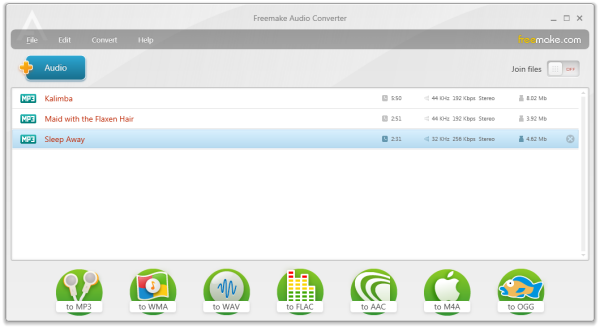
Freemake Audio Converter accepts over 40 audio file formats and converts to MP3, WMA, WAV, FLAC, AAC, M4A, and OGG, and can prepare files for playback on various portable media players. It can convert audio files into M4A and M4R files for iPad, iPhone, and iPod and automatically adds converted files to the iTunes library. Several ready-made presets for each supported output file format are present and the ability to create a custom preset with the adjustment of bitrate, audio channels, and sample rate is also possible. The program can combine multiple audio files into a single file.

Freemake Audio Converter is also capable of extracting the audio soundtrack from different video formats, such as DVD, MP4, AVI, MPEG, H.264, MKV, DIVX, MOV, WMV, VOB, 3GP, RM, QT, and FLV.
Hanso Converter

hanso-converter

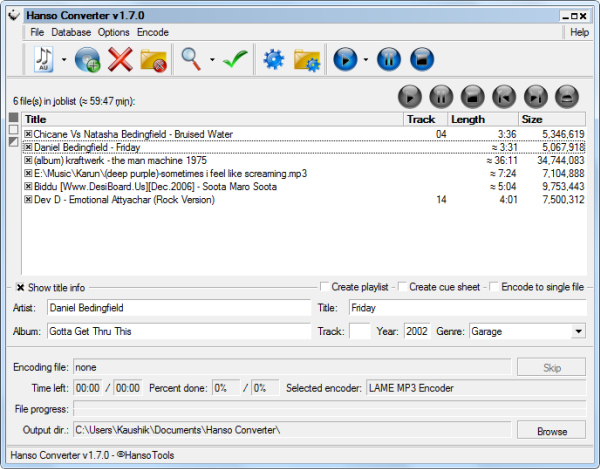
Hanso Converter offers support for multiple popular formats including MP3, MP4/M4A, Ogg Vorbis, AAC, Bonk and FLAC. Aside from audio conversion, Hanso Converter also rips CDs.

The key difference between Hanso Converter and other audio converting software mentioned above is that the former offers greater control on audio conversion settings. Once you select the encoder (LAME or FLAC or WMA) you can adjust the encoder settings such as set maximum and minimum VBR bitrate, set control bits, enable CRC, set low-pass and high-pass filters, etc, depending on the capabilities of the encoder.

IDv1 and IDv2 tags editing is allowed. You can also plug into a free online CD database to access track information such as artist, album, year etc.

Related: 5 Multi Threaded Free Video Converters for Faster Conversion

Receive SMS Notification When Playing Full Screen Games[Android]

Be the first to comment!
Labels:

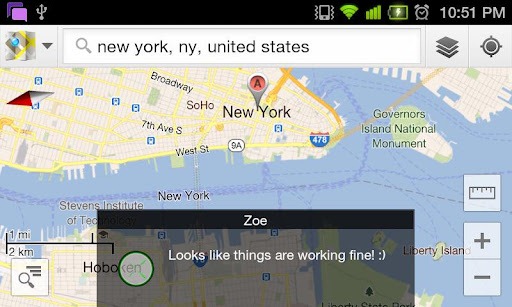
Don’t you hate when you hear the SMS notification tone right in the middle of an engrossing gaming session? Quitting the game to check the message is disruptive, yet you can’t ignore the allure of a new message. Who is it from? What does it say? SMS Flash will answer all your queries while saving you from the trouble of returning back to the home screen.

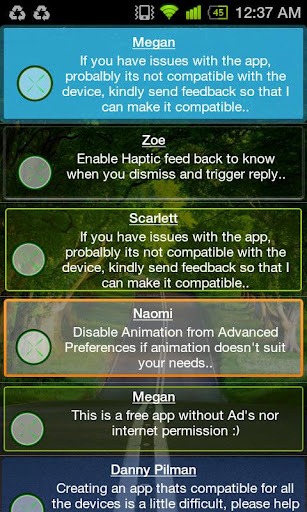
This free app for Android displays incoming SMS as soon as they are received in a transparent pop-up bubble. The message display is non interactive, meaning that you can touch through the displayed message and continue interacting with the screen underneath. The message display automatically goes away after a few seconds. It can also be closed by momentarily touching or blocking the proximity sensor on your device. Just a simple tap on the sensor and the message disappears. If you need to extend the display time if you haven’t finished reading the message, just touch the proximity sensor and hold.

sms-flash

And it doesn’t stop there. You can even reply to the SMS from within whatever full screen app you are using. Double tap the proximity sensor to bring up the reply box.

SMS Flash provides plenty of options to configure the behavior and appearance of the notifications. The message box’s transparency, background color, font color, font transparency, display duration, position, etc can be adjusted. Several built in themes with different color combinations are also available. A blacklist and a whitelist ensures you aren’t interrupted by the wrong contacts.

SMS Flash is very handy not only during games but during any full screen activity such as watching movie, recording video, taking pictures, browsing etc.

sms-flash-themes

Tiggit: Download and Install Over 300 Free Indie Games

Be the first to comment!
Labels: , ,

The Indie game scene has seen a surge in the last few years primarily due to availability of new online distribution methods and social media for publicity. There are probably thousands of indie games developed by now, some of which have gone on to become an Internet phenomenon such as Minecraft. It’s hard to keep track of how many such games are released in a year because of the very nature of Indie games. One way to keep yourself abreast, if you are a fan of these small games, is to follow blogs dedicated to Indie gaming. Another way is to install Tiggit.

Tiggit is a an open source game installer and launcher, like Steam. The biggest difference, aside from the fact that they're not operated by Valve, is that Tiggit was built to serve only indie games. According to the website, Tiggit's mission is to help users find all the awesome indie games that exist 'hidden' around the internet. As of now Tiggit only provides freeware games and demos. So there will no sales or anything.

tiggit

Currently, Tiggit features over 300 freeware titles and 30 odd playable demos. The games are categorized according to the genre; single-player and multi-player games are also grouped separately. You can sort the games by rating (although it is not clear from where the ratings are sourced) and there is a search box for easy finding.

Each game is accompanied by a short description and a screenshot. A one click install button ensures that you don’t have to manually visit the game’s website to download it. Tiggit does not require users to register an account. You simply install the program the launcher and enjoy.

Also see Games Downloader, a similar freeware games downloader.

GIMP 2.8 With Single Window Released

Be the first to comment!
Labels:

After more than three years of development, GIMP 2.8 is finally available for download. The new version brings the long-awaited single-window mode, as well as several improvements like layer grouping, on-canvas text editing, multi-column dock windows, a new set of brushes and many other features.

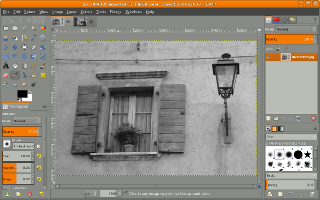
The single window mode in GIMP 2.8 is optional; the default mode is still multi-window. Users can toggle between the default multi-window mode and the new single-window mode. In the single window mode GIMP docks the various floating dialogs and images in a single, tabbed image window. The single-window mode setting is preserved if you quit and start GIMP again. Although like any new program GIMP takes some time getting used to, the new unified window will make learning curve a little less steep.

gimp2.8-single-window-mode

GIMP 2.8 has also added multi-column dock windows, that allows multi-monitor users to have to have a big dock window with all the dialogs and the tools on one monitor, while all images are on other displays. The docking bars have been removed and replaced with overlaid highlights. An automatic tab style automatically which makes dockable tabs use the available space.

Another big change is layer organization. With GIMP 2.8 you can organize layers into groups in a tree-like structures. Similarly, it is now possible to tag GIMP resources such as brushes and patterns to group them. The tagging is performed from the respective dockables e.g. the Brushes dockable, and it is possible to filter resources based on these tags.

When you are adding text into your images it is now possible to edit text directly on the canvas without the need to turn to a separate window. The brush dynamics engine has been expanded considerably, making almost all aspects of the brush engine drivable by a multitude of inputs, all of them configurable with their own response curve. Saving and exporting images are now separated activities. Saving an image can only be done in the XCF format which is GIMP's native file format, able to save all kinds of information necessary for works in progress. To save an image as JPEG or other universal image format, you have to use the Export feature.

There are numerous other changes, the full list of which can be found on GIMP’s website.

If you have tried GIMP before and didn’t like it, it’s time to give the program another try.


Recent comments

Recent comments

Followers

Sponsors

Recent comments

fefew

Recommend on Google

Copyright © 2011 All Rights Reserved Thesis skin. by Nitin. Converted into Blogger Template by TheTechFizz.