Get the latest updates from us for free

Sign-up for FREE weekly Newsletter.
Showing posts with label Featured. Show all posts

7 Software Update Monitors That Keep Your Programs Updated Compared

Be the first to comment!
Labels: , ,

Keeping all your installed programs up-to-date is quite a challenge. While most programs are capable of automatically updating it does so when you start the program, and you will agree that the best time to update a program isn't when you're trying to use it. You want to have your programs updated silently, in the background, when you are not using them. Since programs by their own are incapable of doing this, we have to resort to third party tools.

Here is what we’ve got. A comparison table is given at the end of this article.

Patch My PC

patch-my-pc

Patch My PC is a small compact program which when run will scan your computer for installed application and display a list of those found. The list will highlight outdated programs in red, up-to-date programs in green and missing programs in black. Patch My PC can also detect missing Windows updates and download and install them as well.

Additional options include the ability ignore select programs, have the program delete desktop shortcuts after installing software, a startup manager and an uninstaller.

The program can patches some 56 common third party products such as Adobe Reader, Flash, Java, QuickTime, Firefox, Chrome and the usual stuff. Patch My PC couldn’t detect the majority of my programs and even the ones that it clearly supports. For instance, it failed to check Picasa and FeedDemon, Media Player Classic, Audacity, uTorrent and many others.

Pros: Cons:
  • Automatically updates applications and removes earlier versions.
  • Check for Windows updates
  • Poor support for applications other than the most common ones.
  • No sorting, filtering option in the UI.
  • Low accuracy

FileHippo.com Update Checker

filehippo

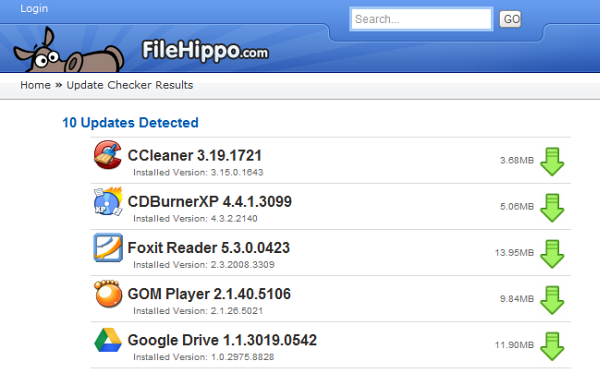
FileHippo Update Checker scans the computer, detects out-dated software and then prepares a webpage where you will find links to download the updated versions. However, downloading and installing the program is your job.

The program doesn't check for updates for every installed program, but it works fine when it comes common applications like browsers, media players, chat clients and the like. If you install your programs at locations other than the default, there is an option to have the program scan these custom locations.

Pros: Cons:
  • Can scan custom program directory
  • Poor support for applications other than the most common ones.
  • Doesn’t auto update applications.
  • Low accuracy

Secunia Personal Software Inspector

secunia-psi

Secunia PSI can recognize around 30,000 software products gathering update information from a variety of online sources including a user community and in-house research.

Once the scan is completed, Secunia PSI will present you with a list of issues that were detected, along with download links to updated version, additional online information and other details. Scan results lists programs that have reached the end of support and programs that require updating because the current version is insecure. The interface is a bit overwhelming and text heavy and maybe is strewn with information that users don’t need like your security score and how they compare to people using Secunia PSI near your city.

Pros: Cons:
  • Auto update programs.
  • Recognize more than 30,000 applications.
  • Can scan custom drives other than the system partition
  • Resource heavy. Uses around 100MB or more of memory
  • Scanning is slow
  • Low accuracy

SUMo

sumo

SUMo stands for Software Update Monitor. Like the rest of the lot, SUMo scans your computer and displays a list of all found programs. Upon clicking the “Check” button it will gather information about the latest software version from a “master server” and show you which software on your computer requires updating. You can sort the list by programs that are up-to-date, programs for which minor updates are available and programs for which there is a major update.

Double clicking an entry will take you to a page on the developer’s website where you will find links to download the latest version of the software from various sources like Softpedia, Download.com, and FileHippo.

Pros: Cons:
  • Recognizes many software programs
  • Can scan even portable programs and custom folders
  • Doesn’t automatically update programs
  • The shareware version is riddled with multiple toolbars and spywares. Make sure you download SUMo Lite.

R-Updater

r-updater_1

R-Updater is another powerful software update program that automatically checks for the latest versions of all the installed applications on your computer. The program will show the version of the software it found on your computer, the version that is available on R-Updater’s catalogue and a “new user’s version”. There is no explanation what the “new user’s version” is, but generally this is the correct latest version of the software from the developer. Optionally, R-Updater will also show beta versions whenever available.

To update your programs, check the boxes against the software title and click on the Update button. This will open a webpage with download links to all the selected software. Downloading and installing them is again your job.

R-Updater comes with a scheduler using which you can periodically check your installed programs for update without user intervention. R-Updater can check for new versions at each system startup, daily, weekly or monthly. You can also check for new versions manually. Custom notifications for automatic scans.

Pros: Cons:
  • Recognizes many software programs
  • Scan executable file of programs manually
  • Scheduler available
  • Cannot add custom directory for scanning
  • Doesn’t automatically update programs

Brothersoft Updater

brothersoft

Software download website Brothersoft recently released their own Updater program. Update scans of this tool is based on the huge software catalog they have. After the scan is over it will list all programs found including those that needs updating. Clicking on the Update button next to each entry will take you to Brothersoft’s listing page for the software. The scan results are fairly accurate but it did miss a couple of popular programs.

Pros: Cons:
  • Recognizes many software programs
  • Cannot add custom directory for scanning
  • Doesn’t automatically update programs
  • Doesn’t detect all programs
  • Low accuracy

Software Informer Client

software-informer

The Software Informer update client can recognize more than 2.4 million programs, and pretty accurately too. After the scan is over it will list all programs found and highlight those that needs updating. Additionally, it will also scan for installed drivers and tell you if updates for them are available as well.

At the end of the scan, the program will open a webpage wherein you will find downloads links to all your out of date programs.

Pros: Cons:
  • Detects more than 2.4 million programs
  • Scans and detects drivers
  • Scheduled scanning possible
  • Cannot add custom directory for scanning
  • Doesn’t automatically update programs

Quick Comparison Table


Auto update

No. of supported software

Accuracy

Scheduler

Scan custom location/program

Patch My PC

Yes

~56

Low

No

No

FileHippo Updater

No

Unknown. Small

Low

No

Yes

Secunia PSI

Yes

30,000+

Low

Yes

Yes

SUMo

No

Unknown. Large

High

No

Yes

R-Updater

No

Unknown. Large

High

Yes

No

Brothersoft Updater

No

Unknown. Large

Low

No

No

Software Informer Updater

No

2.4+ million

High

Yes

No

How to Download Windows Updates for Offline Install

Be the first to comment!
Labels: , , ,

If you have several Windows computers at home or office, either connected in a network or running standalone, it makes little sense to enable Windows Updates on all of them. All that is required is one computer to download the updates and the same can be installed on all the machines. This saves bandwidth cost. Having the updates in hand also makes it possible to integrate them with Windows installation source using popular tools such as nLite, or automating their installation using scripts.

Here are three ways to download Windows and Microsoft Office updates.

AutoPatcher

Does AutoPatcher ring any bells to you? It was a very popular alternative to Microsoft Update that allowed users to install software patches, service packs and other updates for certain Microsoft Windows systems. Then in 2007 Microsoft shutdown the project over concerns that the update files could be tampered with since the program stores them in their own server rather than download them from Microsoft’s servers. Following this AutoPatcher was updated. The new AutoPatcher now downloads updates directly from Microsoft.

autopatcher

First download the AutoPatcher from the developer's website, extract the contents and run apup.exe. Select, AutoPatcher Engine – the core component – and the operating system or MS Office package for which you want to download the updates. Click Next and allow the program to download the chosen components from Microsoft’s servers.

The tool downloads and store all the updates required in the same file structure used in previous AutoPatcher release. Once the download is completed, run AutoPatcher.exe. After this everything remains as before.

AutoPatcher currently exists for Windows 2000, XP, Vista, 7 and some server equivalents (Windows 2003 and 2008), Office XP, Office 2003 and Office 2007.

Windows Updates Downloader

windows-updates-downloader

Windows Updates Downloader allows you to download all of the current Windows Updates using a simple interface. Unlike AutoPatcher, it will only download the updates. You’re still left with the task of installing them individually.

Before you can run Windows Updates Downloader, you have to download an update list from this page. The Update Lists (ULs) contain the necessary list of updates for each of the versions of Windows. You will also find ULs for other software such as Office and Exchange. Download the UL file and save it in the same folder as the Windows Updates Downloader program. Double click on the downloaded UL to install it.

After this, run Windows Updates Downloader and choose from the list the updates you wish to download. It is possible to download and install multiple Update Lists for multiple version of Windows. The correct version of Windows or Office software can then be selected from a drop down menu.

Supported versions are: Windows XP, Vista, 7, 2000 Professional, 2003 Server, Office 2003 and Exchange Server 2003. 64-bit updates are available for Windows XP, Vista, and 7.

WSUS Offline Update

wsus

This is our third and last offline updates installer. Download the archived package and extract the contents. Run UpdateGenerator.exe and you will presented with this interface.

Now you can choose which version of Windows or Microsoft Office you want updates of. Supported versions include Windows XP, Vista, 7, 2003 server, 2008 server and 2008 RC2. Both 32 bit and 64 bit versions are supported. WSUS Offline Update can also download Microsoft Security Essential, and Widnows Defender definition files.

Once WSUS Offline Update has downloaded all updates, on the target computer, start UpdateInstaller.exe and select update installation options. The program can optionally prepare an ISO image of the downloaded updates for archival and easy transfer from one computer to another.

Know any other offline installation method?

How to Remove Information About Yourself from Google Search

Be the first to comment!
Labels: , ,

Search engines collect information from billions of pages out on the internet. Among these there might be pages that carry information about you - your email, your job, your interests, and even personally identifiable information such as your name, your phone number and your address. A surprisingly large number of people share a disturbingly detailed account of their lives with no one in particular on Facebook, Twitter, Foursquare and dozens of specialized social networking sites. Social networking sites usually offer certain degree of privacy but other sites such as forums and blogs are viewable by anybody and can appear in search results.

erase-name

People have the tendency to reuse usernames when registering on different websites. It is very easy to build up a profile on such a person by searching their username on Google, and following every result the username shows up on. By picking up breadcrumbs, reading remarks and comments left behind on discussion boards anybody can get a fair idea of the person’s interests, where he lives and what he does.

If something compromising about you is on the Internet, first try to remove it from the site where it's appearing. This means that you need to contact the webmaster of the page and ask them to take down the content in question. Remember that Google only indexes information that is already available on the Internet. If the content isn't removed from the original site, people will be able to see it even if it doesn't appear in Google's search results.

To contact a webmaster, find a 'Contact us' link or an email address for the webmaster on the website itself. If you can’t find a contact address, look up a site's webmaster information using a special search called a 'Whois' search. You can perform a Whois search using Google: just search for “whois www.example.com”. Read how to find who owns a website for details.

Once the content is no longer available, go to www.google.com/webmasters/tools/removals and click on “Create a new removal request” and enter the URL of the page you want to remove from Google search. The URL is case-sensitive—use exactly the same characters and capitalization that the site uses.

There can be two scenarios:

  1. The page is removed from the site and now returns error code 404, i.e. Page Not Found.
  2. The page in question still exists but has been updated to remove information about you.

The webmaster tool automatically detects if the page returns error 404 and will ask you to confirm your request.

removepage

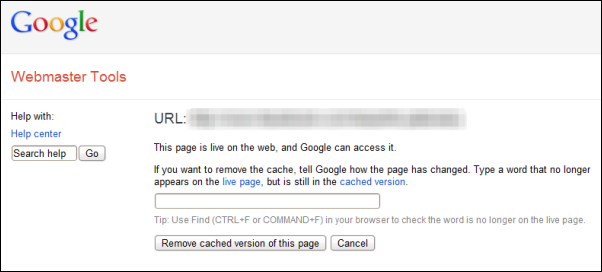
If the page still exist, you have to tell Google how the page has changed. For this, Google will ask you to type a word that no longer appears on the live page, but is still in the cached version. For example if the Google cache of the page contains your name which has been removed from the live page, type your name as it appears in the cached version but doesn’t appear on the updated page. Don’t tell Google that "my name has been removed'. Google suggests users to type a single word rather than a phrase as it often more effective.

remove-cache

Confirm the request and then Click Remove Cache. Once your request has been processed and Google confirms that the submitted word no longer appear on the page, the search result will no longer show a snippet, nor will the cached page be available. There is no estimated time frame when this would happen. It can happen as quickly as the next day or take weeks to update.

Before you request removal of your content from Google, you should make sure that the problematic content has been removed from the web. Otherwise, even if your request is successful, the information could reappear in Google’s index after 90 days.

Source: Google

Image credit: BigStockPhoto

3 Tools to Manage All Cloud Storage Services (Dropbox, Google Drive, SkyDrive etc) at One Place

Be the first to comment!
Labels: , ,

So you have signed up for half a dozen cloud storage and file synchronization services, because with so much free space being thrown around, it is hard not to. While it’s great to have so many choices, it’s inconvenient to have your files distributed across a number of different cloud services. But not if you can manage all your cloud accounts and access all your files from a single place. Here are 3 free services that lets you do that.

Joukuu

Joukuu is a free Windows program that lets users manage all their files on Dropbox, Google Docs, and Box.net from their desktops and without having to switch between separate windows. Simply add all your accounts and you are done. You can drag and drop files between accounts, or drag and drop files from Windows explorer into the Joukuu’s window to upload. You can download, open and edit documents from your desktop. You can also see all your files from all your accounts at once. Files are automatically sorted by types such as documents, images, videos and the rest are dumped as “others”.

joukuu

The Lite version of Joukuu allows you to add only one account per cloud service. You'll need to subscribe for $60 a year if you want to add more than one Google, Box and Dropbox account.

Joukuu says that support for Skydrive, Sugarsync, Huddle and Zoho will be added soon.

Otixo

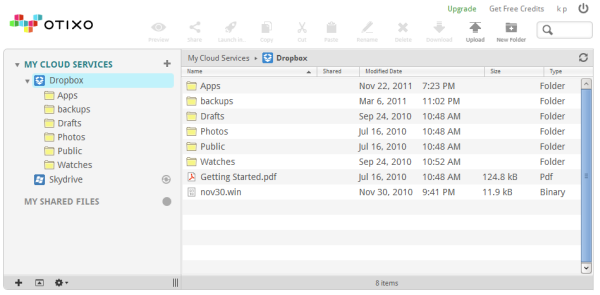
Otixo lets you connect to Dropbox, Box, SkyDrive, Google Docs, SugarSync, Picasa, MobileMe, Amazon S3, as well as FTP sites and WebDav drives. The addition of FTP and WebDAV opens a whole lot of opportunity like the ability to add 4shared, GoDaddy Online Storage and dozens of other services that support any of these two protocols.

otixo

Unlike Joukuu, Otixo is a web app which means that you have to manage everything from your web browser. Fortunately, the interface is very user friendly. Once you connect your accounts, a row of icons come alive at the top of the screen, each dedicated to a particular task like copy, paste, download, share, etc. To upload files you can drag-and-drop them inside the browser window. You can even copy or move files from one service to another without downloading to your computer.

Another great feature of Otixo is the ability to map your Otixo account as a WebDAV drive on Windows explorer. This way you can access all your cloud accounts right from your computer’s file explorer.

Unfortunately, the crippling blow comes when you realize that you get only 250MB of monthly bandwidth on free Personal accounts. Business accounts without the limit are slightly expensive at $10 a month.

Primadesk

Primadesk is a web app that supports over 30 services, including Box.net, Dropbox, Facebook, Gmail, Google Docs, SkyDrive, Picasa, Hotmail, Photobucket, Shutterfly, Smugmug, Snapfish, SugarSync, Flickr, Yahoo Mail, Evernote and Zoho. After connecting your accounts to Primadesk, you can view all your documents in one place, search files on all the services by topic, date range and content type, copy and paste files, or drag and drop between services. Primadesk also supports IMAP so that you can bring in your email inbox too.

primadesk

On free accounts you get 1GB of storage from Primadesk but you can only connect up to 5 services. Paid subscriptions starts at $5 a month.

Related: Put Your Dropbox or Google Drive Folder Inside SkyDrive for Multiple Cloud Backup

Tiggit: Download and Install Over 300 Free Indie Games

Be the first to comment!
Labels: , ,

The Indie game scene has seen a surge in the last few years primarily due to availability of new online distribution methods and social media for publicity. There are probably thousands of indie games developed by now, some of which have gone on to become an Internet phenomenon such as Minecraft. It’s hard to keep track of how many such games are released in a year because of the very nature of Indie games. One way to keep yourself abreast, if you are a fan of these small games, is to follow blogs dedicated to Indie gaming. Another way is to install Tiggit.

Tiggit is a an open source game installer and launcher, like Steam. The biggest difference, aside from the fact that they're not operated by Valve, is that Tiggit was built to serve only indie games. According to the website, Tiggit's mission is to help users find all the awesome indie games that exist 'hidden' around the internet. As of now Tiggit only provides freeware games and demos. So there will no sales or anything.

tiggit

Currently, Tiggit features over 300 freeware titles and 30 odd playable demos. The games are categorized according to the genre; single-player and multi-player games are also grouped separately. You can sort the games by rating (although it is not clear from where the ratings are sourced) and there is a search box for easy finding.

Each game is accompanied by a short description and a screenshot. A one click install button ensures that you don’t have to manually visit the game’s website to download it. Tiggit does not require users to register an account. You simply install the program the launcher and enjoy.

Also see Games Downloader, a similar freeware games downloader.

5 Multi Threaded Free Video Converters for Faster Conversion

Be the first to comment!
Labels: , ,

If you play videos only on your computer, you don’t really need a video converter – most media players today can play almost any video format. But if you want to rip DVDs or Blu-Ray discs to your computer or you have a particularly fussy portable media player or mobile phone such as those manufactured by Apple, you will need one. If you are anything like me, you probably have several. But it’s not enough to have any video converter.

Video encoding is a very taxing job that demands power from the processor. Today, dual-core processors are standard and quad-core processors are also pretty common, thanks to Intel’s Hyper Threading technology that can execute two threads in parallel on a single core effectively turning two cores into four logical cores. Expensive processors have even more - 6 to 8 cores per die. These multi-core processors are excellent for activities like video encoding. Unfortunately, most video converters are incapable of leveraging the extra cores at their disposal. When you use such video converters, your processor is grossly underutilized often running at less than half the capacity. As a result the videos take a long time to process.

multi-threaded-video-converters

Multi-threaded video converters are capable of utilizing multi-core processors to run several threads in parallel that gets the job done quicker. If you have a multi-core processor you should be looking for multi-threaded application, otherwise the money you spent on the extra cores goes to waste. Here we have rounded up 5 brilliant video converting software that supports multiple core processors. And, yes, they are all free.

Handbrake

handbrake

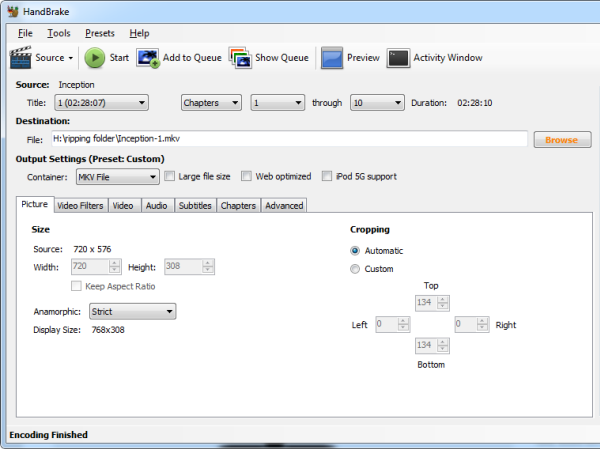
HandBrake is an open-source, cross-platform, multi-threaded video transcoder software application. It’s widely popular amongst film enthusiasts and is a video converter of choice for those who frequently rip DVDs. This is because HandBrake offers granular control on the video converting job allowing the user to control every parameter possible. Because of this HandBrake was considered a geek’s tool, but after recent revisions and numerous GUI updates this is no longer the case.

HandBrake supports almost all video formats, but outputs to only the best available video containers. You can output to either MP4 or MKV using either H.264 or FFmpeg (MPEG4). FLV, WMV, 3GP etc are not supported. Popularly used AVI is also not supported and for good reasons. AVI is out-dated, has many limitations and videos converted to this format is also larger in size but not better in quality than MP4 or MKV. However, the lack of choice may be disappointing for some.

TEncoder

tencoder

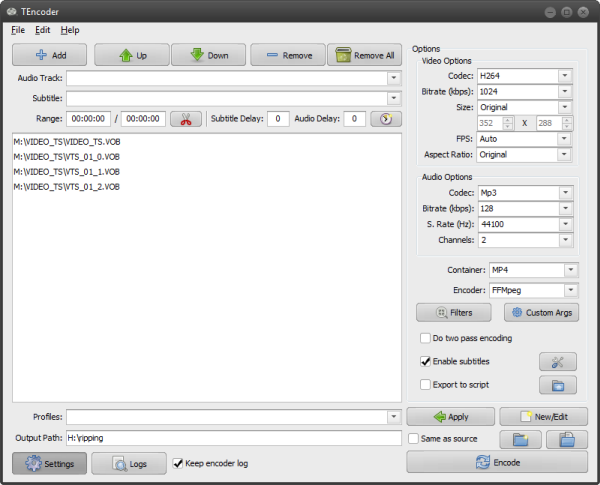
TEncoder is another multithreaded video converter that supports a wide range video and audio codecs as well as containers that enables users to convert almost every video type to each other. Subtitles with same name as video can be hard-coded into video. You can select between multiple audio and subtitle tracks. Extracting video or audio content is possible. Other capabilities such as video edit, audio and subtitle synchronization, 2-pass encoding and deinterlacing are supported.

TEncoder can run up to 8 encoders (threads) in parallel. And if you are interested, TEncoder is also skinnable and probably the only software that allows you to adjust the color saturation and hue of the skin.

MediaCoder

mediacoder

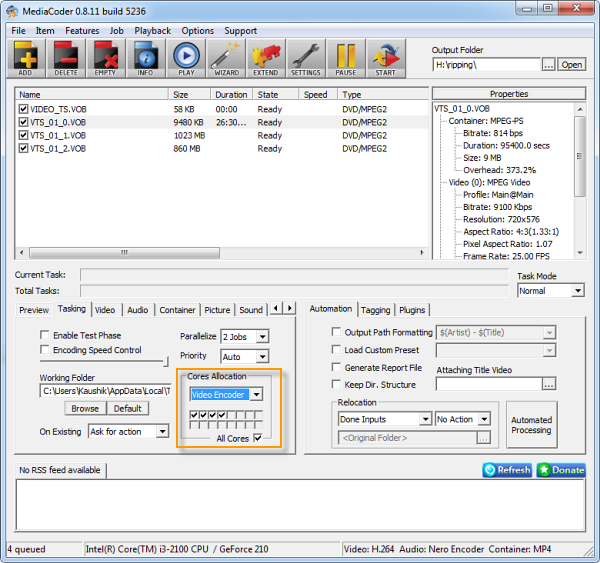
MediaCoder is a vastly powerful video converter/transcoder packed with tons of features that lets you configure every step in the conversion process. It uses various open source audio and video codecs, among several proprietary codecs (such as Intel video encoder) and tools to transcode different audio/video formats and has many extra features. Many formats are supported, including MP3, Vorbis, Advanced Audio Coding (AAC), Windows Media Audio (WMA), WebM, RealAudio, WAV, H.264/MPEG-4 AVC, MPEG-4 Part 2, MPEG-2, Audio Video Interleave (AVI), Video CD and DVD-Video.

The interface is so jam-packed with features that one can get easily overwhelmed. Finding the right stuff is also quite a chore.

An interesting MediaCoder feature is CPU allocation where you can specify the cores the program should use for processing. This is similar to CPU affinity that you can assign from the task manager. (See Mz CPU Accelerator)

Sothink Free Video Converter

sothink-video-converter

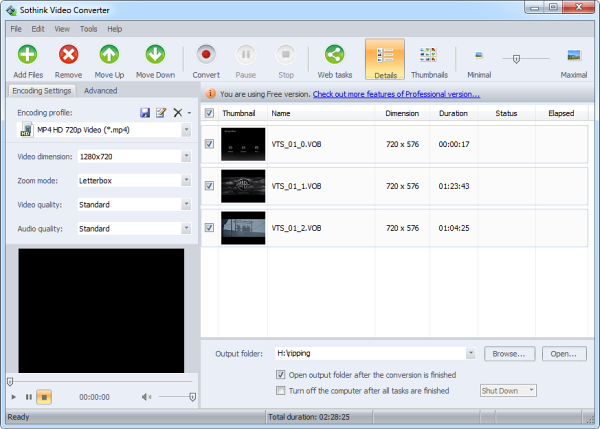
Sothink Free Video Converter can convert any video file to various video formats including MP4, MKV, FLV, SWF, MOV, 3GP, VOB, WebM and more. Video encoder supported are h.264, MPEG4 and Theora. The paid version supports additional formats such as HD video conversion.

You can specify bit rates, frame rates, video size, aspect ratio, and trim the start and end of the video file. Sothink Free Video Converter supports batch processing and multi-threaded operation. You can choose the number of conversion jobs to run simultaneously and the number of threads.

Freemake Video Converter

fremake-video-converter

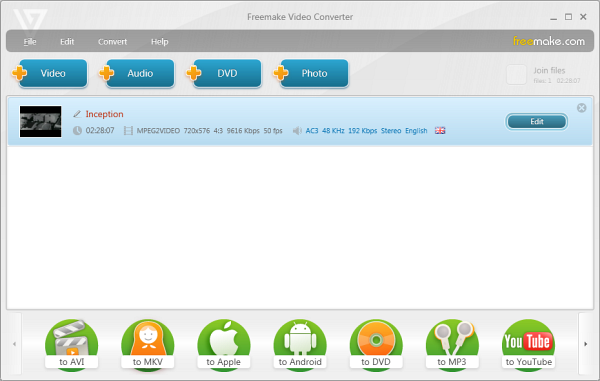
Freemake Video Converter is another multi-threaded video converter that supports large number of video formats such as AVI, MP4, WMV, MKV, MPEG, 3GP, DVD, and MP3, and device specific settings for iPod, iPhone, PSP, and Android phones. It can also upload converted videos directly to YouTube. The software accepts more than 200 input formats.

Freemake Video Converter can also utilize the Nvidia’s CUDA technology to free up CPU resources. However, since we are looking for speed here you should switch CUDA support off. This will force the software to use all available CPU cores.

Know any other video converters with multi-thread support? Tell us in the comments.

Put Your Dropbox or Google Drive Folder Inside SkyDrive for Multiple Cloud Backup

Be the first to comment!
Labels: , ,

inception-topWith the recent launch of Google Drive and re-launch of Microsoft SkyDrive customers seeking for online file storage/backup solutions today have more choices than ever. However, “choice” is not the right word.
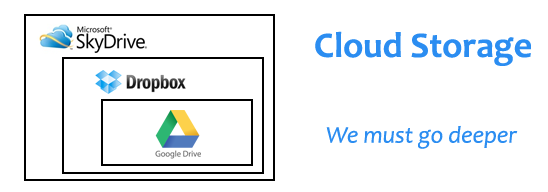
Cloud backup is not the same as social media or email. Most users don’t have the time to actively follow Facebook, Twitter, Google+, Pinterest and tons of other social networking and sharing sites. Instead, we pick one or two where most of our friends and contacts are active. With email, it’s inconvenient to juggle between multiple inboxes so we stick with one. But with cloud storage, nobody is forcing you to be on Dropbox or on Google Drive alone. You can combine these services together to get lots of free storage.

You get 7GB from SkyDrive (25GB for old users), 2GB from Dropbox (upgradeable to 16GB through referrals), 5GB from Google Drive, 2GB from SpiderOak, 5GB from SugarSync, 5GB from Box, 5GB from AVG Livekive and on and on. If you do the math, there is 40GB~50GB of free storage right there.

You can keep videos on SkyDrive, documents on Google Drive, and pictures on Dropbox. However, if your requirements aren’t big, instead of spreading your files across different services you can use just one service for storage and the rest for mirror backup. If one service goes down or loses your files you can retrieve them from the others.

cloudception

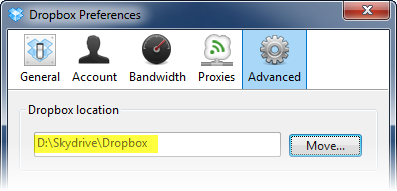
The easiest way to do this is to keep the sync folder of one service inside the sync folder of another service. SkyDrive with 25GB of storage can easily gobble both your Google Drive folder and Dropbox folder together. Or you can keep the Dropbox folder inside the Google Drive folder inside the SkyDrive folder. Anything you want to backup or sync goes into the Dropbox folder, which is automatically synced with Google Drive which in turn goes to your Skydrive storage. In one swoop, you created three backup copies of your files in three different locations. Backups can’t get any more secure.

How to change the sync folder

Dropbox: It’s under the Advanced section in Dropbox Preference.

dropbox-pref

Google Drive: You have to setup the sync folder when you sign in to your account. If you are already signed in, disconnect your account and reconfigure the sync folder.

gdrive-pref

SkyDrive: The sync folder is configured during installation of SkyDrive. To change the location of the folder, you have to uninstall SkyDrive and start afresh.

How to Get Notified When Programs Finishes Processing

Be the first to comment!
Labels: , ,

bellSome programs require several minutes to process data. Usually anything that involves encoding and decoding requires time. File compression, video encoding/decoding, image processing take the most time to get done. Often we have to wait while these programs are processing data. We don’t exactly stare at the screen and twiddle our thumbs, instead we move to other programs that require our attention such as an unfinished Facebook game, but one way or the other, we wait.

The trouble is, there is no way of telling when a program will complete processing. Some programs calculate the approximate time remaining and some show progress bar, but we know better than to trust them. You can have fun listening to elevator music while the progress bar is progressing or replace it with a Nyan Cat, if you are fond of Internet memes. (Tip: you can use Instant Elevator Music as an audible indicator of progress bars. Music stops when progress bar reaches the end.)

If you are using Windows 7, you must have already discovered a wonderful feature. When you are copying files to your computer or downloading files from the Internet using your browser, the program’s icon in the taskbar becomes the progress bar. You can see the state of the download or the file copy job by glancing at the taskbar even when the actual program window is minimized. This might not work for all programs though.

taskbar-progressbar

If the program you are waiting upon uses more than the average CPU time, one way to know when the program finishes processing is to monitor the CPU usage level. If the CPU usage remains high, it indicates the program is running and processing data. If the CPU usage falls, it might indicate that the program has completed processing or stalled or waiting for your response. You can put a large CPU usage level indicator on the taskbar such as SuperbarMonitor or Taskbar Meters to make this easier.

SuperbarMonitor

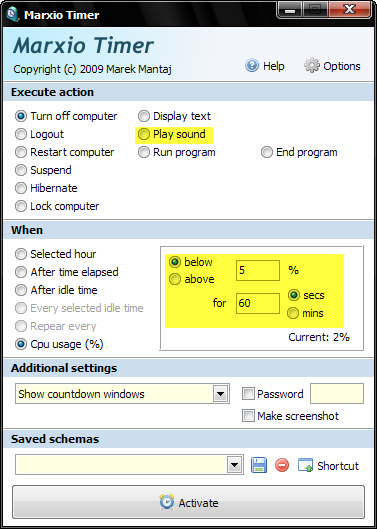
If you don’t want to keep your eye on the taskbar at all times, there are other alternatives. Maybe you aren’t at the computer anymore and want the computer to sound an alarm when the program completes processing, or you just want the computer to shutdown upon completion without bothering you. Then you can use Marxio Timer.

MarxioTimer

Marxio Timer is an advanced task scheduler that allows you to automate tasks based on various triggers such as time and CPU load. You can have Marxio Timer monitor the CPU usage and when it falls below the predefined level, it will trigger an action. The action can be playing a sound file, displaying a text box, or shutdown/logoff/hibernate your computer. TimeToGoAppi is a similar program and more powerful than Marxio Timer.

Alternatively, you can use Tell When Done – a program specifically designed to monitor CPU usage and notify you when the program has completed processing. You run the program, click on the program window you want to monitor and press a hotkey combination. Tell When Done will start monitoring that program process and when it finds the CPU usage hitting 0%, it will alert you by sound or a message box.

tellwhendone

CPUOff is a another freeware application that monitors the CPU load and initiates computer shutdown if the average CPU load has been found to be below a set threshold for a preset time.

Summary of Program Downloads

Related:

Photo credit: BigStockPhoto

Prevent Windows from Shutdown or Logoff When USB Drive or DVD is Present

Be the first to comment!
Labels: ,

stop-sign1I’m sure this has happened to you before: you insert a DVD or CD into the optical drive to browse the contents of the disc or access some files, and after sometime you totally forget about the disc and shutdown the computer while the disc is still inside the drive tray. I can’t count on how many occasions I had to restart the computer just to take out the disc. The same happens with USB drives.
With Free USB Guard, you can prevent this from happening again.

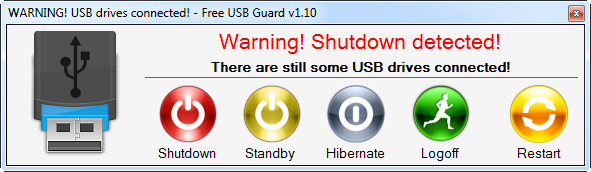
Free USB Guard is a free and portable program that prevents Windows from shutdown, restart or logoff when it detects the presence of a disc in the optical drive or an attached USB drive. When the program detects a USB Flash drive or a CD or DVD inside the optical drive it blocks Windows from shutdown and flashes a message, such as the one below.

free-usb-guard

The user can then proceed to either remove the disc or USB drive from the machine, or ignore the message and choose one of the five options presented, which are shutdown, standby, hibernate, logoff, and restart.

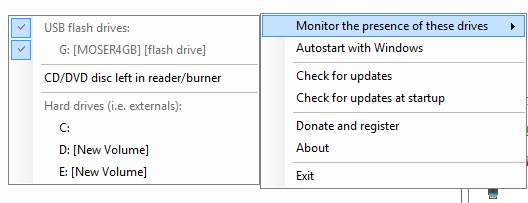
By default, the program only prevents shutdown when there is Flash USB drive. External USB hard disks and CD/DVDs are ignored. To change this behavior, right-click on the program icon on the system tray and choose the type of disks you want the program to monitor.

free-usb-guard-menu

Of course, for this to work the program must be running when you attempt to shutdown the machine. If you are the owner of the machine you can configure the program to run at startup. If you are working on someone else’s computer, you can carry the program in the USB drive itself and have it run automatically via an autorun.ini file, or simply run the program manually. Free USB Guard is portable and doesn’t require administrative rights to run. So you should be able to run the program on any user account on any Windows machine running Windows XP or later.

Although, the program is intended to be used only as a reminder for the user that he or she has forgotten something, it can also be used as a shutdown blocker where the USB drive acts as a key. But there is a better way to prevent Windows from accidental shutdown without using a pen drive. You can however, use a USB drive as key to lock your computer.

Similar program: Pen Drive Reminder

Also read: How to get your lost pen drive returned to you

Better Looking Metro Styled ViStart Skins for Windows 8

Be the first to comment!
Labels: , ,

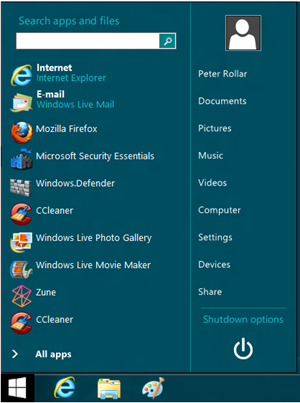
One of the ways to get the missing start menu back on Windows 8 is through the Windows start menu replacement program ViStart. Since Windows 8 has no start menu to replace, ViStart simply adds a new start menu to the taskbar. The program has been around for a long time and is a very popular Windows customization tool because it gives users the ability to switch appearance of the start menu using skins.

The default ViStart menu looks exactly like Windows 7’s start menu which doesn’t blend well with Windows 8’s Metro start screen. Although there is nothing Metro-ish on Windows 8 when on the desktop mode, you can change that by adding some Metro flavor to the ViStart start menu.

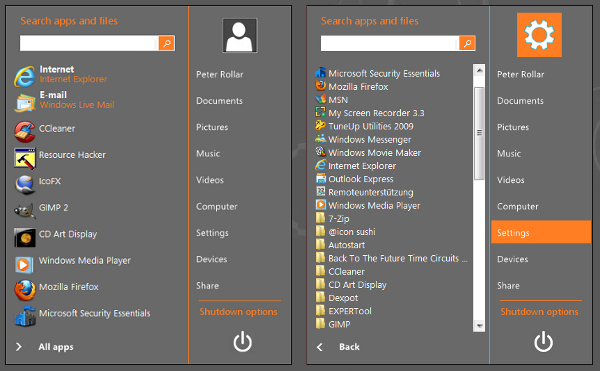
DeviantArt user PeterRollar has designed some incredibly beautiful Metro-styled skins for use with ViStart. Take a look at them.

vistart-metro3 vistart-metro

vistart-metro2

Download

Windows8 startmenu v1
Windows8 startmenu v2

How to Install

Download the latest version of ViStart and install. These skins don’t work with the older version of ViStart.

Open the folder where you have installed ViStart, and backup these files:

- Resources (directory)
- Rollover (directory)
- Settings.xml

Download the skin package and unzip its contents into the ViStart folder. Launch ViStart to see the new skin. To change skin simply replace these files with the new skin files. Currently, there is no GUI or a better method to switch skins. The default ViStart skin is inside the backup folder.

These skins can also be used with ViStart on Windows 7, Vista and XP.

Top 4 Facebook Fan Page Builders Compared

Be the first to comment!
Labels: , , , ,

thumbs-up2Apple, Microsoft, Samsung and Blizzard Entertainment are just a few popular technology brands that have enjoyed amazing success on Facebook. They use their Facebook Fan pages to announce exciting new launches, push targeted promotional campaigns and share news and content with their users. This interaction generates valuable interest and insights that can't be gained anywhere else.

For individuals and small business owners, the idea of designing and managing a Facebook Fan Page can be a bit confusing. Facebook Fan Page builders make the process less complicated, and are an excellent, low-cost option for getting your business on Facebook. The best builders offer a variety of layouts, customization options and widgets. They are always on top of design trends, so your page has the latest and greatest features. Here are some of the best Facebook Fan Page builders, chosen for their exceptional style, function and support.

ShortStack

shortstack

ShortStack is a free builder that uses a widget-driven layout, allowing you to add as many features as you wish in whatever order. Widgets include simple elements such as images, video or text all the way up to some really cool features such as Virtual Gifts, Friend Inviter and Galleries. ShortStack integrates with some popular tools too, including Foursquare, Twitter, Google Maps and MailChimp.

The Downside

ShortStack is free for smaller pages with less than 2000 likes. Once you pass that milestone, it is certainly worth celebrating, even if it means supporting a $30 subscription fee for your Fan Page service. Subscriptions offer the added benefit of removing the ShortStack logo, adding a photo upload/vote system, access to premium support and data export. By the time you have more than 2000 likes, you will want access to analytics, and unfortunately ShortStack charges $75-300 to get access to that feature. This builder does not offer a library of graphics or image, so you must come prepared with a design plan. You also don't have as much design freedom as some other builders unless you are familiar with CSS or HTML.

Why It's Really Awesome

Other than being free up to 2000 likes and packed with features, ShortStack offers a unique widget scheduling feature for creating dynamically changing pages or content to meet the needs of a marketing campaign or holiday launch. You are also given access to the page stylesheets via a CSS editor, and can easily implement your own JavaScript plugins or snippets. The interface is very easy to understand and caters to both novices and advanced users alike.

Wix Fan Page Builder

wix

Millions of people have designed a website with the Wix website builder, which is now gaining momentum with their Facebook Fan Page builder and iFrame tab app "Wix Your Page." Unlike other builders on this list, the Wix builder is a complete website creation suite for designing multi-pages in Flash or (coming in March) HTML5.

The Downside

The Facebook Fan Page builder is a bit more limited than the full page builder, but integrates an iFrame tab app for instant publishing to Facebook. The builder is currently only in Flash, which may not be best if mobile traffic is a concern, but the release of the new HTML5 builder should offset this drawback. Wix does charge a premium subscription fee if you want access to analytics and advanced features such as full eCommerce pages or reveal pages/fan gates.

Why It's So Awesome

The Wix Builder uses a drag-and-drop interface to allow novices and designers to create layouts in a completely visual way without having to edit code. Every element can be styled and customized and take advantage of the huge library of effects, animations and behaviors. Wix also offers graphics, design elements and a photo library to get you started. Their widget library includes video, galleries, slideshows, forms, shopping carts, Google maps and the ability to insert your own HTML or JavaScript if needed. It is the most flexible and feature-packed option on this list, and is also free.

Faceit Pages

faceit

Faceit Pages was developed with business users in mind, combining a selection of Facebook page templates with an easy customization system, a huge library of Facebook apps and integrated analytics.

The Downside

Faceit's Facebook Page "Do-It Yourself Designer" is the most limited of the five builders featured here, relying on pre-formatted layouts and allowing little wiggle-room for changing styles or creating completely bespoke designs without embedding an entire second webpage. Integrating Facebook apps instead of using HTML widgets puts added dependency on Faceit to keep up with Facebook's constantly changing standards and development platform, and they do not offer any eCommerce solutions.

Why It's Awesome

Like ShortStack, Faceit offers more than 20 apps you can use to build your Fan page. They offer instant publishing, fan gates, promotion and lead generation tools and beautiful reports. The premium subscriptions are very affordable in comparison to other offerings, starting at 8$. The designer itself is extremely straightforward, making this a great option for informational pages, bloggers or individuals who are completely new to Facebook Fan Pages.

PageModo

pagemodo

PageModo's Fanpage builder combines fresh templates, fonts and color palettes to help individuals and businesses create professional-looking pages quickly. As an added bonus, they offer page management and marketing tools, analytics and instant Facebook publishing without the need for additional apps or controls.

The Downside

PageModo's design options may be too limited for some, only allowing basic styling such as colors or borders, image upload and font selection. You also give up a wide selection of widgets such as those found in Wix or ShortStack in exchange for more design guidance, making this a better solution for beginners or resellers. The free option is also limited to one page and no extras, but you can preview the full suite for 30 days.

Why It's Awesome

PageModo's Pagebuilder has the lowest premium price plan at $13 for full features, and it’s intuitive interface is a breeze for adding pictures, videos, fonts, background colors and more. The templates are well-designed and keep up with today's design trends. Subscriptions even get you access to Pro Templates which include support for coupons and other eCommerce features.

Have you found an excellent Facebook builder that isn't featured here? Let us know in the comments!

This is a guest article by Vail Joy.

+Vail Joy is a professional writer, designer and developer with a vibrant background in music business, photography and social media. When she is not contributing her expertise to blogs and e-zines, she is building HTML websites and slaying dragons for Obox Design.

7 Exceptional Blogging Apps for Windows

Be the first to comment!
Labels: , , , ,

blogBlogging from your desktop is significantly easier if you manage multiple blogs, write for others, or want to compose your posts locally. A desktop app can offer added security, reliability and organization of your entire body of work, which is a necessity if you are a prolific writer or love to collect snippets and articles from around the web. This list offers a look at some of the best free tools for blog writing and management in Windows based on usability and features.
BlogDesk

blogdesk

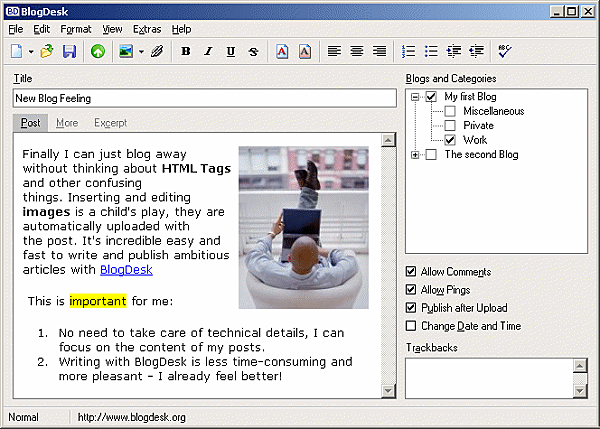
This lightweight app publishes instantly to WordPress, Drupal, Movable Type, ExpressionEngine, and a few more, with support for multiple languages, templates and phrase snippets. If you use WordPress, you can configure BlogDesk with your categories and custom fields to cut down on rework. The text editor is quite simple, and lacks advanced features like headings or an HTML view, but it does offer a "More" and "Excerpt" tab. The best feature is probably the image editor, which is a unique feature compared to other offerings here. BlogDesk is a great solution for WordPress users who don't need a lot of extra bloat, but if you're looking for something that allows access to individual post files, keep reading.

BlogJet

blogjet

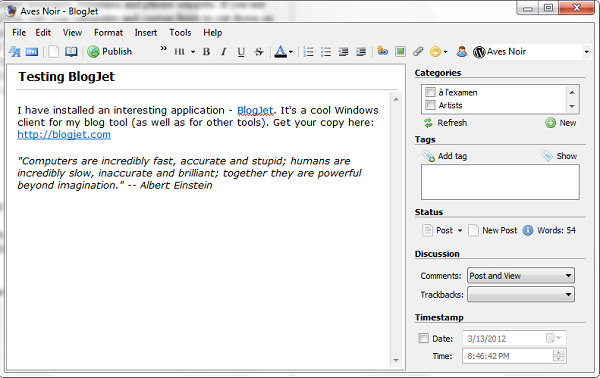
BlogJet can do everything it's predecessors can do, and more. It comes with a full rich-text editor, HTML source viewer, drag-and-drop image support, a word counter, and advanced management for statuses, comments and dates. Best of all, this app lets you export your posts to HTML or text, making it a perfect solution for freelance writers. BlogJet is offered in a free and premium version for just $39.

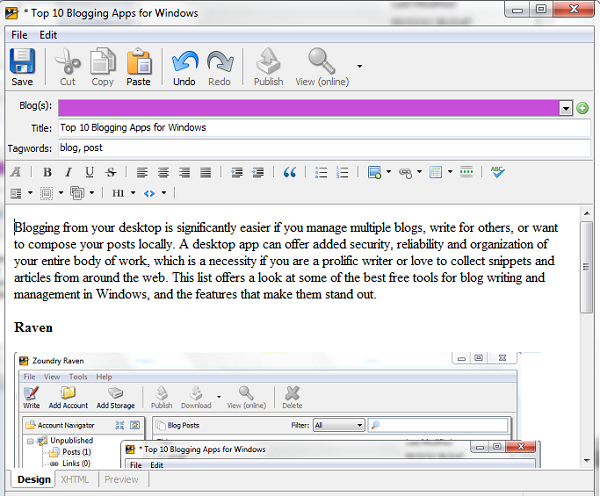
Raven

raven

This Open Source application from Zoundry can be installed as a portable app, which is fantastic if you move between locations often but want the features of a desktop app and local database. It supports over 24 popular blogging platforms for one-click publishing, or you can work without one. The setup is reminiscent of Evernote, providing a neat tree-style navigation for posts, images, tags and links. It supports localization, affiliate links and automatic pinging, and will connect to cloud storage or image hosting services to make synching media a breeze. The text editor has everything you need, and also supports drag-and-drop from your computer or the web. Sadly, it won't let you save your posts to an individual file type such as HTML, the only major downside.

Qumana

qmana

Qumana is one of the more popular or well-known apps with both a Windows and Mac version. It has robust support for ads, video and HTML, with drag-and-drop support for images, too. Like BlogJet, Qumana pulls in your categories and gives you control over comments and dates, but sadly forgot to add a Tag field. It makes up for it a little by pulling in your existing posts and allowing you to save as HTML or text.

Quamana is also available for Mac OSX and Linux.

Windows Live Writer

windows-live-writer

Not the most unique app on the list, but certainly one of the most reliable, Windows Live Writer is part of the Windows Live software suite bundles with Windows 7, or available for free download for XP and Vista. It supports popular blogging platforms such as WordPress and Blogger, and offers a decent selection of plugins for added functionality, including image management, slideshows and styles. You can even configure it to download your blog template, so you can preview how your posts will look as you write them. The 2011 text editor is a little on the light side and doesn't offer the robust options you may be used to with the WordPress editor, making this a better solution for offline blogging, but integration with Bing and Outlook may be a huge plus for those who use other Microsoft services. Windows Live Writer 2012 will introduce several improvements and social media integration, making it one to watch.

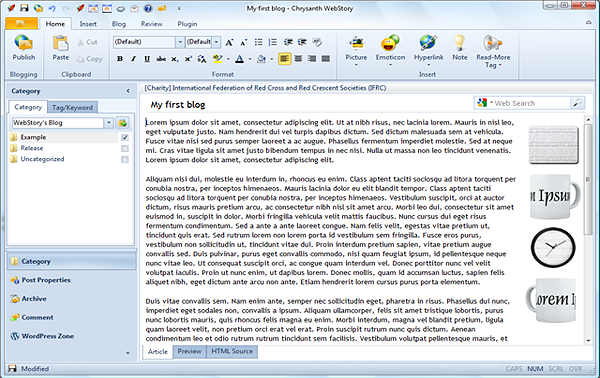
WebStory

webstory

WebStory is a complete solution with a modern interface that supports connections to most popular platforms and export to text or HTML. It has everything you could ask for, including support for image management with services such as flickr and Picasa, and import of local files. The best part? It has complete integration with Twitter and Facebook for easy microblog management and full article syndication. You can even view your activity lists directly from the app. Additional functionality is available under the plugin tab, such as image effects, FTP upload and pings. WebStory is free to use, and can be extended using their credit system, but for most bloggers the Casual account is more than enough.

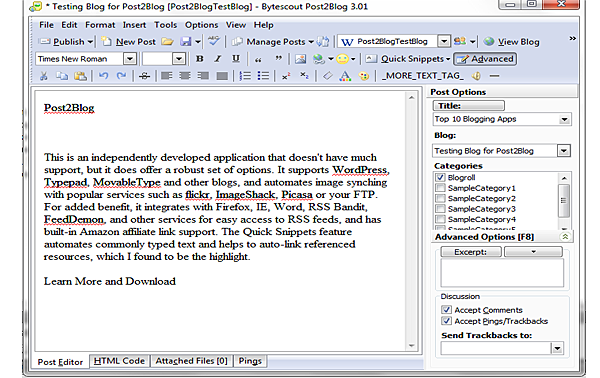
Post2Blog

post2blog

This is an independently developed application that doesn't have much support, but it does offer a robust set of options. It is very similar to BlogJet with the additional benefit of text, HTML or PDF export, and an integrated Thesaurus. It integrates with Firefox, IE, Word, RSS Bandit, FeedDemon, and other services for easy access to RSS feeds, and has built-in Amazon affiliate link support. The Quick Snippets feature automates commonly typed text and helps to auto-link referenced resources, which I found to be extremely useful. If you don't need the social network integration of WebStory, Post2Blog is surprisingly the most well-rounded app for serious bloggers that need the kind of formatting control it offers.

Conclusion

All seven apps are easy to use and will streamline your workflow. Each offers just enough features to satisfy a multi-blogger's needs, and throws in a few extras even your blogging platform may not offer. Windows Live Writer and Post2Blog are my personal recommendations for the sheer range of features and functionality, while WebStory offers the best option for socially-driven bloggers that will benefit from their network and community.Know of another exceptional solution? Let us know in the comments!

This is a guest article by Vail Joy who is a long-time writer, designer and copy editor with 15 years of experience in corporate business writing, music journalism and internet media design. When she is not hard at work designing something, she loves writing for Wix.com, the free website builder.


Recent comments

Recent comments

Followers

Sponsors

Recent comments

fefew

Recommend on Google

Copyright © 2011 All Rights Reserved Thesis skin. by Nitin. Converted into Blogger Template by TheTechFizz.