Get the latest updates from us for free

Sign-up for FREE weekly Newsletter.

UsenetStorm: Free Usenet Provider With in-Browser Downloading

Be the first to comment!
Labels:

Usenet is a vast, globally distributed system of discussion and file sharing groups known as “newsgroups”. Users read and post messages called articles or news to one or more newsgroups which are then broadcast to other newsgroups interconnected via a wide variety of networks. Individual users with access to a Usenet server may then read messages from and post messages to, download files etc., using a Usenet client software called Newsreader. 

Today, the importance of Usenet is diminishing, losing out to mainstream Internet services such as email, discussion board, web access and mainly Torrents, but there is no denying the fact there are certain decisive advantages of Usenet over Torrents. Top of the list for many will be security and speed.

Usenet is anonymous. Unlike Bittorrent where you broadcast to the world every bit of data you download, Usenet downloads are completely secure and private. Nobody can snoop on what you download from or upload to a newsgroup. BitTorrent's speed depends largely on how many seeders there are distributing the files. In Usenet, the complete file is present in the Usenet server just waiting to be downloaded. On Usenet, your download speed is limited by the speed of your home connection.

However, unlike BitTorrent, Usenet is not free, which is a deal-breaker for those without a credit card.

In the past, ISPs used to operate Usenet servers for their users, but because of the large amount of data involved, and small customer base, many ISPs have discontinued Usenet access. Free Usenet providers doesn’t exist anymore, and even if they do, they probably server a small community of enthusiast well hidden from the rest of Internet.

Today, TorrentFreak introduced a new Usenet provider called UsenetStorm that’s offering free entry-level service. Furthermore, UsenetStorm reduces the complexity of Usenet downloading by providing access to binary content through a standard web-browser.

usenetstorm

UsenetStorm offers Usenet binary files download over HTTP, through a process similar to the one employed by services that offer Torrents-over-HTTP download. Using a free Usenet search engine such as NZBIndex.nl or Binsearch.info, users download the NZB file and then uploads the same to UsenetStorm. They can also supply the URL to the NZB file instead of downloading to their computer and uploading. The NZB is small –  a couple of Megabytes at most.

Once you upload the NZB file, UsenetStorm will grab the files you want from Usenet, wrap it up in a single ZIP file and store it on its own servers. When the file is ready to download, you will be taken to the download page from where you can download the ZIP file to your hard drive.

Free users are limited to 500MB per NZB file and download speeds are capped at 5mbit, which means you cannot download any file larger than 500MB. But you can download any number of files smaller than 500MB and any number of times. Usage is unlimited to everyone without registration.

UsenetStorm is a great service for anyone who wants to get a taste of Usenet but shying away because of the cost and lack of understanding and rumors of steep learning curve.

Read: Automatically Download Movie Torrents/NZB Of Preferred Quality With CouchPotato

One Year Ago: PhotoMove, Evolution Player and Relocate Firefox Download Dialog

Be the first to comment!
Labels:

Go Through Audiobooks, Podcasts Faster by Increasing Tempo While Preserving Pitch

Be the first to comment!
Labels: , ,

Sometime ago, NPR wrote a lovely article on how an average person was going to miss almost everything that was ever written, filmed, sung or made. There is only so much time in a lifetime and millions of things to do and hundreds of goals to achieve. Reading is one thing that’s suffers the most, because it takes more than a couple of days to finish a book from cover to cover. Most people can’t even afford to spend a few hours in one task, much less days.

Audiobooks have recently started gaining popularity among readers and, here is the best part – non-readers as well. Audiobooks are far more convenient than normal books - you can buy and download them in a few minutes, and then have them on your MP3 player ready to listen to. You can listen to audiobooks while driving, cooking, showering, eating and during all other activities where reading is impossible.

But then again, there are so many audiobooks to listen and so less time. My suggestion: speed them up. But wouldn’t that increase the pitch of the voice into shrill mickey mousey type? No, it won’t, when you know how to do it.

We will use our favorite audio editing program for that. Fire up Audacity and load the MP3 file of the audio book you wish to speed up.

audacity-change-tempo

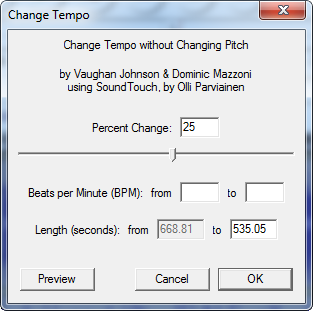
Press CTRL+A to select the entire waveform. Then click on the Effects menu and select Change Tempo.

audacity-change-tempo2

Increase the tempo by 25%. You can choose a higher tempo such as 35% or even 50% if the result is still comprehensible. It all depends on how fast or slow the speaker is.

Preview the result before finalizing and adjust the tempo until you are satisfied. Alternatively, you can decrease the length of the audio by time, but keep an eye on the percentage change. Once you are okay with the result, click the OK button to start encoding. This is going to take a couple of minutes at most.

To save the modified audiobook, click on the File menu and click on “Export as MP3”. If you haven’t configured the LAME encoder, you will be asked to specify the location of the DLL file. Download LAME for Audacity and install it. The DLL file in question will be at the installation directory.

audiobooks-speedup2

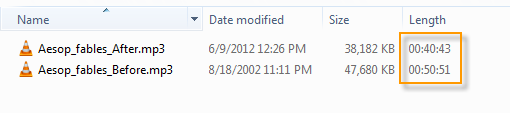
By increasing the tempo by 25% we have shaved 10 minutes off a 50-minute long audiobook.

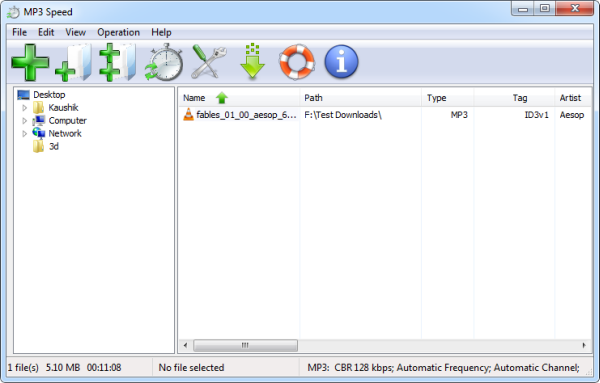
Now, doing this for every audiobook you own can be tedious. So here is an automated software that does the exact same thing: MP3 Speed Changer. The benefit of using MP3 Speed Changer is that it’s capable of batch processing. You can load entire folders and sub-folders containing audiobooks. You can also drag and drop MP3 files into the window to process. Additionally, MP3 Speed is capable of writing ID3v1, ID3v2 and APE MP3 tag.

mp3speed

So save time, be well-read.

HaoZip: Powerful File Compression Software You May Not Have Heard About

Be the first to comment!
Labels:

HaoZip is a powerful archive manager from a Chinese developer with an impressive file format support. The program can create compressed archive for 7Z, ZIP, BZIP2, GZIP, XZ, LZH, WIM and TAR files. It can also create encrypted sub-volume compressed files and self-extracting files.

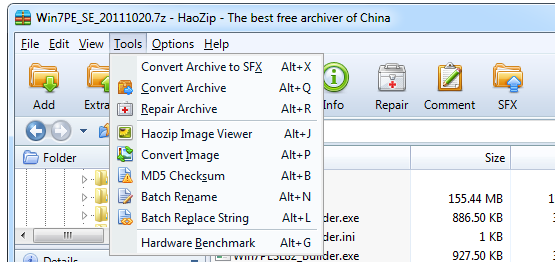
HaoZip support decompression of 50 archive formats including RAR, ZIPX, ISO, UDF, ISZ, ACE, ALZ, CAB, BZIP2, ARJ, JAR, LZH, RPM, Z, LZMA, NSIS, CHM, DMG, HFS, WIM, DEB, MSI, CPIO, XAR, UUE and more. Additionally, HaoZip includes several tools such as an archive file format converter, MD5 checksum verifier, a tool to repair corrupted archive, batch file renaming tool, hardware benchmarking software, a built-in antivirus scanner (optional) and even an image converter.

haozip

HaoZip also runs perceivable faster than many commercial programs like WinRAR. Compression and decompression is quick, and with good Explorer integration you wouldn’t miss WinRAR/WinZip anymore. In many ways, HaoZip is similar to WinRAR - in appearance and features - almost as if the developer was inspired by this popular archiving program. The antivirus scanner, benchmarking tool, and repair archive utility were definitely borrowed from WinRAR.

haozip2

A very useful feature of HaoZip is the ability to view images within a compressed archive without extracting the images first. If you have the habit of archiving your pictures, this is can come real handy. The image viewer looks pretty similar to Windows XP’s default image viewer but with extra functionality like thumbnails and one-click Edit button.

haozip3

Another nice thing is the ability to select multiple archives and extract their contents into a common folder, or extract them into separate folders. Other features include support for the mouse drag and drop operations, multi-threaded operation, and a skinnable interface.

HaoZip is definitely a keeper.

ControlC: Securely Save Your Entire Clipboard History

Be the first to comment!
Labels:

ControlC is a unique application that monitors your clipboard and automatically stores any copied text and images on your computer in an encrypted, secured database. The purpose of ControlC is to archive every piece of item that you ever copy to your clipboard, so that someday if you need to recall something that you copied in the past, you can easily do so. Because the database is encrypted, no third person can sneak into it without the correct password.

ControlC is not a clipboard manager. It doesn’t provide an interface from which you can quickly select items from the clipboard to paste. It just securely files away whatever you copy to the clipboard. The clipboard history can be viewed from the browser via a localhost URL after logging in with the password you’ve set.

controlc

Every clipboard item is accompanied by the name of the software program from where the text or URL or image was copied, the title of the program window and the icon of the program. Also accompanied is the precise time and date. The clipboard history can spawn multiple pages, which is why an advanced search tool is provided. Using it you can search by keywords, time period, clipboard item type (text, image or URL), source program, title and path.

Clipboard items can be marked with a star and selectively deleted.

You can automatically purge history older than a certain period. By default this is set to 2 weeks. For files and images you can also set a maximum file size. There is also a blacklist feature. Unfortunately, there is no documentation on how to use it.

ControlC can exist merrily with whatever clipboard manager you are using. I suggest using a clipboard manager for managing clipboard entries for immediate use, and ControlC for long time archival.

Breeziee: Add a Paywall to Any Link. Sell Digital Goods Easily

Be the first to comment!
Labels:

A new startup called Breeziee makes it possible for anybody to quickly setup a paywall to any link and use it for selling digital goods such as downloadable files, images or even articles on webpages. Simply fill out the form on the homepage, and your file will be posted for sale immediately. You can then share your sales page and manage all your sales through the control panel. The best part is, Breeziee charges no fees and takes no cuts from payment. The payments go right to your PayPal account.

The process is very simple and takes less a minute. You enter your PayPal email address, the link to the product which you wish to sale and the price. Optionally, you can add a description and upload an image.

breezies

Once you click the “Sell” button, your file will be put up for sale and will also automatically be added to their file directory. You get a shortened link that takes you to your sale page. When a customer clicks on the “Buy” button they are automatically taken to PayPal to complete the payment. Payments go directly to your PayPal account.

From the seller’s dashboard, one can change, track, and view stats such as the number of views made and sales completed, and the total earnings.

One should keep in mind that the paywall is encountered only when visiting your sales page. The actual link to your product is still unprotected and can be accessed by anyone who knows the URL.

Related: Refer.ly Offers Regular People to Earn Easy Affiliate Commission

Watch The Transit of Venus 2012 Online

Be the first to comment!
Labels:

One of the rarest celestial events of the century will occur tomorrow and will be viewable from select regions of the Earth. The planet Venus will trek across the disc of the sun, an event known famously as the Transit of Venus.

Transits of Venus are among the rarest of predictable astronomical phenomena. They occur in a pattern that repeats every 243 years, with pairs of transits eight years apart separated by long gaps of 121.5 years and 105.5 years. The next transit of Venus will occur on 5 and 6 June 2012, and will be the last Venus transit this century. The prior transit took place on 8 June 2004. Altogether only six such transits have been observed and recorded in human history. It is a real privilege to be alive during such an important period of time.

Visibility_of_2012_Transit_of_Venus.jpg

The transit will begin at 22:09 UTC on 5 June 2012, and will finish at 04:49 UTC on 6 June, during which the planet will appear as a small, dark disk moving across the face of the Sun. Admittedly, it will be as interesting as watching grass grow, yet the excitement among space buffs is palpable.

You can catch a live webcast of the transit on NASA’s website. Another way to view this event on your mobile phone is through the app VenusTransit, which is available on Android and iOS.

The phone app will allow citizens around the world to witness this rare phenomenon and to contribute their observation to a collective experiment to measure the sun’s distance. The phone app will assist the user in timing the transit and will also tell you the precise time when the transit will start based on your GPS location. After the transit, you can access your data on a map on our website.

You can lookup the timing of the various stages of the event for major cities on this page. If you can’t find your place, just punch your location into this converter to get the timing of the event in your local time.

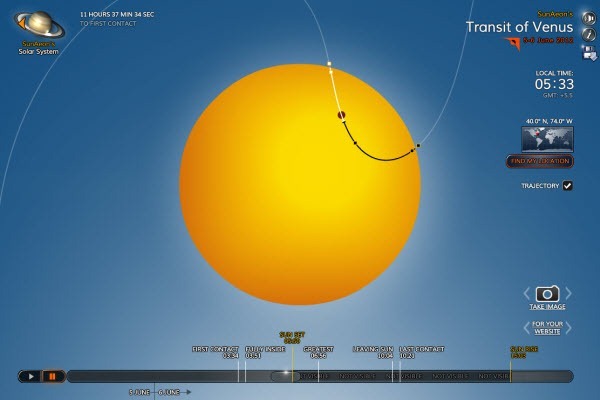
A beautiful Flash animation of the transit is also available here.

venus-transit

Venus transits are historically of great scientific importance as they were used to gain the first realistic estimates of the size of the Solar System. Observations of the 1639 transit, combined with the principle of parallax, provided an estimate of the distance between the Sun and the Earth that was more accurate than any other up to that time. In addition, the June 2012 transit will provide scientists with a number of other research opportunities, particularly in the refinement of techniques to be used in the search for exoplanets.

Get Now Playing Notifications for YouTube Videos on Desktop [Firefox and Chrome]

Be the first to comment!
Labels: , , ,

Some media players show pop-up notification on the desktop whenever the track changes even if the media player is minimized or not in focus. I’m not particularly fond of those, but if you are, you will love the Now Playing notification for videos playing in YouTube. If you are wondering why one should need notification when they can see for themself which video is playing, you are forgetting that YouTube is the most popular destination for listening to music.

Most users will load a video album playlist, click the play button and minimize the browser or otherwise carry on surfing. With YouTube notification, these users get the same functionality they get from their desktop media player. And here is the interesting part: these notifications are displayed on the desktop, out of the browser.

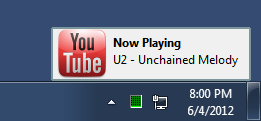
youtube-notification-chrome youtube-notification-firefox

Now Playing YouTube Notification in Chrome (left) and Firefox (right).

Whenever a new video loads from the playlist, a small window pops open near the notification tray displaying the title of the song. The notifications stays just long enough for you to notice and disappears on it’s own.

Want these notifications? Get them for Firefox and Chrome.

Related: How to Download All YouTube Videos in a Playlist

Make EULAs Easier to Read With EULAlyzer

Be the first to comment!
Labels:

Do you read End User License Agreements (EULA)? I’m pretty sure you don’t. You have probably clicked through hundreds of EULA dialogs when installing software and you haven't read a single word of any of them. Software developer and blogger Joel Spolsky once included a 40% coupon code in the EULA of one of his software, to see if anybody reads them. By the time he spilled the beans eight months later, not a single person had come forward to claim the discount. In another attempt to prove that no one reads EULAs, anti-spyware firm PC Pitstop buried a note in its own EULA, saying they would give $1,000 to the first person who emailed them at a certain address. It took four months and over 3,000 downloads before someone noticed it and sent an email and got the $1,000.

While the chances of you finding treasures in license agreements is exceedingly rare, it actually pays to read them. But EULAs are hard to read, and boring too. They are long and so full of legal jargon that no average person can fully understand them.

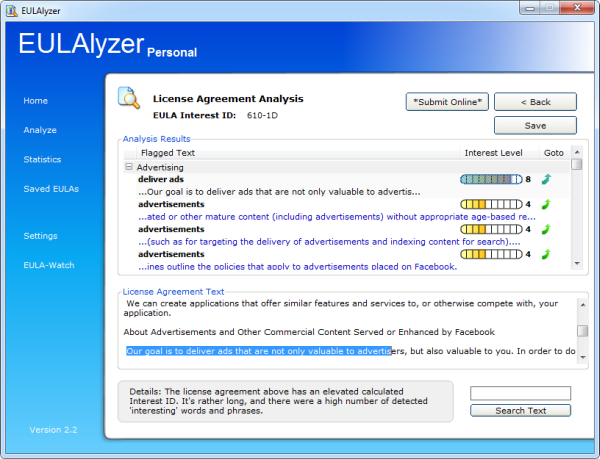
eulalyzer

EULAlyzer analyzing Facebook’s terms and condition

Free software EULAlyzer makes the task a tad easier by helping you spot important information in the license agreements. EULAlyzer can analyze license agreements in seconds, and provide a detailed listing of potentially interesting words and phrases that may indicate information sharing, advertising bundles or other privacy related issue buried in the license agreement.

All you have to do is copy the text of the entire license and paste it into EULAlyzer’s analysis box and click the “Analyze” button. You can also use a handy drop target to capture the text from the dialog window. The Pro version have an option that automatically captures and analyzes EULAs.

EULAlyzer presents its findings in discreet groups and flags each item with an Interest Score. Scanning a typical license agreement for a software or website, you may find items grouped under headings such as Advertising, Promotional Messages, Third Party, Website Address, Without Notice and Pop-ups. A Goto link at the end of the item will highlight the relevant passage from the agreement. You will then have to read the highlighted passage and make your own judgment.

It's important to understand the program doesn't make any legal interpretation of the agreement, nor does it determine what is wrong or right. Neither does it explain the agreement in simpler words. What it does is help you locate clauses in the agreement that has something to do with your privacy, program usability and other problematic areas much faster than you could by reading the entire document.

Related: Hundred year old EULA on Edison’s Wax Cylinder

How the Night Sky Will Look Like 7 Billion Years From Now?

Be the first to comment!
Labels: ,

NASA astronomers using the Hubble Space Telescope have worked out when precisely our Milky Way Galaxy will crash into its neighbour, Andromeda making it possible to portray, with a fair degree of accuracy, how the night sky above our head will appear 7 billion years from now. While it’s another thing, there will be no humans on Earth to witness the spectacle.

The Andromeda galaxy located some 2.6 million light-years from Earth is on a collision course with the Milky Way. The pair are being pulled together by their mutual gravity and the scientists expect them to begin to merge in about four billion years' time. A further two billion years on and they will have completely merged to appear as a single entity.

Although the galaxies will plow into each other, stars inside each galaxy are so far apart that they will not collide with other stars during the encounter. However, the stars will be thrown into different orbits around the new galactic center. Simulations show that our solar system will probably be tossed much farther from the galactic core than it is today, but our Earth and solar system are in no danger of being destroyed.

today

The night sky as it is today.

andromeda-milkyway-collison375

In 3.75 billion years Andromeda fills the field of view.

andromeda-milkyway-collison385

In 3.85 billion years the sky is ablaze with new star formation.

andromeda-milkyway-collison395

In 3.9 billion years, star formation continues.

andromeda-milkyway-collison4

In 4 billion years Andromeda is tidally stretched and the Milky Way becomes warped.

andromeda-milkyway-collison51

In 5.1 billion years the cores of the Milky Way and Andromeda appear as a pair of bright lobes.

andromeda-milkyway-collison7

In 7 billion years the merged galaxies form a huge elliptical galaxy, its bright core dominating the nighttime sky.

"After nearly a century of speculation about the future destiny of Andromeda and our Milky Way, we at last have a clear picture of how events will unfold over the coming billions of years," said Sangmo Tony Sohn of STScI.

For the very first time, we've been able to measure the sideways motion - in astronomy, also known as proper motion - of the Andromeda Galaxy ”

Previously, it was unknown whether the far-future encounter will be a miss, glancing blow, or head-on smashup. This depends on M31’s tangential motion. Until now, astronomers had not been able to measure M31's sideways motion in the sky, despite attempts dating back more than a century. The Hubble Space Telescope team, led by van der Marel, conducted extraordinarily precise observations of the sideways motion of M31 that remove any doubt that it is destined to collide and merge with the Milky Way.

The animation above depicts the collision between our Milky Way galaxy and the Andromeda galaxy. Hubble Space Telescope observations indicate that the two galaxies, pulled together by their mutual gravity, will crash together about 4 billion years from now. Around 6 billion years from now, the two galaxies will merge to form a single galaxy. The video also shows the Triangulum galaxy, which will join in the collision and perhaps later merge with the Andromeda/Milky Way pair.

[via Nasa]

7 Software Update Monitors That Keep Your Programs Updated Compared

Be the first to comment!
Labels: , ,

Keeping all your installed programs up-to-date is quite a challenge. While most programs are capable of automatically updating it does so when you start the program, and you will agree that the best time to update a program isn't when you're trying to use it. You want to have your programs updated silently, in the background, when you are not using them. Since programs by their own are incapable of doing this, we have to resort to third party tools.

Here is what we’ve got. A comparison table is given at the end of this article.

Patch My PC

patch-my-pc

Patch My PC is a small compact program which when run will scan your computer for installed application and display a list of those found. The list will highlight outdated programs in red, up-to-date programs in green and missing programs in black. Patch My PC can also detect missing Windows updates and download and install them as well.

Additional options include the ability ignore select programs, have the program delete desktop shortcuts after installing software, a startup manager and an uninstaller.

The program can patches some 56 common third party products such as Adobe Reader, Flash, Java, QuickTime, Firefox, Chrome and the usual stuff. Patch My PC couldn’t detect the majority of my programs and even the ones that it clearly supports. For instance, it failed to check Picasa and FeedDemon, Media Player Classic, Audacity, uTorrent and many others.

Pros: Cons:
  • Automatically updates applications and removes earlier versions.
  • Check for Windows updates
  • Poor support for applications other than the most common ones.
  • No sorting, filtering option in the UI.
  • Low accuracy

FileHippo.com Update Checker

filehippo

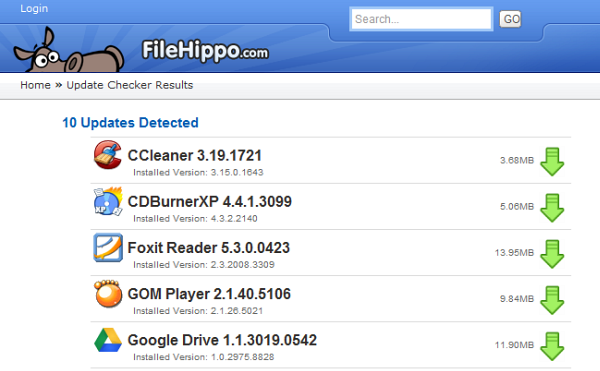
FileHippo Update Checker scans the computer, detects out-dated software and then prepares a webpage where you will find links to download the updated versions. However, downloading and installing the program is your job.

The program doesn't check for updates for every installed program, but it works fine when it comes common applications like browsers, media players, chat clients and the like. If you install your programs at locations other than the default, there is an option to have the program scan these custom locations.

Pros: Cons:
  • Can scan custom program directory
  • Poor support for applications other than the most common ones.
  • Doesn’t auto update applications.
  • Low accuracy

Secunia Personal Software Inspector

secunia-psi

Secunia PSI can recognize around 30,000 software products gathering update information from a variety of online sources including a user community and in-house research.

Once the scan is completed, Secunia PSI will present you with a list of issues that were detected, along with download links to updated version, additional online information and other details. Scan results lists programs that have reached the end of support and programs that require updating because the current version is insecure. The interface is a bit overwhelming and text heavy and maybe is strewn with information that users don’t need like your security score and how they compare to people using Secunia PSI near your city.

Pros: Cons:
  • Auto update programs.
  • Recognize more than 30,000 applications.
  • Can scan custom drives other than the system partition
  • Resource heavy. Uses around 100MB or more of memory
  • Scanning is slow
  • Low accuracy

SUMo

sumo

SUMo stands for Software Update Monitor. Like the rest of the lot, SUMo scans your computer and displays a list of all found programs. Upon clicking the “Check” button it will gather information about the latest software version from a “master server” and show you which software on your computer requires updating. You can sort the list by programs that are up-to-date, programs for which minor updates are available and programs for which there is a major update.

Double clicking an entry will take you to a page on the developer’s website where you will find links to download the latest version of the software from various sources like Softpedia, Download.com, and FileHippo.

Pros: Cons:
  • Recognizes many software programs
  • Can scan even portable programs and custom folders
  • Doesn’t automatically update programs
  • The shareware version is riddled with multiple toolbars and spywares. Make sure you download SUMo Lite.

R-Updater

r-updater_1

R-Updater is another powerful software update program that automatically checks for the latest versions of all the installed applications on your computer. The program will show the version of the software it found on your computer, the version that is available on R-Updater’s catalogue and a “new user’s version”. There is no explanation what the “new user’s version” is, but generally this is the correct latest version of the software from the developer. Optionally, R-Updater will also show beta versions whenever available.

To update your programs, check the boxes against the software title and click on the Update button. This will open a webpage with download links to all the selected software. Downloading and installing them is again your job.

R-Updater comes with a scheduler using which you can periodically check your installed programs for update without user intervention. R-Updater can check for new versions at each system startup, daily, weekly or monthly. You can also check for new versions manually. Custom notifications for automatic scans.

Pros: Cons:
  • Recognizes many software programs
  • Scan executable file of programs manually
  • Scheduler available
  • Cannot add custom directory for scanning
  • Doesn’t automatically update programs

Brothersoft Updater

brothersoft

Software download website Brothersoft recently released their own Updater program. Update scans of this tool is based on the huge software catalog they have. After the scan is over it will list all programs found including those that needs updating. Clicking on the Update button next to each entry will take you to Brothersoft’s listing page for the software. The scan results are fairly accurate but it did miss a couple of popular programs.

Pros: Cons:
  • Recognizes many software programs
  • Cannot add custom directory for scanning
  • Doesn’t automatically update programs
  • Doesn’t detect all programs
  • Low accuracy

Software Informer Client

software-informer

The Software Informer update client can recognize more than 2.4 million programs, and pretty accurately too. After the scan is over it will list all programs found and highlight those that needs updating. Additionally, it will also scan for installed drivers and tell you if updates for them are available as well.

At the end of the scan, the program will open a webpage wherein you will find downloads links to all your out of date programs.

Pros: Cons:
  • Detects more than 2.4 million programs
  • Scans and detects drivers
  • Scheduled scanning possible
  • Cannot add custom directory for scanning
  • Doesn’t automatically update programs

Quick Comparison Table


Auto update

No. of supported software

Accuracy

Scheduler

Scan custom location/program

Patch My PC

Yes

~56

Low

No

No

FileHippo Updater

No

Unknown. Small

Low

No

Yes

Secunia PSI

Yes

30,000+

Low

Yes

Yes

SUMo

No

Unknown. Large

High

No

Yes

R-Updater

No

Unknown. Large

High

Yes

No

Brothersoft Updater

No

Unknown. Large

Low

No

No

Software Informer Updater

No

2.4+ million

High

Yes

No


Recent comments

Recent comments

Followers

Sponsors

Recent comments

fefew

Recommend on Google

Copyright © 2011 All Rights Reserved Thesis skin. by Nitin. Converted into Blogger Template by TheTechFizz.