Get the latest updates from us for free

Sign-up for FREE weekly Newsletter.

Save Images and Videos From Online Flash Galleries by Monitoring HTTP Requests

Be the first to comment!
Labels: ,

Some websites use different tricks to prevent visitors from saving content on their site to their own computers. Sometime this is deliberate, for example, video streaming sites often obfuscate the URL to the actual video file. Others may be unintentional, for example, Flash websites and Flash photo galleries. Flash websites can display animation and transition that cannot be easily recreated using HTML and JavaScript. But images, text and videos embedded in Flash websites cannot be saved by right-clicking on the content.

One way to save pictures embedded inside Flash galleries is to save the SWF file to your computer and then using a decompiling software such as Flash Digger or Adobe Flash Professional to extract its contents. However, this method doesn’t always work. Most websites use Flash only as a player, just like YouTube or any other video streaming sites does. The actual video file or images are pulled from a directory on the server and displayed inside the Flash player. Decompiling such a Flash/SWF file will yield nothing.

So how do you save images displayed within such a Flash gallery? The same way video downloading tools such as Stream Transport does – by sniffing the traffic between the browser and the remote server and capture the URL to the actual files.

Now since there are no software that will sniff out images, we will have to do that ourselves. Some browsers have developer tools built-in; that’s all we need for our purpose. In Chrome you can open Developer tools from the Tools menu or by pressing Ctrl+Shift+I. In Opera, developer tools is under Page > Developer Tools > Opera Dragonfly.

developer-tools

After you have opened the Developer Tools window, load the website or page on which the Flash gallery is. Click on the Network tab on the Developer tools window and keep your eyes on the HTTP traffic that is exchanged between the browser and server. The Type column will tell you the type of files that the browser has downloaded. Watch out for images or videos, whatever you want to save. The moment the image or video loads on the page you should see the files downloading. Grab the URL of these files from the developer tools window.

In Firefox, you can use the Firebug extension. Another easy tool is Tamper Data. It has a clean interface, and focuses only on HTTP requests.

tamper-data

By monitoring HTTP requests it is possible to save almost anything that is seen in your screen or heard through the speakers.

Giveaway Forever: Install Giveaway of the Day Programs After the Giveaway Expired

Be the first to comment!
Labels: ,

You must be aware of the website Giveaway of the Day, often abbreviated GAOTD. The website offers one commercially licensed Windows software for free every single day. Each software offered on the site is free only on a specific date and should be downloaded, installed and activated on the same day. A protection software included with the download makes sure that you cannot install the program once the 24 hour giveaway period has expired, even if you’ve still got the installer. Understandably, people are eager to know how to bypass the protection.

It so happens that there is a weakness in the Giveaway of the day wrapper - it extracts the setup installer of the software to the temporary folder in Windows and then connects to GAOTD’s server to find out whether the program is being given away for that day. For a short period of time, the naked installer remains in the temporary directory. There are already several guides all over the Internet that shows you how to locate the temporary directory and recover the installer before it is deleted from the system.

gaotd-wrapper

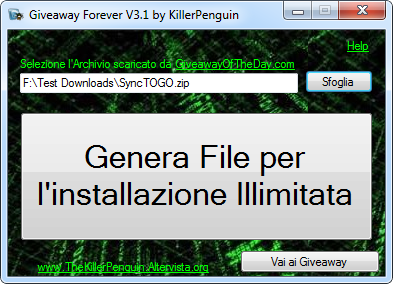
Now there is a tool called Giveaway Forever which is able to automatically detect the setup installer in the temporary folder and save it on your computer so that you can install it later.

Giveaway Forever program is in Italian but it’s easy to use if you follow these steps.

giveaway-forever

First click on the Sfoglia button to browse for the ZIP file that you’ve downloaded from Giveaway of the day’s website. Then click the huge “Genera File per l’installazione Illimitata” button which will automatically extract the zip file, run the setup.exe, detect the setup installer from temporary folder and copy it to Documents folder. Finally click the Vai ai Giveaway button to open the My Documents folder to access the original setup installer file.

You can use Giveaway Forever at anytime to extract the installer from the GAOTD setup. Of course, the setup file itself needs to be downloaded from GAOTD’s website the same day when the giveaway is active.

Thanks Raymond

OSFMount: Mount Any Disk Image as Virtual Drive

Be the first to comment!
Labels:

There are plenty of tools around that can mount disc images as virtual drives and allow you to browse them in Windows Explorer without having to burn the image to a blank disc. These tools are quite popular among gamers. In order to save their physical disc from scratches, they would prepare an image of the disc, mount the image using such an utility and play it off the virtual drive. But OSFMount is not just another virtual disk drive software.

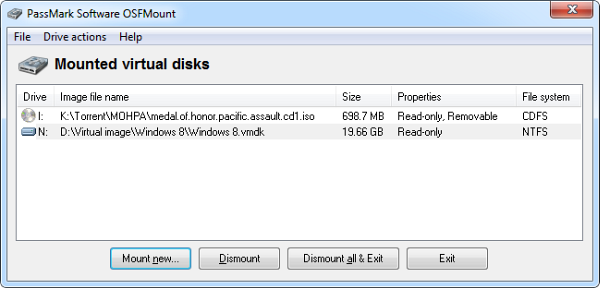
Most disk mounting software are usually limited to two or three formats. ISO is supported and maybe a few others like BIN and IMG and even VHD. OSFMount, on the other hand, supports a large number of image standards. Aside from the usual ISO and BIN images, it can also work with IMG, DD, 00n, NRG, SDI, AFF, AFM, AFD, and even VMWare VMDK images. Those who are unfamiliar with some of the formats mentioned, here is a brief description of the supported formats.

osfmount

IMG is the raw dump of the content of a disk usually copied and saved bit by bit. DD is another raw image format created by the Unix disk imaging tool of the same name. 00n are split raw image files. NRG is the propitiatory format used by Nero burning programs. SDI is a System Deployment Image used primarily with Microsoft products such as Windows Embedded. AFF, AFM and AFD are extensible open image formats used by certain forensic tools. VMDK is the format created and used by VMWare Workstation and VMWare Player for virtual computers.

osfmount2

OSFMount can not only mount these images but can also perform certain operations on them, like extend their size or format Users also get the option to mount the drive as read-only or writable, as a removable drive or as a fixed drive or even as floppy drives. OSFMount also supports the creation of RAM disks. You can mount a disk image into RAM for faster file access or create an empty RAM drive to temporarily store data in memory, without writing it to your hard drive. Furthermore, you can save any mounted drive as a disk image.

You can even mount only a part of the disk image. For instance, you can mount the first 1GB of the drive or the first block or say from 10,000 MB to 20,000 MB. No other software gives you that flexibility.

Virtual drives are created on demand only. When you are not mounting anything there is no empty virtual drive icon in “my computer”. Unlike most disk mounting tools, there is also no limit on the number of disk drives you can mount simultaneously.

OSFMount works on Windows XP, Windows Vista, Windows 7 and Windows Server 2000, 2003, 2008. Both 32bit and 64bit versions are available.

Related reading:

Windows Explorer Tracker: Record All File Activities

Be the first to comment!
Labels:

If you want to monitor and record all activities on a computer you might install a keylogger or a spying tool that secretly records emails, passwords and mouse clicks. But if you want to keep track of what’s happening on Windows Explorer, and for legitimate purpose, you don’t have much choice. Windows Explorer Tracker is great tool for the job.

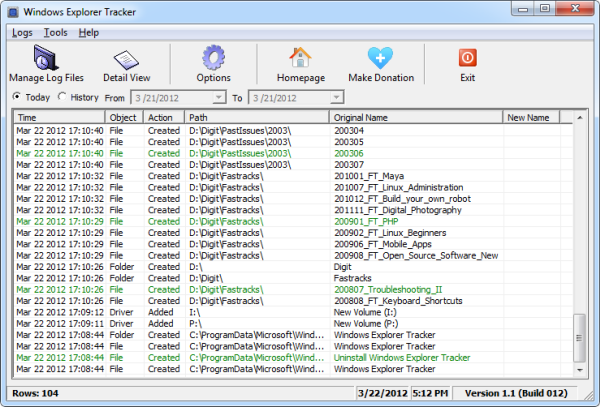
This freeware utility records all operations such as Delete, Rename, Create, Insert, Cut, Copy and Paste actions performed on files and folders on drives and storage media. The result is automatically saved on a .log file under the user’s directory. For as long as the program is running, it will continue to log Explorer activity and append it to the log file. The log is visible from within the program. You can also open it using any text editor or specialized log file viewers since the log can grow exceedingly long.

windows-explorer-tracker

Customization options are limited – you can adjust some of the display parameters and time format. On the viewer there is an option to filter the data by time period/date. Personally, I would have liked to tell the program where to save the log files. Overall, a nice and simple utility for system administrators to monitor file activity on a network or home computer.

Related software:

Google Street View Goes into the Amazon Jungle

Be the first to comment!
Labels: ,

Back in August last year, a few members of Google Street View and Google Earth Outreach team went into the Amazon Basin to collect ground-level images of the rivers, forest and communities in the Rio Negro Reserve. They are back and the pictures and videos they collected are now available through the Street View feature on Google Maps.

Take a virtual boat ride down the main section of the Rio Negro, and float up into the smaller tributaries where the forest is flooded. Stroll along the paths of Tumbira, the largest community in the Reserve, or visit some of the other communities who invited us to share their lives and cultures. Enjoy a hike along an Amazon forest trail and see where Brazil nuts are harvested. You can even see a forest critter if you look hard enough!

The project was made possible in partnership with the Amazonas Sustainable Foundation (FAS), the local nonprofit conservation organization that invited the teams to the area. Google used the Street View trike and a tripod camera with a fisheye lens to capture both the natural landscape and the local communities. In all, more than 50,000 still photos were stitched together to create immersive, 360-degree panoramic views.

Many areas of the Amazon, including Rio Negro Reserve, are under the protection of the Brazilian government with restricted access to the public, so we hope that this Street View collection provides access to this special corner of the planet that many of us otherwise wouldn’t have the chance to experience. Together with FAS, we’re thrilled to help everyone from researchers and scientists to armchair explorers around the world learn more about the Amazon, and better understand how local communities there are working to preserve this unique environment for future generations.

[via Google Latlongblog]

Giveaway and Review: Wondershare Video Editor

Be the first to comment!
Labels: ,

video-editor-bannerYou must remember Microsoft’s video editing application Windows Movie Maker that first debuted on Windows Me and later included in Windows XP and then on Vista. Despite its bare-bone interface and relatively lack luster feature Windows Movie Maker became a popular software for home video editing because it was simple and because it worked.

After the release of Windows Vista, development of the program was abandoned and replaced by Windows Live Movie Maker as a part of Windows Live Essentials. It does not have the same features as Windows Movie Maker – in many ways the new version is inferior to the original program. It’s doesn’t have the timeline, for instance. It’s a shame that Microsoft maimed such a good software. And when that happens, people start looking for alternatives.

There is no shortage of capable of video editing programs, and most of them are vastly powerful than Windows Movie Maker. But video editing software are usually complicated programs. With software such as Jahshaka and Lightworks, you get Hollywood type abilities but miss out on simplicity. Just navigating the various menus and buttons on these programs is a chore.

Wondershare Video Editor, on the other hand, is refreshingly different. It has a simple interface with simple functions and just the right amount of goodies to produce the perfect home video.

Wondershare Video Editor

Run Wondershare Video Editor and choose an aspect ratio between 16:9 or 4:3, and the main interface will load. Click "Import" to select videos, audio and photos from your computer, or click "Record" to capture videos with a connected capturing device. You can also batch drag and drop files into the editor.

wondershare-video-editor

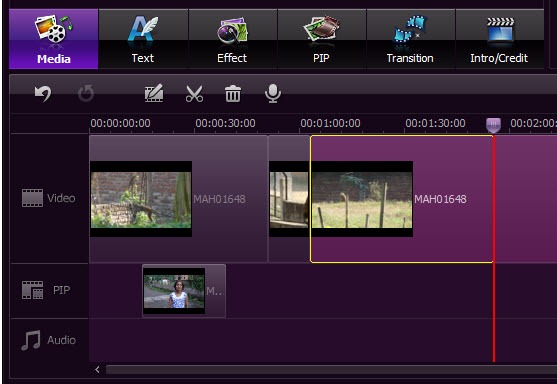
To make a new video, drag media files from your Album to the Timeline at bottom. You can drag and drop as many video clips as you want to the timeline and stitch them together to produce a single long video. For background music, you can drag a music file and drop it into the timeline.

Now here is an interesting feature: if you drag a video and drop it over an existing video on the timeline, the first video will automatically split to accommodate the second video in between. Video trimming can be done right on the timeline itself. Simply grab one end of the video and drag it left or right to trim the ends.

In the timeline, you can cut, copy, paste and delete any clip any time you want. All the editing can be previewed in real-time. You can change each video clip's contrast, brightness, hue, saturation and gamma individually. Other editing tools include Crop, Rotate (Flip), Adjust and Speed (Fast and Slow Motion), while Audio tools include Volume, Fade in/out, and Effect (Voice change).
wondershare-video-editor-2

To add titles, effects and intro/credit to your movie, just switch to Text, Effect or Intro/Credit tab, and then drag and drop an item to the Timeline. You can double click the added item to make changes. On Timeline, you can easily move added items and adjust the duration by dragging. You can also add transitions between your video or photo clips from the Transition tab.

Wondershare Video Editor has another interesting feature called Picture-in-Picture.

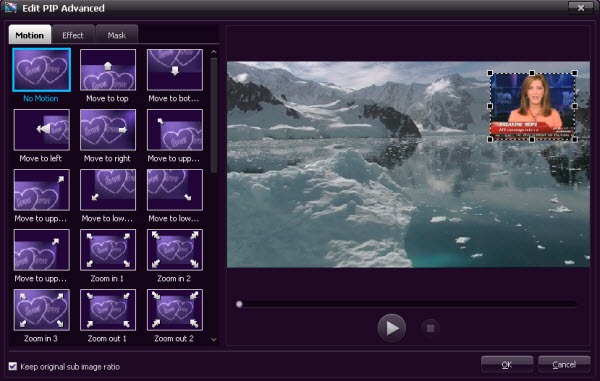
Picture-in-Picture is an additional video clip or picture playing on top of the main video. Picture-in-Picture is commonly seen in news broadcast where the news video is displayed on the full TV screen and at the same time a video of the news anchor is displayed in an inset window at a corner of the screen.
wondershare-video-editor-3

Using Wondershare Video Editor you can reproduce Picture-in-Picture effect. Simply drag imported video/photo to the "PIP" track, and bingo! you get a Picture-in-Picture video. You could double click on PIP items on Timeline to personalize your Picture-in-Picture video with Motions, and even additional effects like shadow, border, alpha, and mask by clicking "Advanced" button.

Once you are done with editing, it’s time to save your video. For this Wondershare Video Editor offers plenty of options. You can either choose a video format such as AVI, WMV, MOV, FLV, MP4, MKV, MPEG, etc., or choose a device from iPhone 4, iPad, iPod touch, PSP, Wii, Creative, etc. to get the optimized videos for your devices. You can save the video to your hard disk or burn it into a DVD. You can also directly upload the finished video to YouTube

Wondershare Video Editor supports a large number of video, audio and image format. The likelihood of you encountering file format compatibility issues is non-existent.

Giveaway

We have 8 licenses for Wondershare Video Editor priced at $35 each. Those who are interested in entering the giveaway contest, just leave your name and email ID in the form below. Winners will be selected by a random draw. The contest closes on 24 March, 2012.

Additionally, Wondershare is organizing a Spring Break promotion where you can win 20 copies of the Video Editor and the grand prize of the new iPad. To enter the contest participants will be required to upload 1 or 2 of their most memorable pictures, and write a sentence or two about their trip and what made the trip great. Entries which receive the most number of votes will be chosen the winner. The contest starts from March 12th and April 16th, 2012. More information at the promotion page.

inPulse: A Watch that Receives Push Notifications from your Smartphone

Be the first to comment!
Labels:

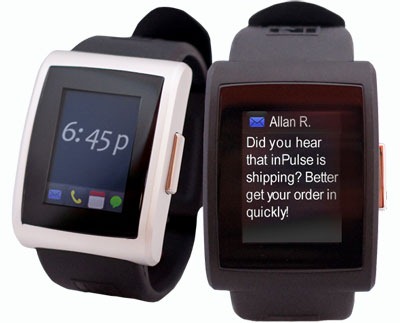
There is still hope for wristwatches. Allerta Inc. has developed a new gadget that can not only stave off the demise of this time device, but can to stop it altogether and even revert it. Their invention: inPulse, a watch that couples with a Blackberry or Android smartphone acting as a secondary display on which you can receive push notification, read emails, chat messages, check weather and more.

inPulse is powered by a 52Mhz ARM7 processor and 8Kb of RAM and carries a display of 1.3 inch across with a resolution of 96 x 128 pixels. No, you can’t play Angry Birds but you can sure read your emails. At $149, it’s costly for a wristwatch, but this is no ordinary watch.

inpulse

inPulse connects to a Blackberry or Android device running Cyanogenmod via Bluetooth and can alert you to anything you setup through the filter. These alerts are then displayed on the 1.3-inch OLED screen, and you are notified of their presence by the vibrator inside. There is no touchscreen, but a simple single button input. The watch charge via microUSB, and in 45 minutes gets enough juice to last for around four days.

Out of the box, the inPulse smartphone app lets you push emails, SMS, calendar alerts and caller ID. You can customize fonts and colors, set filtering options for emails and manage notification/vibration profiles.

The creators have also released an SDK so that developers can create more apps to run on the watch.

From NYtimes:

Some programmers are already using the new Allerta. One app offers the ability to control an iTunes music library from the watch. Another becomes an extension of a Blackberry smartphone and shows new e-mail messages and calendars on the phone through the watch’s display.

Pneumatic Tubes File Router: A File Organization Utility

Be the first to comment!
Labels:

Pneumatic Tubes File Router is a free program that lets Windows users move files from one folder to another. The program derives its name from the 19th century invention called Pneumatic Tube Transport – a network of pipes through which solid objects were transported over relatively short distances such as within a building, by using compressed air as means of propulsion. In some European countries, Pneumatic tubes were in use as late as the end of the 20th century. While Pneumatic tubes transported mails and documents within a bank or post office, Pneumatic Tubes File Router move files and folders within a hard drive or between hard drives in a system.

You begin by creating a “tube” which is nothing but the path to the destination folder. You can also configure a single-key keyboard shortcut, and an icon for the “tube”. Multiple tubes can be created for multiple destination and they appear inside the program’s window with the icon of your choice. To move a file or folder through the tube, simply drag and drop it on the tube’s icon.

pneumatic-tubes-file-router

Another way to move files is by using the “conveyor belt”. The belt appears above the tubes and displays the contents of the source folder one item at a time. You can move files to the desired destination by dragging them from the belt and dropping it into the appropriate tube. This is the same as dragging and dropping files from Windows explorer to Pneumatic Tubes File Router. The utility of the conveyor belt is that you don’t have to have an Explorer window open. However, had conveyor belt displayed more than one file at a time it would have been more useful.

The true utility of Pneumatic Tubes File Router can only be realized when you are moving files from the source directory to multiple destinations. I can definitely see myself using this when I perform file sorting the next time.

[via Freewaregenius]

SarynPaint: The Cutest Paint Program for Young Kids

Be the first to comment!
Labels:

Young boy with face covered in colourful paintHaving seen plenty of smart nephews and nieces grow up, I never underestimate the intelligence of toddlers, however young they might be. They learn quickly, just by watching, listening and imitating. Imagine yourself trying to learn a foreign language just by hearing people talk. Kids do that all the time and with little effort. Today’s kids have to absorb in a vast amount of information and inputs from their surroundings, than kids had to a few decades ago. They are introduced to computers and gadgets from a young age, and they learn fast by watching elders use these devices. It reminds me of the video of a 2-year old using the iPad for the first time.

Controlling the mouse however, requires a little more practice. Most kids have difficulty clicking the button at the right time and right place. Clicking and dragging at the same time requires even more control than 2-year olds have. Besides, the mouse is too big for their tiny hands.

These problems are addressed by a simple paint program called SarynPaint, written for a young child named Saryn who was two years old at the time. The program is setup to paint simply by moving the mouse – no clicking is necessary. You can select colors and paintbrush shapes by moving the mouse over the panels on the screen edges. Yes, it leaves a big fat trail wherever it goes, but your kid is hardly going to produce a Dali. The bright coloured trails are enough to cheer him up.

sarynpaint

The program is simple to use. Just download the JAR file and double click on it to run. JAR is an archive file format for the Java platform. If you have the Java Runtimes installed, JAR will behave like an executable file.

The program opens full screen with simple instructions on how to use. Any movement of the mouse will draw on the canvas. Double clicking on the canvas clears the screen of the previous sketch. Double clicking on the Color bar on the left sets the background color. To select a brush you simply move the mouse over it. You do the same when selecting color.

There are different brush shapes like triangle, square, hexagon, pentagon, kitty, fishy, and doggy. A sweet young voice speaks out each brush name as you move your mouse over it. It also speaks out the names of color when you select a color for the brush. It will greet you when you open the program and bid you goodbye when you exit by pressing the Esc key.

It’s so cute, your kids will love it. SarynPaint is cross-platform and hence runs on Windows, Mac and Linux.

Looking for more software for kids? Checkout these:

Trying to escape kids? There are apps for that too.

Photo credit: BigStockPhoto

Thunderbird Gets Instant Messaging: Twitter, Facebook and Google Chat

Be the first to comment!
Labels:

thunderbirdMozilla announced last week the availability of the development build of Thunderbird 14. The last stable build of the open source email program is 11 and was released just this weekend. While Thunderbird 11 brings only a minor interface overhaul and a couple of bug fixes, version 14 promises to be a big one. The most recent nightly builds of Thunderbird 14 has “powerful instant messaging capabilities, thanks to a major code check-in which integrates Instantbird capabilities to Thunderbird’s”. In short, you get a major functionality of Mozilla’s instant messaging program Instantbird in Thunderbird itself. This means email, Twitter, Facebook, Google talk, IRC and possibly more - all under the same roof.

Instantbird is a Mozilla technologies powered instant messaging application that integrates ICQ, AIM, Yahoo!, MSN Live, Google Talks and other Jabber based networks, Twitter and Facebook Chat, all in the same application.

On Thunderbird, integration is coming in a new tab where all your accounts come together. Not all services are supported yet. Only Facebook, Twitter, Google Talk and IRC are supported, and it is not clear if other services will follow.

thunderbird-with-chat

You can download the daily build from Mozilla’s FTP servers and start chatting right away. You might encounter a few hiccups on the way, like not being able to authenticate Twitter and Facebook rejecting your login. Here is how to get around these problems.

When you enter your Facebook login ID, Thunderbird tells you to enter your username and not the email address you generally use to login on Facebook’s portal. Your username appears on the location bar of your browser after "https://www.facebook.com/" when you view your profile or Page. For example, if the URL of your Facebook profile is https://www.facebook.com/chuck.norris, then your Facebook username is chuck.norris.

Facebook username is an optional feature. It’s not clear if and how Thunderbird will allow users who don’t have a username to login to Facebook chat.

thunderbird-with-chat2

As far as Twitter authentication failure is concerned, it’s probably just some bug. If you find yourself stuck on the authentication screen, simply close the window and try to connect to your Twitter account again. You will probably get through the second time. Twitter integration lacks some core features like the inability to send direct messages or read messages sent to you by fellow Twitters. But you can post status updates and communicate using the @ sign.

One interesting feature is that Thunderbird automatically saves all your sessions, whether you are connected to Facebook or Twitter. If you logged into Twitter at 9AM and then again at 12PM, you can still view your timeline as it was at 9AM. So you can leisurely browse your timeline later.

Keep in mind, this is a development build so there are still a lot to come.

Instant Fundas Facebook Page Needs Your Love err.. Likes

Be the first to comment!
Labels:

Instant Fundas has finally jumped the bandwagon. Truth be told, I created a Facebook fan page for this site nearly two years ago, on March 2010. But I hesitated to click the ‘publish’ button because I thought it was silly idea and that nobody would be interested in it anyway. My opinion isn’t much different today as it was two year ago, but my personal likes and dislikes is puny in front of the behemoth that Facebook is.

So why or rather when did I decide that Instant Fundas needs a Facebook page? An email from a reader asking me why there isn’t any. And then I thought of those people that I must have disappointed all these years. Doesn’t matter if it’s one or one hundred or one thousand, I have disappointed some of my readers. So here I’m on Facebook, and as the adage goes, “better late than never”.

instantfundas-facebook

Visit Instant Fundas on Facebook

I’m not sure what I can do to make the fan page exciting, but I will stick around answering comments and sharing news snippets and links that I discover on the web. All it needs now is your love and Likes.


Recent comments

Recent comments

Followers

Sponsors

Recent comments

fefew

Recommend on Google

Copyright © 2011 All Rights Reserved Thesis skin. by Nitin. Converted into Blogger Template by TheTechFizz.